Aller au contenu principal
Idriss Neumann
founder cwcloud.tech
View All Authors

Using quickwit as a web search engine in your website

· 11 minutes de lecture
Idriss Neumann
founder cwcloud.tech

Happy new year 2026 🎉 . Let's hope this year will be full of professional and personal success for everyone.

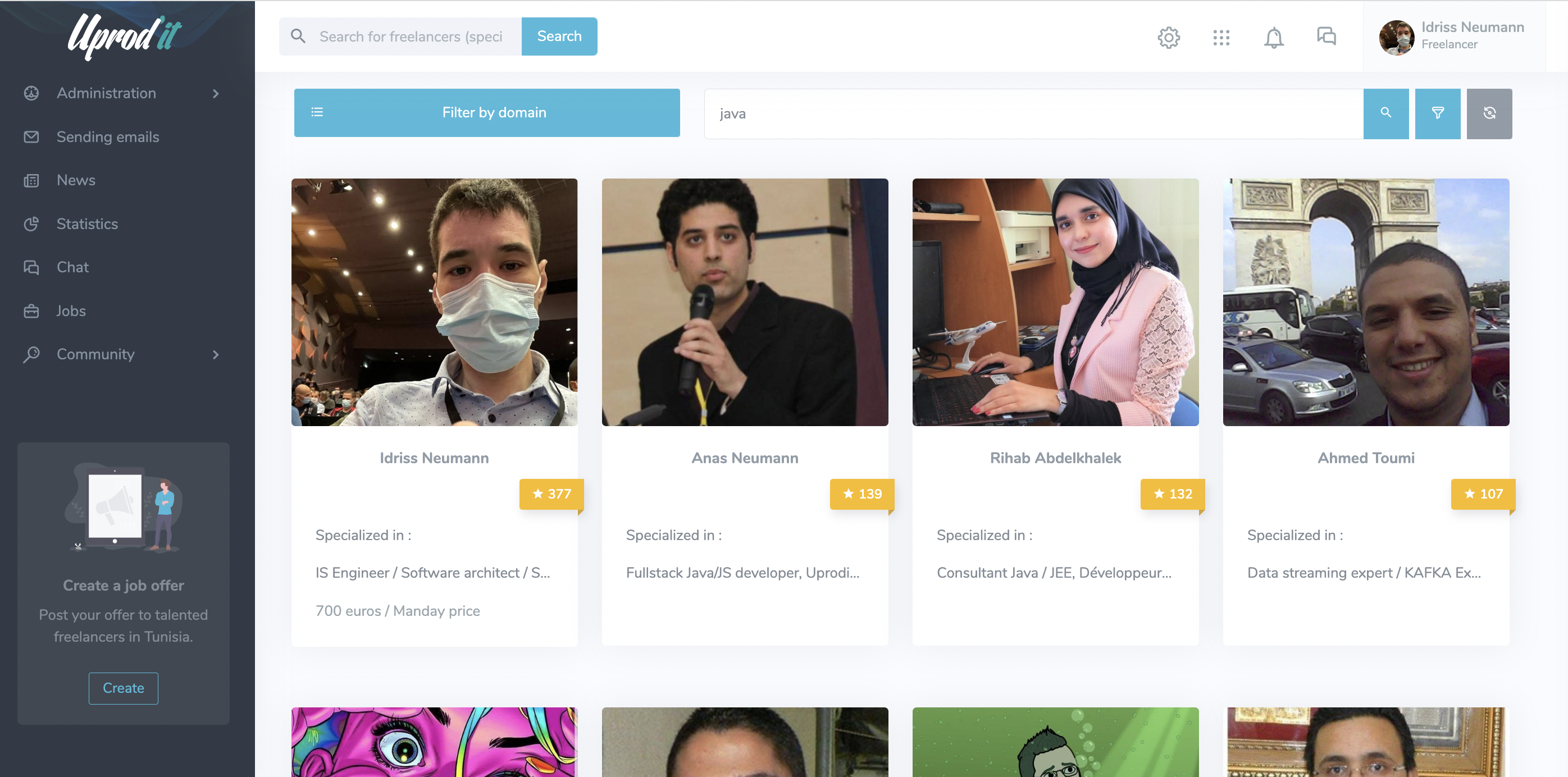
Twelve years ago, a long time before the creation of CWCloud, we launched uprodit.com, a social network dedicated to Tunisian freelancers.

The platform was developed in Java, using the Spring framework, Tomcat, and Vert.x later. One of our main ambitions was to build an intelligent search engine capable of leveraging the information users freely entered in their profiles. At the time, achieving this level of flexibility and relevance was extremely challenging with traditional relational databases RDBMS1.

uprodit-search-engine

That's why it was my second experience with Elasticsearch in production (before the product focused on observability area) after few years with Apache SolR and it worked like a charm.

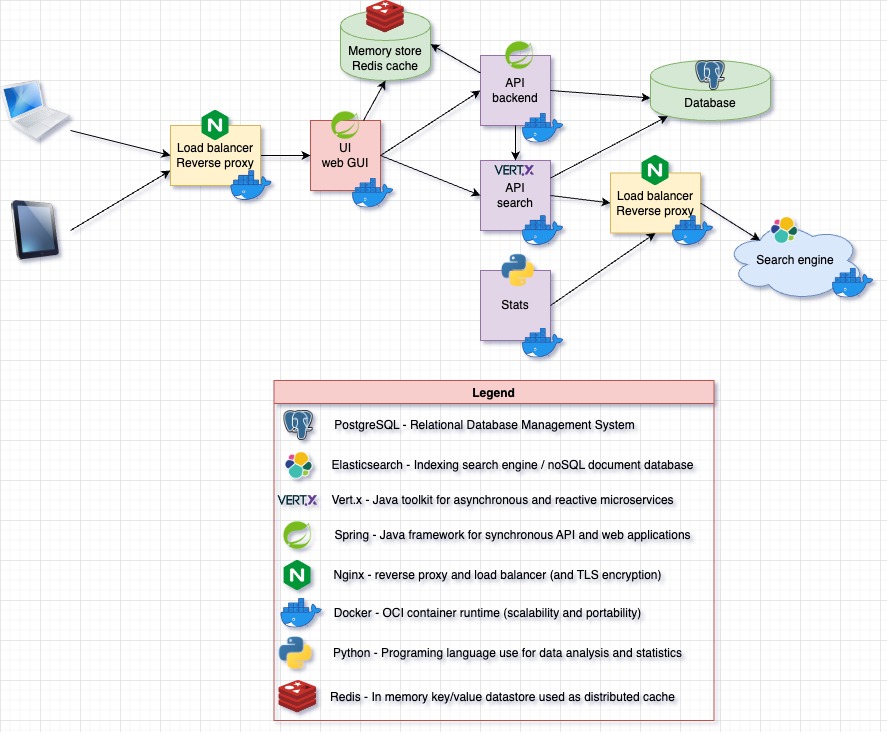
After the launch of CWCloud, uprodit migrated from physical servers to Scaleway instances using CWCloud. At the same time, we started modernizing the backend by adopting container-based architectures. However, the cost of maintaining an Elasticsearch cluster gradually became too expensive for the organization. Here was the technical architecture of the project at that time:

uprodit-old-arch

One year ago, we started working with Quickwit2 and replaced our entire observability and monitoring stack with it. This included logs, traces, Prometheus metrics, and even web analytics.

Although Quickwit wasn't originally designed to serve as a web search engine, our experience with metrics and analytics showed that it could effectively meet our needs while significantly reducing infrastructure costs (because of the less amount of RAM consumption and the fact that the indexed data are stored on object storage).

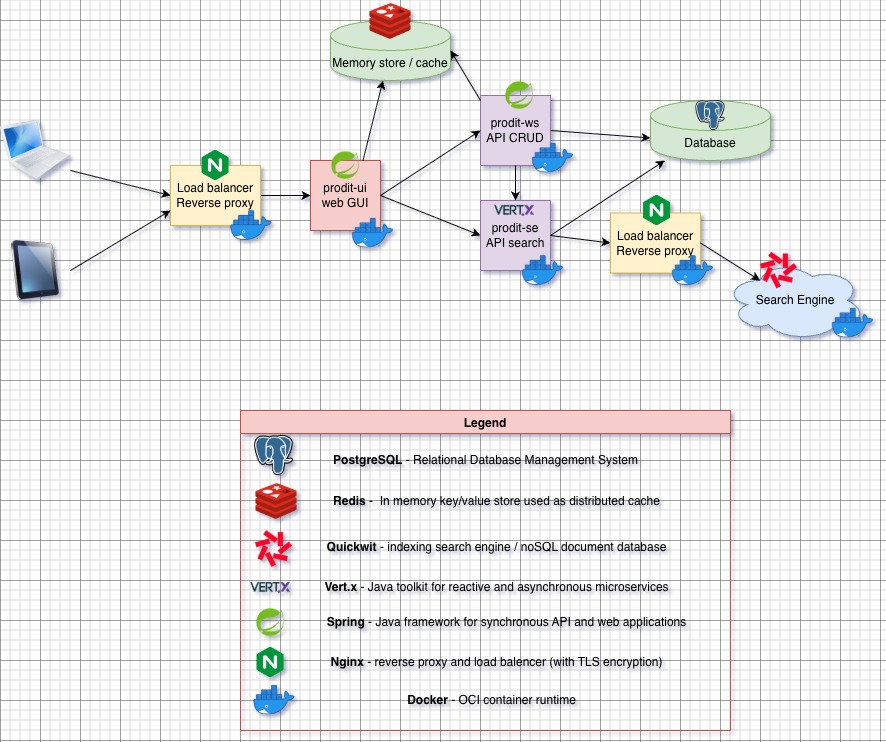
As you may know, since we mentioned it in a previous blog post, Quickwit provides an _elastic endpoint that is interoperable with the Elasticsearch and OpenSearch APIs. The idea, therefore, was to replace Elasticsearch while keeping the existing Vert.x Java code with minimal changes, like this:

uprodit-new-arch

In other words, we wanted to keep the Elasticsearch client library to build the queries dynamically with the Elasticsearch DSL3. In this blog post, we'll detail the few key point to succeed the migration.

Keeping the Elasticsearch client library

As we mentioned before we wanted to have the less code rewriting possible, so we choose to keep the Elasticsearch client library to benefit from the DSL builder. Here's the maven dependancy (in the pom.xml file):

<dependency>
<groupId>co.elastic.clients</groupId>
<artifactId>elasticsearch-java</artifactId>
<version>9.2.4</version>
</dependency>

Creating the Quickwit client

We created a IQuickwitService interface because we may have multiple implementations using other http client later:

package tn.prodit.network.se.utils.singleton.quickwit;

import io.vertx.core.json.JsonObject;

import java.io.Serializable;

public interface IQuickwitService {
<T extends Serializable> void index(String index, String id, T document);

<T extends Serializable> void delete(String index, String id);

String search(String indeix, JsonObject query);
}

Then the default implementation using both Vert.x asynchronous http client for the write methods (index and delete) and default java http client for the search method.

import io.vertx.core.Vertx;
import io.vertx.core.http.HttpClient;
import io.vertx.core.http.HttpClientOptions;
import io.vertx.core.http.HttpClientResponse;
import io.vertx.core.http.HttpMethod;
import io.vertx.core.json.JsonObject;

import tn.prodit.network.se.utils.singleton.IPropertyReader;
import tn.prodit.network.se.utils.singleton.quickwit.IQuickwitService;
import tn.prodit.network.se.utils.singleton.quickwit.QuickwitTimeout;

import jakarta.inject.Inject;
import jakarta.inject.Singleton;

import java.net.URI;
import java.net.http.HttpRequest;
import java.net.http.HttpResponse;
import java.nio.charset.StandardCharsets;
import java.time.Duration;
import java.util.Arrays;
import java.util.Base64;

import static org.apache.commons.lang3.StringUtils.isBlank;

@Singleton
public class QuickwitService implements IQuickwitService {
private static final Logger LOGGER = LogManager.getLogger(QuickwitService.class);

@Inject
private IPropertyReader reader;

@Inject
private Vertx vertx;

private HttpClient client;

private java.net.http.HttpClient syncClient;

private String basicAuth;

private QuickwitTimeout timeout;

private String uri;

private QuickwitTimeout getTimeout() {
if (null == this.timeout) {
this.timeout = QuickwitTimeout.load(reader);
}

return this.timeout;
}

public String getUri() {
if (null == this.uri) {
String host = reader.getQuietly(APP_CONFIG_FILE, QW_KEY_HOST);
Integer port = reader.getIntQuietly(APP_CONFIG_FILE, QW_KEY_PORT);
String scheme = reader.getBoolQuietly(APP_CONFIG_FILE, QW_KEY_TLS) ? "https" : "http";
this.uri = String.format("%s://%s:%s", scheme, host, port);
}
return this.uri;
}

private java.net.http.HttpClient getSyncClient() {
if (null == this.syncClient) {
QuickwitTimeout timeout = getTimeout();
this.syncClient = java.net.http.HttpClient.newBuilder()
.connectTimeout(Duration.ofMillis(timeout.getConnectTimeout()))
.followRedirects(java.net.http.HttpClient.Redirect.NORMAL).build();
}
return this.syncClient;
}

private HttpClient getClient() {
if (null == this.client) {
String host = reader.getQuietly(APP_CONFIG_FILE, QW_KEY_HOST);
Integer port = reader.getIntQuietly(APP_CONFIG_FILE, QW_KEY_PORT);
Boolean tls = reader.getBoolQuietly(APP_CONFIG_FILE, QW_KEY_TLS);
QuickwitTimeout timeout = getTimeout();

this.client = vertx.createHttpClient(new HttpClientOptions().setDefaultHost(host)
.setDefaultPort(port).setSsl(tls).setConnectTimeout(timeout.getConnectTimeout())
.setReadIdleTimeout(timeout.getReadTimeoutInSec()));
}
return this.client;
}

private String getBasicAuth() {
if (isBlank(this.basicAuth)) {
String user = reader.getQuietly(APP_CONFIG_FILE, QW_KEY_USER);
String password = reader.getQuietly(APP_CONFIG_FILE, QW_KEY_PASSWORD);
this.basicAuth = String.format("Basic %s", Base64.getEncoder().encodeToString(String.format("%s:%s", user, password).getBytes(StandardCharsets.UTF_8)));
}

return this.basicAuth;
}

@Override
public <T extends Serializable> void index(String index, String id, T document) {
String url = String.format("/api/v1/%s/ingest", index);
getClient().request(HttpMethod.POST, url, ar -> {
if (ar.failed()) {
LOGGER.error("[quickwit][index] Request creation failure: " + ar.cause().getMessage(),
ar.cause());
return;
}

JsonObject payload = JsonObject.mapFrom(document);
ar.result().putHeader("Content-Type", "application/json")
.putHeader("Accept", "application/json").putHeader("Authorization", getBasicAuth())
.send(payload.toBuffer(), resp -> {
if (resp.failed()) {
LOGGER.error("[quickwit][index] Request sending failure: " + ar.cause().getMessage(), ar.cause());
return;
}

HttpClientResponse response = resp.result();
response.bodyHandler(body -> {
String logMessage = String.format("[quickwit][index] response url = %s, code = %s, body = %s, payload = %s", url, response.statusCode(), body.toString(), payload);
if (response.statusCode() < 200 || response.statusCode() >= 400) {
LOGGER.error(logMessage);
} else {
LOGGER.debug(logMessage);
}
});
});
});
}

@Override
public <T extends Serializable> void delete(String index, String id) {
String url = String.format("/api/v1/%s/delete-tasks", index);
getClient().request(HttpMethod.POST, url, ar -> {
if (ar.failed()) {
LOGGER.error("[quickwit][delete] Request creation failure: " + ar.cause().getMessage(), ar.cause());
return;
}

JsonObject payload = new JsonObject();
payload.put("query", "id:" + id);
payload.put("search_fields", Arrays.asList("id"));
ar.result().putHeader("Content-Type", "application/json")
.putHeader("Accept", "application/json").putHeader("Authorization", getBasicAuth())
.send(payload.toBuffer(), resp -> {
if (resp.failed()) {
LOGGER.error("[quickwit][delete] Request sending failure: " + ar.cause().getMessage(), ar.cause());
return;
}

HttpClientResponse response = resp.result();
response.bodyHandler(body -> {
String logMessage = String.format("[quickwit][delete] response url = %s, code = %s, body = %s, payload = %s", url, response.statusCode(), body.toString(), payload);

if (response.statusCode() < 200 || response.statusCode() >= 400) {
LOGGER.error(logMessage);
} else {
LOGGER.debug(logMessage);
}
});
});
});
}

@Override
public String search(String index, JsonObject query) {
String path = String.format("/api/v1/_elastic/%s/_search", index);
HttpRequest request =
HttpRequest.newBuilder().timeout(Duration.ofMillis(getTimeout().getReadTimeout()))
.uri(URI.create(String.format("%s%s", getUri(), path)))
.header("Content-Type", "application/json").header("Accept", "application/json")
.header("Authorization", getBasicAuth())
.POST(HttpRequest.BodyPublishers.ofString(query.toString())).build();
try {
HttpResponse<String> response =
getSyncClient().send(request, HttpResponse.BodyHandlers.ofString());
return response.body();
} catch (IOException | InterruptedException e) {
LOGGER.error(String.format("[quickwit][search] Unexpected exception e.type = %s, e.msg = %s",
e.getClass().getSimpleName(),
e.getMessage()));
return null;
}
}
}

Adding an abstraction layer

To make a smooth transition, we created two interfaces with an Elasticsearch implementation then replacing by a Quickwit implementation using dependancy injection4.

Indexing interface

For the the writing part, here's the interface had two implementations (an Elasticsearch's one and a Quickwit's one).

import tn.prodit.network.se.indexation.adapter.IndexedDocAdapater;

import java.io.IOException;
import java.io.Serializable;

public interface IIndexer {
<T extends Serializable> void index(IndexedDocAdapater<T> adapter, String id, T document) throws IOException;

<T extends Serializable> void delete(IndexedDocAdapater<T> adapter, String id) throws IOException;
}

And here's the Quickwit implementation:

package tn.prodit.network.se.utils.singleton.indexer.impl;

import tn.prodit.network.se.indexation.adapter.IndexedDocAdapater;
import tn.prodit.network.se.pojo.IQuickwitSerializable;
import tn.prodit.network.se.utils.singleton.indexer.IIndexer;
import tn.prodit.network.se.utils.singleton.quickwit.IQuickwitService;

import jakarta.inject.Inject;
import jakarta.inject.Named;
import jakarta.inject.Singleton;

@Singleton
@Named("quickwitIndexer")
public class QuickwitIndexer implements IIndexer {
@Inject
private IQuickwitService quickwit;

@Override
public <T extends Serializable> void index(IndexedDocAdapater<T> adapter, String id, T document)
throws IOException {
quickwit.index(adapter.getIndexFullName(),
id,
document instanceof IQuickwitSerializable ? ((IQuickwitSerializable<?>) document).to()
: document);
}

@Override
public <T extends Serializable> void delete(IndexedDocAdapater<T> adapter, String id) throws IOException {
quickwit.delete(adapter.getIndexFullName(), id);
}
}

And the implementation using the quickwit client:

import tn.prodit.network.se.indexation.adapter.IndexedDocAdapater;
import tn.prodit.network.se.pojo.IQuickwitSerializable;
import tn.prodit.network.se.utils.singleton.indexer.IIndexer;
import tn.prodit.network.se.utils.singleton.quickwit.IQuickwitService;

import jakarta.inject.Inject;
import jakarta.inject.Named;
import jakarta.inject.Singleton;

@Singleton
@Named("quickwitIndexer")
public class QuickwitIndexer implements IIndexer {
@Inject
private IQuickwitService quickwit;

@Override
public <T extends Serializable> void index(IndexedDocAdapater<T> adapter, String id, T document)
throws IOException {
quickwit.index(adapter.getIndexFullName(),
id,
document instanceof IQuickwitSerializable ? ((IQuickwitSerializable<?>) document).to()
: document);
}

@Override
public <T extends Serializable> void delete(IndexedDocAdapater<T> adapter, String id)
throws IOException {
quickwit.delete(adapter.getIndexFullName(), id);
}
}

You can observe that we introduced the IQuickwitSerializable interface for value objects (VO)5 because some types are not fully supported by Vert.x and therefore cannot be serialized directly. For example, lists of nested objects are not properly handled.

Let’s imagine we have a List<SkillVO> skills, which is a nested list of objects. To address this limitation, we had to duplicate the data in the index mapping using two array<text> fields: one containing only the searchable subfields (such as name), and another preserving the full object structure so it can be unmarshalled correctly and remain interoperable.

{
"indexed": true,
"fast": true,
"name": "searchableSkills",
"type": "array<text>",
"tokenizer": "raw"
},
{
"indexed": false,
"name": "skills",
"type": "array<text>"
}

Then, on the original VO class, we had to implement the to() method of the IQuickwitSerializable interface like this:

class PersonalProfileVO implements IQuickwitSerializable<QuickwitPersonalProfile> {
private List<SkillVO> skills;

public List<SkillVO> getSkills() {
return this.skills;
}

public void setSkills(List<SkillVO> skills) {
this.skills = skills;
}

@Override
public QuickwitPersonalProfile to() {
QuickwitPersonalProfile dest = new QuickwitPersonalProfile();

if (null != this.getSkills()) {
dest.setSkills(this.getSkills().stream().map(s -> JSONUtils.objectTojsonQuietly(s, SkillVO.class)).collect(Collectors.toList()));

// we will perform the search query only on the name
dest.setSearchableSkills(this.getSkills().stream().map(s -> s.getName()).collect(Collectors.toList()));
}

return dest;
}
}

Then duplicate the VO class and implements the to() the other way arround:

class QuickwitPersonalProfile implements IQuickwitSerializable<PersonalProfileVO> {
private List<String> skills;

private List<String> searchableSkills;

public List<String> getSkills() {
return this.skills;
}

public void setSkills(List<String> skills) {
this.skills = skills;
}

public List<String> getSearchableSkills() {
return this.searchableSkills;
}

public void setSearchableSkills(List<String> searchableSkills) {
this.searchableSkills = searchableSkills;
}

@Override
public PersonalProfileVO to() {
PersonalProfileVO dest = new PersonalProfileVO();

if (null != this.getSkills()) {
dest.setSkills(this.getSkills().stream().map(s -> JSONUtils.json2objectQuietly(s, SkillVO.class)).collect(Collectors.toList()));
}

return dest;
}
}

Reading interface

For the reading part, here's the interface which also had two implementations (an Elasticsearch's one and a Quickwit's one).

import co.elastic.clients.elasticsearch._types.SortOrder;
import co.elastic.clients.elasticsearch._types.query_dsl.BoolQuery;
import co.elastic.clients.elasticsearch.core.SearchRequest;
import co.elastic.clients.json.jackson.JacksonJsonpGenerator;
import co.elastic.clients.json.jackson.JacksonJsonpMapper;
import com.fasterxml.jackson.core.JsonFactory;
import jakarta.json.stream.JsonGenerator;
import tn.prodit.network.se.pojo.SearchResult;
import tn.prodit.network.se.pojo.fields.IFields;

public interface ISearcher {
JacksonJsonpMapper mapper = new JacksonJsonpMapper();

<T extends Serializable> SearchResult<T> search(String index,
BoolQuery query,
Optional<Sort> sort,
Integer startIndex,
Integer maxResults,
Class<T> clazz);

<T extends IFields> SearchResult<String> search(String index,
List<String> fields,
List<String> criteria,
Integer startIndex,
Integer maxResults,
Class<T> clazz);

static String toJson(SearchRequest request, JacksonJsonpMapper mapper) {
JsonFactory factory = new JsonFactory();
StringWriter jsonObjectWriter = new StringWriter();
try {
JsonGenerator generator = new JacksonJsonpGenerator(factory.createGenerator(jsonObjectWriter));
request.serialize(generator, mapper);
generator.close();
return jsonObjectWriter.toString();
} catch (IOException e) {
return null;
}
}

default JacksonJsonpMapper getMapper() {
return mapper;
}

default String toJson(BoolQuery query) {
return toJson(query, getMapper());
}
}

Notes:

  • you can override the default method getMapper() with an already instanciated mapper
  • the toJson() method will allow the Quickwit implementation to transform the SearchRequest object into a String containing json that will be sent to the _elastic endpoint

Then, the implementation for Quickwit were pretty straight forward:

import co.elastic.clients.elasticsearch._types.query_dsl.BoolQuery;
import co.elastic.clients.elasticsearch.core.SearchRequest;
import io.vertx.core.json.JsonArray;
import io.vertx.core.json.JsonObject;

import tn.prodit.network.se.pojo.IQuickwitSerializable;
import tn.prodit.network.se.pojo.SearchResult;
import tn.prodit.network.se.pojo.fields.IFields;
import tn.prodit.network.se.utils.singleton.quickwit.IQuickwitService;
import tn.prodit.network.se.utils.singleton.searcher.ISearcher;
import tn.prodit.network.se.utils.singleton.searcher.Sort;

import jakarta.inject.Inject;
import jakarta.inject.Named;
import jakarta.inject.Singleton;

import static org.apache.commons.lang3.StringUtils.isBlank;
import static tn.prodit.network.se.utils.CommonUtils.initSearchResult;
import static tn.prodit.network.se.utils.JSONUtils.json2objectQuietly;

@Singleton
@Named("quickwitSearcher")
public class QuickwitSearcher implements ISearcher {
private static final Logger LOGGER = LogManager.getLogger(QuickwitSearcher.class);

@Inject
private IQuickwitService quickwit;

private JsonObject performSearch(String index,
BoolQuery query,
Optional<Sort> sort,
Integer startIndex,
Integer maxResults) {
SearchRequest r = getSearchRequest(index, sort, startIndex, maxResults, query);
JsonObject jsonQuery = new JsonObject(toJson(r));
String quickwitResponse = quickwit.search(index, jsonQuery);

if (isBlank(quickwitResponse)) {
quickwitResponse = "{\"hits\": {\"hits\": []}}";
}

return new JsonObject(quickwitResponse);
}

@Override
public <T extends Serializable> SearchResult<T> search(String index,
BoolQuery query,
Optional<Sort> sort,
Integer startIndex,
Integer maxResults,
Class<T> clazz) {
SearchResult<T> result = initSearchResult(Long.valueOf(startIndex), Long.valueOf(maxResults));
List<T> elems = new ArrayList<>();
JsonObject quickwitResponse = performSearch(index, query, sort, startIndex, maxResults);
JsonObject hits = quickwitResponse.getJsonObject("hits");
if (null == hits) {
return result;
}

JsonArray hits2 = hits.getJsonArray("hits");
for (int i = 0; i < hits2.size(); i++) {
if (IQuickwitSerializable.class.isAssignableFrom(clazz)) {
JsonObject hit = hits2.getJsonObject(i);
if (null == hit) {
continue;
}

JsonObject source = hit.getJsonObject("_source");
if (null == source || isBlank(source.toString())) {
continue;
}

IQuickwitSerializable<?> obj = (IQuickwitSerializable<?>) json2objectQuietly(source.toString(), IQuickwitSerializable.getSerializationClazz(clazz));
elems.add((T) obj.to());
}
}

result.setResults(elems);
result.setTotalResults(Long.valueOf(elems.size()));
return result;
}
}

Few difficulties to address

Here are some of the challenges we encountered:

  • Quickwit ain't replace documents by ID in case of updates, so queries must explicitly filter and select the most recent document version.
  • Document deletion is not as immediate as in Elasticsearch, meaning deleted profiles may still appear in search results for a short period of time.
  • Quickwit ain't support regex queries, which required us to rewrite those queries using term or match queries instead.

Conclusion

Given the difficulties previously mentioned, it's understandable that many applications may argue that Quickwit ain't the best solution for this use case. However, in the context of uprodit, search result relevance ain't need to be perfect considering the significant infrastructure cost savings we achieved with this migration.

Footnotes

  1. Relational Database Management System

  2. Before it was acquired by datadog

  3. Domain Specific Language

  4. The prodit-se module was already written in Vert.x using Google Juice and JSR330 (javax.inject package)

  5. Value Object

Récupérer les données de son AppleWatch avec le moteur FaaS de CWCloud

· 7 minutes de lecture
Idriss Neumann
founder cwcloud.tech

Ce blogpost va nous permettre d'illustrer un cas d'utilisation concret de l'utilisation du moteur FaaS1 de CWCloud pour à la fois exposer des fonctions serverless comme webhooks publics et également montrer comment interagir avec des LLM2.

En dehors de l'IT, j'aime pratiquer régulièrement certains sports, notamment la course à pied ou encore le powerlifting. Depuis un certain temps, j'utilise une Apple Watch SE pour récupérer les métriques et suivre la progression, entre autres au niveau de l'endurance et du cardio.

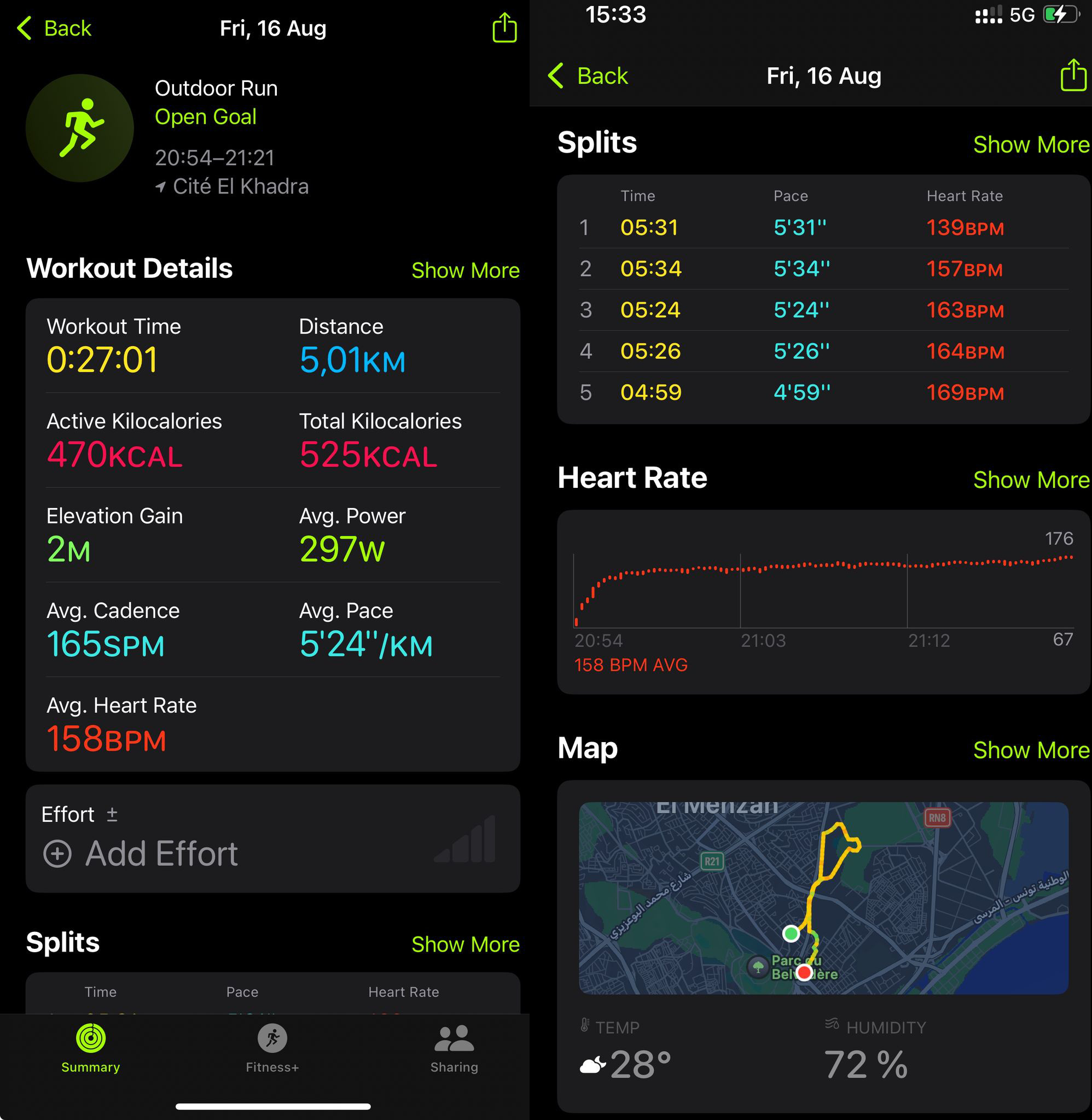
Pour un utilisateur "non-tech", le niveau de détail et de présentation des données au cours d'un exercice est très satisfaisant. Ici, vous avez par exemple le détail de ce qui se passe pendant une course : les positions GPS, le rythme cardiaque et les zones tout au long de l'exercice...

apple-activity-dashboard

La montre donne également plein d'autres données sur la qualité du sommeil, le rythme cardiaque au repos, les calories dépensées... mais il y a toujours eu un souci qui me frustre, comparé à d'autres modèles que j'ai pu avoir par le passé comme les montres Fitbit : pas d'API et webservices pour les développeurs. Or, j'aurais bien voulu récupérer ces données pour pouvoir les traiter avec des LLM en passant par le moteur FaaS low-code de CWCloud.

Cependant, pas d'API en ligne ne signifie pas pour autant qu'il est impossible de les récupérer : on voit que beaucoup d'applications sur l'iPhone sont capables de malgré tout récupérer les données de la montre, à l'exemple de Strava, MyFitnessPal...

Ces applications passent la plupart du temps par une lecture des données directement depuis l'iPhone en utilisant le framework d'Apple HealthKit et en donnant les permissions nécessaires depuis les paramètres de sécurité d'Apple.

Cependant, cela demande quand même beaucoup d'efforts pour quelqu’un qui n’est pas développeur mobile iOS de devoir builder et valider une application développée en Swift pour envoyer les données sur un webhook. J’ai cherché à voir si quelqu’un d’autre n’avait pas déjà fait ce travail. Et c’était effectivement le cas avec l’application Health Auto Export.

Cette application est assez mal notée, mais quand on lit les commentaires, on comprend parfaitement pourquoi : les gens n'ont pas compris à quoi elle servait. Entre autres, elle ne sert pas à faire de jolis dashboards d'agrégations statistiques, mais à exporter les données de santé d'Apple dans des formats exploitables par des développeurs (CSV ou JSON), et également à programmer des envois schedulés de ces exports vers des connecteurs externes (webhook REST/HTTP, fichiers MQTT, Dropbox...).

Dans notre cas, c’est très exactement ce qu’il nous fallait. Voici comment configurer, par exemple, un webhook HTTP pour envoyer les données à CWCloud dans une automation qui va tourner toutes les minutes :

health-auto-export

Toutes les minutes, la fonction serverless de CWCloud va recevoir comme payload un JSON au format suivant :

{
"data" : {
"metrics" : [
{
"units" : "count\/min",
"data" : [
{
"Min" : 79,
"date" : "2025-06-30 23:17:40 +0200",
"Avg" : 79,
"Max" : 79,
"source" : "Idriss’s Apple Watch"
},
{
"Min" : 66,
"Max" : 66,
"Avg" : 66,
"source" : "Idriss’s Apple Watch",
"date" : "2025-06-30 23:23:45 +0200"
},
{
"Max" : 66,
"date" : "2025-06-30 23:26:52 +0200",
"source" : "Idriss’s Apple Watch",
"Min" : 66,
"Avg" : 66
}
],
"name" : "heart_rate"
}
]
}
}

Dans l'automation, on pourra noter que j’ai filtré uniquement la métrique heart_rate, car sinon cela pourrait en envoyer beaucoup d’autres, et pas uniquement provenant de l’Apple Watch, mais également d’autres applications comme MyFitnessPal, qui fait le tracking de vos macros (calories, protéines, lipides, glucides, calcium, etc.) de votre alimentation. Bref, il y a vraiment de quoi faire des usecases très intéressants 😁.

Cela étant, ce payload n’est pas compatible avec le contrat d’interface de notre moteur serverless avec les endpoints classiques que nous avons documentés dans plusieurs démos, où l’on attend à l’avance les paramètres de votre fonction.

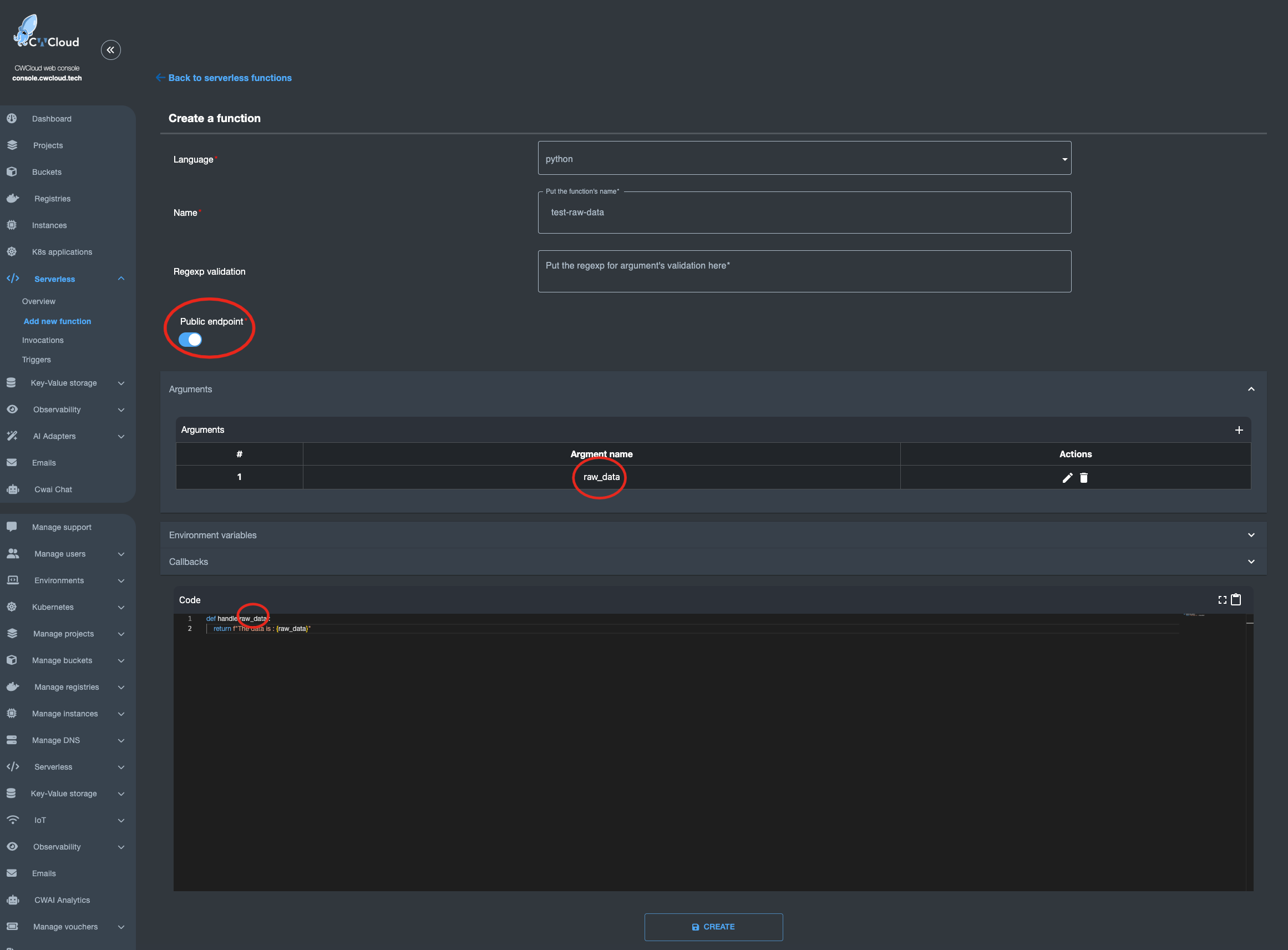
Il existe toutefois un endpoint /v1/faas/webhook/{function_id} (ou /v1/faas/webhook/{function_id}/sync si vous souhaitez recevoir la réponse de la fonction en synchrone dans la réponse HTTP). Dans ce cas, il faut que votre fonction soit définie avec un unique argument raw_data comme ceci :

faas-raw-data-arg

Une fois que c’est fait, il devient très simple d’invoquer la fonction en lui passant ce que vous voulez comme body, que vous pourrez ensuite parser directement dans votre code :

$ curl "https://api.cwcloud.tech/v1/faas/webhook/ecb10330-02bf-400b-b6a8-d98107324ac3/sync" -X POST -d '{"foo":"bar"}' 2>/dev/null|jq .
{
"status": "ok",
"code": 200,
"entity": {
"id": "78774026-f75e-4c7c-850a-9b9eb2cb2ec0",
"invoker_id": 3,
"updated_at": "2025-07-05T14:39:53.119780",
"content": {
"args": [
{
"key": "raw_data",
"value": "{\"foo\":\"bar\"}"
}
],
"state": "complete",
"result": "The data is : {\"foo\":\"bar\"}\n",
"user_id": null,
"function_id": "ecb10330-02bf-400b-b6a8-d98107324ac3"
},
"created_at": "2025-07-05T14:39:52.443918"
}
}

Vous l'aurez compris, dans l'automation de l'application Health Auto Export c'est une URL au format https://api.cwcloud.tech/v1/faas/webhook/{function_id} qu'il faudra définir (pas besoin du /sync à la fin car vous n'aurez pas besoin d'attendre le résultat de l'exécution de la fonction).

Note : on a aussi exposé la fonction en public pour pouvoir l’invoquer sans authentification, mais ce n’est pas forcément ce qui est souhaitable. N’oubliez pas que vous êtes facturés aux tokens que vous consommerez dans le cas ou vous utilisez des modèles publics. Donc ici on le fait à des fins illustratives mais vous n’allez pas forcément vouloir que tout le monde invoque votre webhook. Vous pouvez très bien gérer cela en gardant la fonction privée et en ajoutant un header X-User-Token dans l’automation sur l’application Health Auto Export.

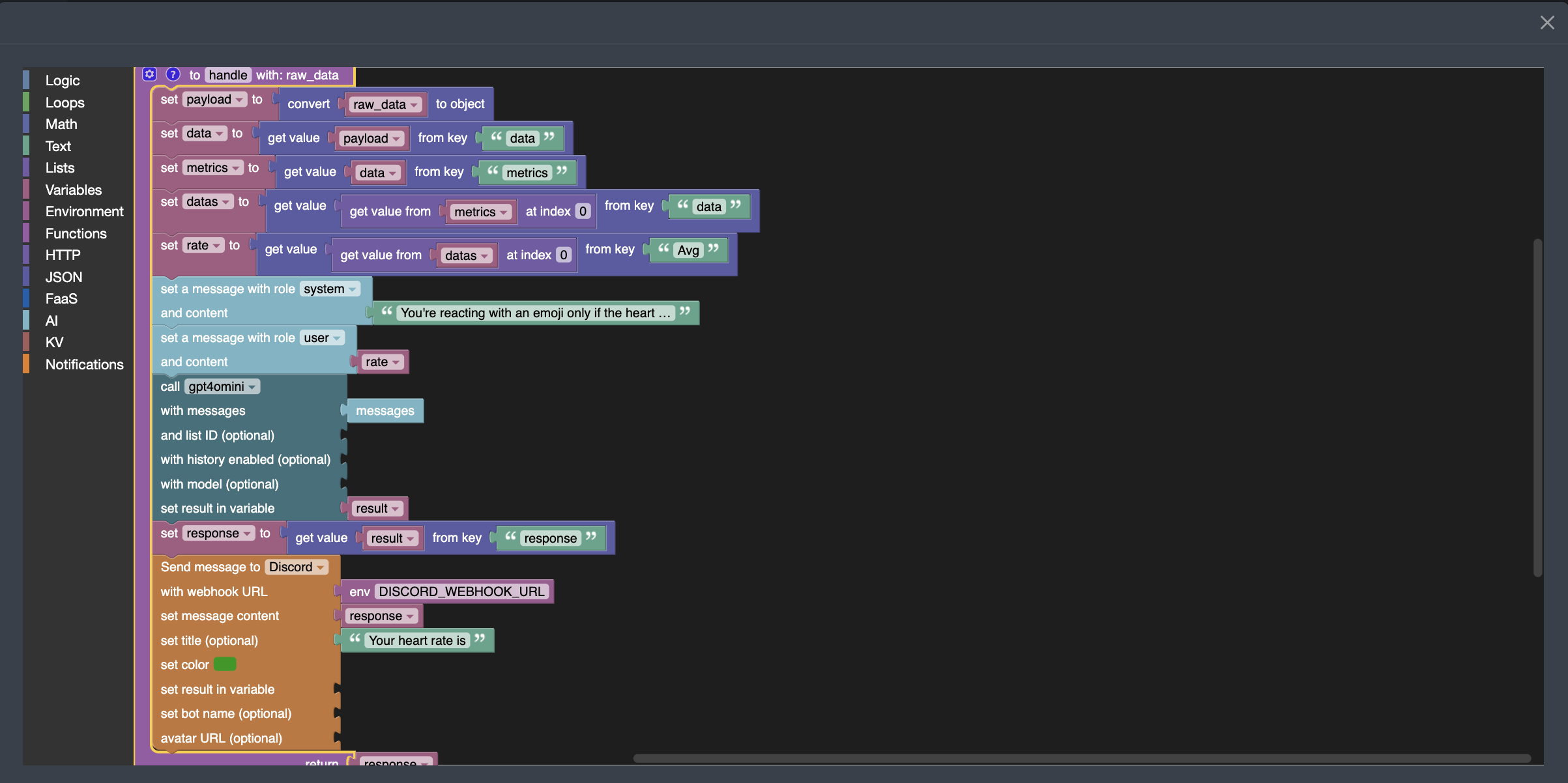
Maintenant qu’on sait comment créer un webhook, voici le code Blockly3 pour extraire la moyenne de votre heart rate, l’envoyer au LLM gpt4omini. Ici, on a demandé au LLM de réagir avec un emoji à la valeur qu’il reçoit et d’envoyer le résultat dans Discord :

faas-blockly-heart-rate

Vous pouvez observer que je passe la phrase suivante "You're reacting with an emoji only if the heart rate is too slow or to high" comme prompt système ainsi que le nombre de battements cardiaque récupérée des données de l'Apple Watch comme prompt utilisateur.

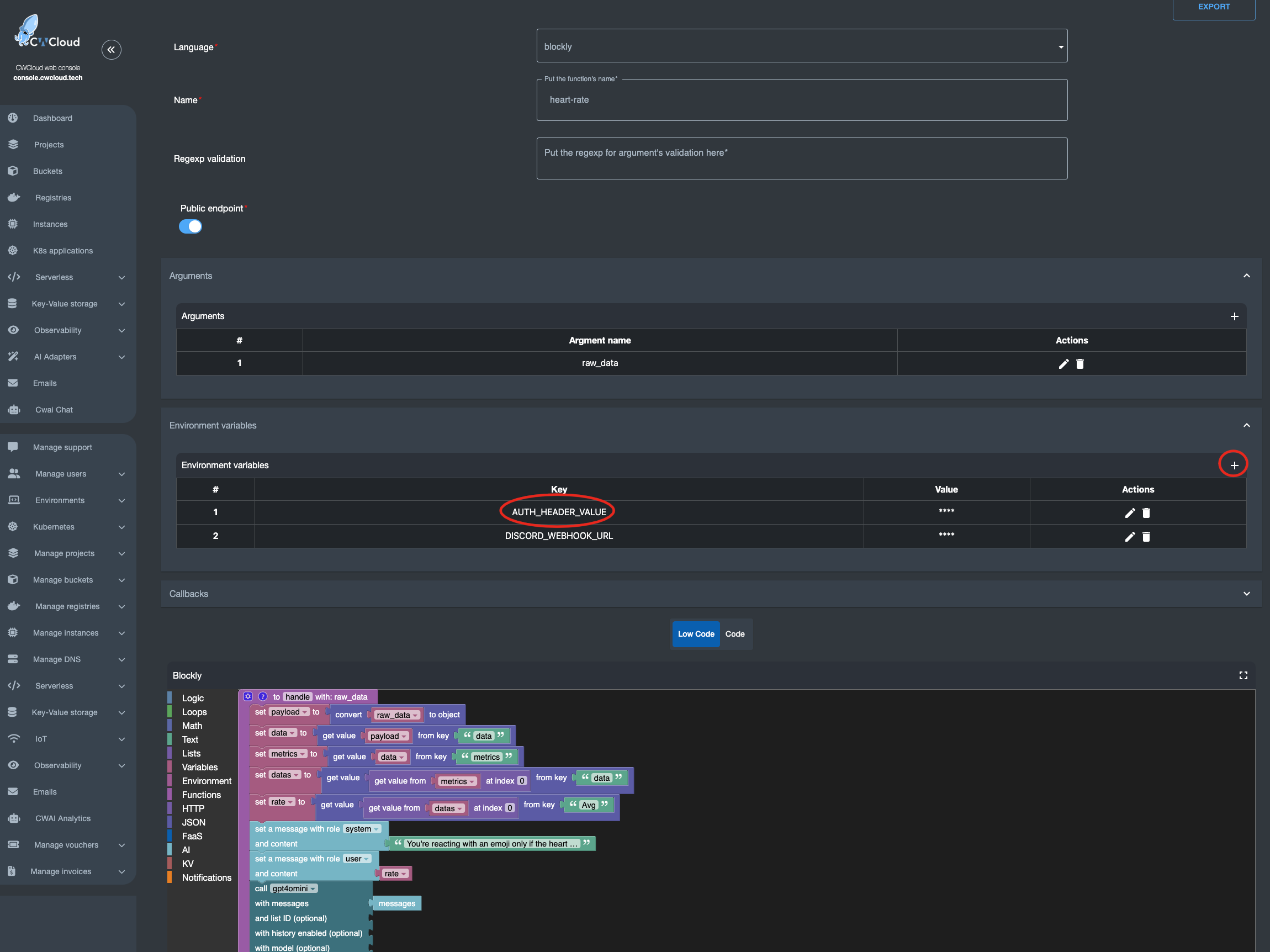
En outre, il faut savoir que les blocs AI vous obligent à vous authentifier pour pouvoir invoquer l'API CWCloud AI. Si vous voulez conserver le fait d'ouvrir ce webhook à n'importe qui il faudra créer une clef d'API en suivant ce tutoriel et en injectant cette clef dans une variable d'environnement AUTH_HEADER_VALUE comme ceci :

faas-authentication-cwai

Dans ce cas tous le monde pourra invoquer votre webhook et c'est votre compte qui sera facturé à la consommation si vous utilisez des modèles d'IA publics. Vous pouvez aussi chosir d'utiliser votre propre LLM hébergé sur vos instances à la place et dans ce cas cela ferait plus sens de garder le webhook public 😇.

Il faut également savoir que si la variable AUTH_HEADER_VALUE est définie, elle est prise en priorité sur l'authentification lorsque vous invoquez le webhook de façon authentifiée.

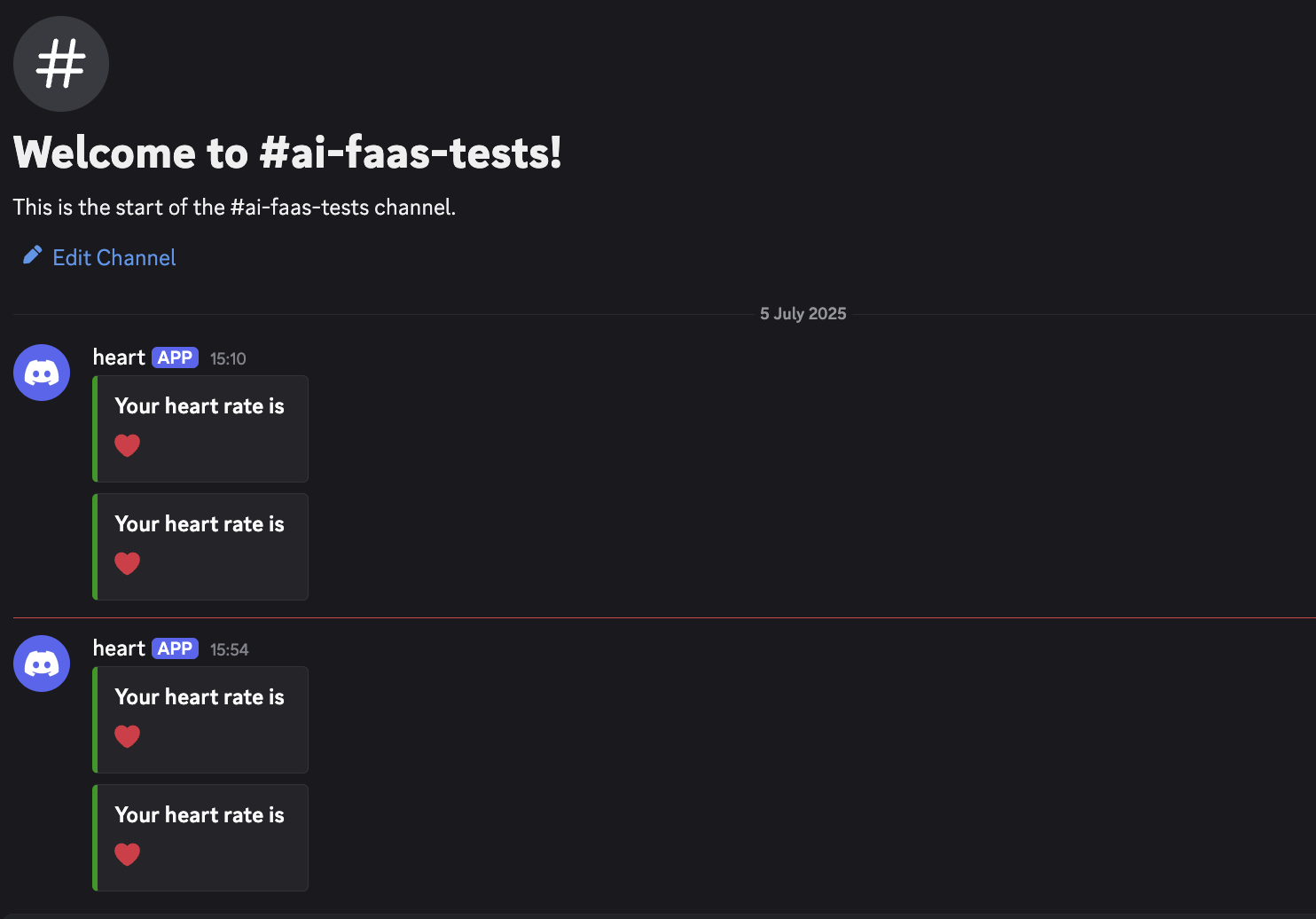
On peut également remarquer dans la capture d'écran précédant qu'un webhook pour Discord a été défini dans une autre variable d'environnement DISCORD_WEBHOOK_URL afin d'être utilisé pour envoyer la réponse du LLM dans Discord, et voici le résultat :

faas-discord-heart-rate

On peut voir que jusqu'ici tout va bien côté cardio, rien à signaler 😅

Footnotes

  1. Function as a Service

  2. Large Language Model

  3. Blockly est le langage low-code qu'on utilise dans CWCloud

Fork It Tunis 2025, résumé de la journée

· 2 minutes de lecture
Idriss Neumann
founder cwcloud.tech

On l'a fait ! Tunis 🇹🇳 a enfin eu sa journée de conférence orientée pour les développeurs à la cité de la culture le 5 avril.

forkit-tn-2025-hall

Comme annoncé dans un précédent blogpost, nous avions monté un très beau stand dans le but de challenger les conférenciers avec un concours IA, serverless et IoT et on a eu beaucoup de participant(e)s.

forkit-tn-2025-cwcloud-booth

Félicitons encore nos gagnant(e)s: Zayneb, Ala Eddine et Yassmine1!

forkit-tn-2025-winners

Le code source de la démo est disponible sur github et si vous voulez plus d'explications, vous pouvez visionner cette courte vidéo :

J'ai également eu la chance d'avoir la scène pour parler de Quickwit, Grafana et OpenTelemetry avec une autre démo. Il était prévu de le faire en anglais mais finalement le public a préféré la langue de molière. Je m'excuse pour les personnes qui auraient souhaité le voir en anglais, il y aura d'autres occasions 😅.

forkit-tn-2025-talk-quickwit

Il y aura un replay, les slides et supports sont disponibles sur github également et si vous souhaitez en apprendre davantage, vous pouvez également lire ce blogpost.

J'ai également pu assister à la keynote très inspirante "how do you learn" d'Olivier et Sonyth Huber et vous recommande de visionner le replay lorsqu'il sera publié.

Et pour finir, j'ai également pu faire visiter Sidi Bou Saïd à mon ami speaker Yacine, la plus belle place de la région de Tunis. Yacine qui a également donné un super talk sur comment il a réussi à porter Doom sur navigateur en utilisant WASM, une merveilleuse technologie.

forkit-tn-2025-sidibou

Si vous souhaitez garder le contact, en particulier si vous avez apprécié les démo et le challenge de CWCloud, nous avons un serveur discord communautaire que vous pouvez rejoindre.

Les prochaines conférences auxquelles j'assisterai seront DevoxxFR comme visiteur, SunnyTech et RivieraDev en tant que speaker. J'espère vous y voir nombreux(se)s comme d'habitude 🤩.

Footnotes

  1. Yassmine n'a pas pu rester pour recevoir son cadeau donc son ami l'a pris à sa place 😅.

L'évènement Fork It 2025 à Tunis

· 2 minutes de lecture
Idriss Neumann
founder cwcloud.tech

Comme vous le savez peut-être déjà avec nos récentes communications, un évenement Fork It aura lieu à la cité de la culture à Tunis 🇹🇳 le 5 avril 2025.

CWCloud aura un stand avec un concours IoT, IA et serverless qui consistera à lire un capteur de température et humidité DHT22 à l'aide d'un Raspberry Pi et de les envoyer à une fonction serverless et lowcode de CWCloud afin qu'elle fasse réagir des LLM avec des emojis pour indiquer s'il fait chaud ou froid. Vous aurez plus d'informations avec cette vidéo :

Il y aura des livres d'Aurélie Vache à gagner :

aurelie-books

Je présenterai aussi un talk à 16h55: Découvrons ensemble la relève de l'observabilité avec les logs et traces : Quickwit (le talk sera en anglais mais vous avez une version disponible en Français à BDX/IO).

Il est important de vous inscrire et de récupérer votre ticket ici. C'est vraiment peu cher pour un évènement technique de cette qualité et nous avons également un code promo qui permet de le faire descendre encore de 20% : COMWORK20.

Afin de vous enregistrer, vous devez cliquer sur "Get Tickets" :

forkit-get-tickets

Ensuite vous avez le choix pour payer en ligne soit en TND soit en Euros avec une carte de crédit :

forkit-choose-currency

Si vous utilisez tunis.events afin de payer en TND, voici comment ajouter le code promo en cliquant sur "code secret" :

forkit-ticket-tnd

Et si vous utilisez lu.ma afin de régler en Euros, pour utiliser le code promo vous devez cliquer sur "add a coupon" :

forkit-ticket-euros

On espère vous voir très nombreux à l'évènement !

Nouvelle identité CWCloud

· Une minute de lecture
Idriss Neumann
founder cwcloud.tech

new-identity-cwcloud

Vous l'aurez peut être constaté, nous avons changé d'identité visuelle et commencé à séparer les activités. CWCloud deviens un produit à part entière avec ses propres structures juridiques en cours de création (tant que c'est en cours, le produit reste sous la tutelle de la société comwork).

A cette occasion, CWCloud se munit de sa propre landing page et le blog lui a été transféré ici : cwcloud.tech.

Comwork va continuer à exister en tant que boite de service avec son propre site web qui pour rappel est le suivant : comwork.io.

Beaucoup de choses vont changer notamment vous pourrez le constater l'apparition de deux versions : community edition (opensource en licence MIT) et enterprise (propriétaire) avec des fonctionnalités en plus adaptés aux grands groupes. Les versions SaaS quant à elle pour les marchés européens/internationaux et tunisiens vont directement pointer sur des version enterprise.

Nous vous informons également que nous sommes en train de postuler chez YCombinator afin de mieux faire évoluer le produit. Nous vous tiendrons informer de l'évolution.

DevOps est mort, est-ce grave docteur ?

· 7 minutes de lecture
Idriss Neumann
founder cwcloud.tech

Bonne année 2025 à toutes et à tous 🎉. Commençons cette nouvelle année avec une rétrospective sur le mouvement DevOps.

Il existe déjà de nombreux articles et billets de blog1 qui expliquent en détail ce qu’est ce mouvement mais je vais quand même passer rapidement dessus afin d'être sûr nous soyons sur la même longueur d'onde pour le reste de l'article.

Pour faire simple, DevOps est une sorte d'alignement stratégique entre les parties prenantes qui développent un produit et ses fonctionnalités (le build) et celles qui maintiennent la production (le run). On est censé mesurer la bonne application du DevOps par le fait de réussir à briser les frontières (ou silos) qu'il peux exister entre le build et le run dans une entreprise ou organisation.

Depuis un certain temps, le mot DevOps est dévoyé de son sens d’origine, notamment par les recruteurs, afin de désigner directement un ensemble de compétences techniques2 parfois utilisées dans sa mise en œuvre. C’est pourquoi on peut lire beaucoup d’évangélistes DevOps qui martèlent que "DevOps n’est pas un rôle, c’est un ensemble de bonnes pratiques pour briser les silos", et ils ont raison d'une certaine manière.

Cependant, en tant que responsable technique souhaitant fournir des outils et des compétences précises, je pense que nous n'avons pas d'autres choix qu'accepter et s’adapter à l'usage du terme d'aujourd’hui. C’est pourquoi je n’ai aucun problème à ajouter le mot DevOps sur des CVs ou des offres d’emploi quand il s’agit de sélectionner des profils dont le rôle correspond davantage à des SRE3 ou des Platform Engineers. C’est pareil pour les outils que nous développons comme CWCloud. Ce qui compte le plus, c’est de répondre aux besoins des clients et utilisateurs et non pas pinailler sur l'origine d'un éthymologique d'un mot qui vient d'un mouvement qui n'adresse plus réellement les problèmes d'échelles rencontrés par les entreprises. Donc, si les clients et recruteurs pensent que DevOps est un ensemble de compétences et pratiques techniques, ce n’est pas un problème fondamentalement grave. Commençons par les approcher parce que nous sommes pertinents pour les aider, plutôt que de les corriger de manière dogmatique et irrévérencieuse.

Pour illustrer davantage le fait qu'il ne sert à rien de lutter contre le sens du courant, voyons par exemple comment GitLab se présente :

GitLab: The most-comprehensive AI-powered DevSecOps platform

Ce qui peux se traduire comme ceci :

GitLab : la plateforme DevSecOps alimentée par l’IA la plus complète

Avant le battage médiatique autour de l’IA, GitLab se définissait pendant des années comme la chaîne d’outils DevOps complète, malgré le fait que ses fonctionnalités (dépôts git, pipelines CI/CD et les fonctionnalités GitOps) n'impliquent pas nécéssairement que l'organisation soit DevOps. Beaucoup d’entreprises qui utilisent GitLab ne suivent pas du tout les principes DevOps. Personnellement, je pense qu’il en va de même pour les personnes capables d’automatiser des déploiements avec des compétences techniques comme ansible, terraform, helm, etc.

Cela étant, revenons au sujet principal de cet article : je pense personnellement que le mouvement DevOps en lui-même est mort et que nous revenons aux silos. C'est un phénomène récurrent qui se produit chaque décennie dans toutes les industries en croissance, et dans le cas de l'IT, ce dernier retour aux silos est la conséquence directe du passage au cloud moderne.

Définissons d’abord ce qu’est le cloud moderne : c’est essentiellement une couche d’abstraction de la complexité des infrastructures via des API ou interfaces simples à consommer pouvant être directement par des product owners, des développeurs, des data scientists... bref, des parties prenantes qui ne sont pas expertes en hébergement d'infrastructure et gestion d'applications en production. Et ces API, avec différents niveaux d’abstraction, sont fournies As a Service4.

Le cloud moderne peut être délégué à des hébergeurs ou hyperscalers et c'est ce qu'on appelera le cloud public (fournisseurs comme AWS, GCP, Azure, Scaleway...) ou mis en place dans des infrastructures privées (on parlera donc de cloud privé) via des outils d'IaaS comme OpenStack, OpenShift, Kubernetes, des plateformes FaaS... bref, tout ce qui permet de donner de l’autonomie aux équipes de développement pour le déploiement de leur code.

Et c’est pour cela que nous assistons à un retour des silos :

  • des équipes de Platform Engineers qui fournissent les outils pour aider les développeurs à déployer leur code (registries d’images, CI/CD, moteurs serverless, observabilité...)
  • des équipes de SRE5 qui sont souvent d’anciens développeurs gérant les incidents en production et apportant des solutions à court et long terme, parfois en corrigeant directement le code
  • des équipes consommatrices (développeurs, product owners, data scientists...) de la plateforme6
  • des équipes OPS qui s’occupent de l’infrastructure physique : matériel, réseau, administration système de bas niveau

La seule différence entre le cloud public et le cloud privé est que certains des intervenants de ces silos travaillent directement comme employés de l'hébergeur. Il s’agit d’une mutualisation des ressources humaines dans de grandes organisations qui n’ont jamais réellement adopté le mouvement DevOps d'ailleurs.

Mais du coup, cela ne ressemble t-il pas à ce que nous avions avant l'ère DevOps ? Quelle est la différence ?

La principale différence réside dans le fait que les SLA7 et le time to market étaient très mauvais pour plusieurs raisons :

  • manque d’agilité dans la planification entre les équipes non-alignées en terme d'objectifs
  • certaines personnes étaient des goulets d’étranglement par manque d’automatisation et d’abstraction de leurs interventions
  • d’anciens cadres méthodologiques comme ITIL ou CMMI qui géraient tout via l’ITSM8

Comme pour les méthodologies agiles avant lui, DevOps était trop axé sur la suppression des silos, ce qui est impossible dans les grandes organisations. Et puisque le but de toute entreprise est de croître, ce n’était pas une solution durable. Une méthodologie non scalable n’est pas durable à long terme.

Alors est-ce vraiment un problème si nous revenons aux anciens silos ? Je ne pense pas. Comme pour Agile (et même ITIL, CMMI, COBIT, DDD, TDD, etc.), nous progressons en piochant les principes qui nous intéressent au moment opportun. Bien sûr, nous continuerons à améliorer l’automatisation, la CI/CD, l’observabilité, nos SLA dans la résolution d’incidents et notre time to market pour les évolutions via l’ingénierie pragmatique, pas en suivant religieusement une méthodologie. Le dogmatisme et le pragmatisme sont souvent opposés, et en tant qu’ingénieurs, nous devrions rester pragmatiques et chercher la meilleure solution avec le meilleur ROI9.

Donc encore une fois, bonne année, et espérons que 2025 soit une nouvelle ère d’amélioration de nos pratiques et produits de gestion des déploiements et infrastructures. Nous avons plein de surprises qui arrivent en matière d’observabilité et d’automatisation (peut-être avec de l’IA 😱).


Footnotes

  1. J’aime beaucoup cet article de Katia Himeur Talhi pour définir ce qu'est DevOps

  2. Pipelines CI/CD, automatisation des déploiements, observabilité, scripting...

  3. System Reliability Engineer. Si vous ne connaissez pas bien le concept, je vous conseille encore une fois l’article de Katia

  4. C’est ce dont on parle souvent avec les termes IaaS, PaaS, DaaS, CaaS, FaaS...

  5. On constate souvent que cette équipe est constituée des mêmes personnes qui font aussi de l’ingénierie de plateforme. Deux rôles différents mais compétences similaires, donc souvent mêmes personnes.

  6. Dans un monde idéal, ces personnes sont censées consommer directement les API de la plateforme : écrire les Dockerfiles, configurer les pipelines CI/CD... Mais c’est parfois délégué aux équipes plateformes pour diverses raisons (manque de temps, complexité...). Je pense que cela sera résolu par plus d’abstraction, d’automatisation et d’IA, car ces configurations sont souvent répétitives. C’est aussi pour cela qu’on développe CWCloud 😜

  7. Service Level Agreement

  8. Information Technology Service Management. En gros, gérer toute l’organisation avec des outils à tickets comme Jira, Asana, Mantis, etc.

  9. Return on Investment

Replace Google Analytics with Grafana, Quickwit and CWCloud

· 6 minutes de lecture
Idriss Neumann
founder cwcloud.tech

Hi and Merry Christmas 🎄 (again yes, I didn't thought that I was going to publish another blogpost so soon 😄).

In this blogpost we'll see how to use CWCloud and Quickwit to setup beautiful dashboards like this in replacement of Google Analytics:

grafana-geomap-dashboard

Before going in detail, let's start to give you a bit of context of what brought us to do this transition.

First, Google Analytics ain't comply with the GDPR1. So basically it was becoming illegal to continue to use it despite it was an amazing tool to analyze our websites and application usages.

With the last case law, we started to use Matomo as a replacement and we're still providing Matomo as a Service in our CWCloud SaaS. And it worked pretty well (even if I find the UI a bit old-fashion)...

However I didn't like to maintain multiple stacks which, from my perspective, are serving the same purpose: observability. And yes web analytics should be part of it from my perspective.

I already explained why we choosed Quickwit as our observability core stack in previous blogposts:

So the idea was to use the same observability stack to track visitors data and index and display those on Grafana. And to be able to achieve this, we needed something very easy to add in our various frontend like a one-pixel image:

<img src="https://api.cwcloud.tech/v1/tracker/img/{mywebsite}" style="display: none;"></img>

As you can see, we provided it as an endpoint in CWCloud to complete the observability features and it's documented here.

This endpoint is writing a log which looks like this:

INFO:root:{"status": "ok", "type": "tracker", "time": "2024-12-20T13:46:23.358233", "host": "82.65.240.115", "user_agent": "Mozilla/5.0 (iPhone; CPU iPhone OS 18_1_1 like Mac OS X) AppleWebKit/605.1.15 (KHTML, like Gecko) Version/18.1.1 Mobile/15E148 Safari/604.1", "referrer": "https://www.cwcloud.tech/", "website": "www.cwcloud.tech", "device": "mobile", "browser": "safari", "os": "ios", "details": {"brand": "apple", "type": "iphone"}, "infos": {"status": "ok", "status_code": 200, "city": "Saint-Quentin", "region": "Hauts-de-France", "country": "France", "region_code": "HDF", "country_iso": "FR", "lookup": "FRA", "timezone": "Europe/Paris", "utc_offset": "FR", "currency": "EUR", "asn": "AS12322", "org": "Free SAS", "ip": "xx.xx.xx.xx", "network": "xx.xx.xx.0/24", "version": "IPv4", "hostname": "xx-xx-xx-xx.subs.proxad.net", "loc": "48.8534,2.3488"}, "level": "INFO", "cid": "742b7629-7a26-4bc6-bd2a-3e41bee32517"}

So at the end, it contain a JSON payload we can extract and index:

{
"status": "ok",
"type": "tracker",
"time": "2024-12-20T13:46:23.358233",
"host": "82.65.240.115",
"user_agent": "Mozilla/5.0 (iPhone; CPU iPhone OS 18_1_1 like Mac OS X) AppleWebKit/605.1.15 (KHTML, like Gecko) Version/18.1.1 Mobile/15E148 Safari/604.1",
"referrer": "https://www.cwcloud.tech/",
"website": "www.cwcloud.tech",
"device": "mobile",
"browser": "safari",
"os": "ios",
"details": {
"brand": "apple",
"type": "iphone"
},
"infos": {
"status": "ok",
"status_code": 200,
"city": "Saint-Quentin",
"region": "Hauts-de-France",
"country": "France",
"region_code": "HDF",
"country_iso": "FR",
"lookup": "FRA",
"timezone": "Europe/Paris",
"utc_offset": "FR",
"currency": "EUR",
"asn": "AS12322",
"org": "Free SAS",
"ip": "xx.xx.xx.xx",
"network": "xx.xx.xx.0/24",
"version": "IPv4",
"hostname": "xx-xx-xx-xx.subs.proxad.net",
"loc": "48.8534,2.3488"
},
"level": "INFO",
"cid": "742b7629-7a26-4bc6-bd2a-3e41bee32517"
}

So let's start by creating the Quickwit mapping:

{
"doc_mapping": {
"mode": "lenient",
"field_mappings": [
{
"name": "time",
"type": "datetime",
"fast": true,
"fast_precision": "seconds",
"indexed": true,
"input_formats": [
"rfc3339",
"unix_timestamp"
],
"output_format": "unix_timestamp_nanos",
"stored": true
},
{
"indexed": true,
"fast": true,
"name": "cid",
"type": "text",
"tokenizer": "raw"
},
{
"indexed": true,
"fast": true,
"name": "website",
"type": "text",
"tokenizer": "raw"
},
{
"indexed": true,
"fast": true,
"name": "device",
"type": "text",
"tokenizer": "raw"
},
{
"indexed": true,
"fast": true,
"name": "os",
"type": "text",
"tokenizer": "raw"
},
{
"indexed": true,
"fast": true,
"name": "browser",
"type": "text",
"tokenizer": "raw"
},
{
"indexed": true,
"fast": true,
"name": "host",
"type": "ip"
},
{
"indexed": true,
"fast": true,
"name": "hostname",
"type": "text",
"tokenizer": "raw"
},
{
"indexed": true,
"fast": true,
"name": "user_agent",
"type": "text",
"tokenizer": "raw"
},
{
"indexed": true,
"fast": true,
"name": "referrer",
"type": "text",
"tokenizer": "raw"
},
{
"indexed": true,
"fast": true,
"name": "lookup",
"type": "text",
"tokenizer": "raw"
},
{
"name": "details",
"type": "object",
"field_mappings": [
{
"indexed": true,
"fast": true,
"name": "brand",
"type": "text",
"tokenizer": "raw"
},
{
"indexed": true,
"fast": true,
"name": "type",
"type": "text",
"tokenizer": "raw"
}
]
},
{
"name": "infos",
"type": "object",
"field_mappings": [
{
"indexed": true,
"fast": true,
"name": "status",
"type": "text",
"tokenizer": "raw"
},
{
"name": "status_code",
"fast": true,
"indexed": true,
"type": "u64"
},
{
"indexed": true,
"fast": true,
"name": "city",
"type": "text",
"tokenizer": "raw"
},
{
"indexed": true,
"fast": true,
"name": "region",
"type": "text",
"tokenizer": "raw"
},
{
"indexed": true,
"fast": true,
"name": "country",
"type": "text",
"tokenizer": "raw"
},
{
"indexed": true,
"fast": true,
"name": "region_code",
"type": "text",
"tokenizer": "raw"
},
{
"indexed": true,
"fast": true,
"name": "country_iso",
"type": "text",
"tokenizer": "raw"
},
{
"indexed": true,
"fast": true,
"name": "timezone",
"type": "text",
"tokenizer": "raw"
},
{
"indexed": true,
"fast": true,
"name": "utc_offset",
"type": "text",
"tokenizer": "raw"
},
{
"indexed": true,
"fast": true,
"name": "currency",
"type": "text",
"tokenizer": "raw"
},
{
"indexed": true,
"fast": true,
"name": "asn",
"type": "text",
"tokenizer": "raw"
},
{
"indexed": true,
"fast": true,
"name": "network",
"type": "text",
"tokenizer": "raw"
},
{
"indexed": true,
"fast": true,
"name": "ip",
"type": "ip"
},
{
"indexed": true,
"fast": true,
"name": "org",
"type": "text",
"tokenizer": "raw"
},
{
"indexed": true,
"fast": true,
"name": "version",
"type": "text",
"tokenizer": "raw"
},
{
"indexed": true,
"fast": true,
"name": "loc",
"type": "text",
"tokenizer": "raw"
}
]
}
],
"timestamp_field": "time",
"max_num_partitions": 200,
"index_field_presence": true,
"store_source": false,
"tokenizers": []
},
"index_id": "analytics-v0.4",
"search_settings": {
"default_search_fields": [
"website",
"cid",
"host",
"referrer",
"infos.ip",
"infos.country",
"infos.country_iso",
"infos.city",
"infos.region_code",
"infos.timezone",
"infos.currency",
"infos.version"
]
},
"version": "0.8"
}

Note: as you can see, we moved the lookup field to the root document in order to be able to use the Geomap plugin of Grafana.

Once it's done, we can use Vector, as usual, to parse this log line with the following remap function:

remap_analytics:
inputs:
- "kubernetes_logs"
type: "remap"
source: |
.time, _ = to_unix_timestamp(.timestamp, unit: "nanoseconds")

.message = string!(.message)
.message = replace(.message, r'^[^:]*:[^:]*:', "")

.body, err = parse_json(.message)
if err != null || is_null(.body) || is_null(.body.cid) || is_null(.body.type) || .body.type != "tracker" {
abort
}

.cid = .body.cid
.website = .body.website
.browser = .body.browser
.device = .body.device
.os = .body.os
.host = .body.host
.referrer = .body.referrer
.user_agent = .body.user_agent
.infos = .body.infos
.details = .body.details

if is_string(.infos.lookup) {
.lookup = del(.infos.lookup)
}

del(.timestamp)
del(.body)
del(.message)
del(.source_type)

And then the sink2:

sinks:
analytics:
type: "http"
method: "post"
inputs: ["remap_analytics"]
encoding:
codec: "json"
framing:
method: "newline_delimited"
uri: "https://xxxx:yyyyy@quickwit.yourinstance.com:443/api/v1/analytics-v0.4/ingest"

Once it's done you'll be able to do some visualization in Grafana using the Geomap plugin:

grafana-geomap

Very nice, isn't it?

Have a nice end of year and Merry Christmas 🎄 again!

Footnotes

  1. General Data Protection Regulation, a European law you can find here

  2. A sink is an output of vector which is working like an ETL (for Extract Transform Load)

Installing CWCloud on K8S is so easy!

· 3 minutes de lecture
Idriss Neumann
founder cwcloud.tech

Hi and Merry Christmas 🎄.

With all the demos we've done lately, some people asks us a way to install CWCloud easily on localhost to give it a try, especially for the serverless part.

Let's start with a quick reminder on what is CWCloud: it's an agnostic deployment accelerator platform which provides the following features:

  • DaaS or Deployment as a Service: you can checkout this tutorial to understand how DaaS is working with cwcloud and what's the difference between IaaS, PaaS and DaaS.
  • FaaS or Function as a Service: you can checkout this blogpost to understand what is the purpose of this feature
  • Observability and monitoring: you can checkout this tutorial

At the time of writing, here's the different component used by CWCloud to run:

  • A RESTful API
  • A Web GUI1
  • Some asynchronous workers to schedule run the serverless function
  • ObjectStorage
  • PostgreSQL as relational and JSON database
  • Redis for the cache and message queuing
  • Flyway DB SQL migrations

It can be seen as a bit heavy but believe me it's not, it can run on a single Raspberry PI!

In order to self-host CWCloud, we provide three ways (the three are relying on docker images):

But this is not enough to bootstap it in seconds. In this blogpost we will show you how to run CWCloud with our CLI cwc using kind2 in order to use some feature which doesn't not depends on the external services like the FaaS or the monitor features.

Just a bit of reminder, here's how to install kind, kubect and helm with brew:

brew install kubectl
brew install helm
brew install kind

Then you can also install our cwc cli using brew3:

brew tap cwc/cwc https://gitlab.cwcloud.tech/oss/cwc/homebrew-cwc.git
brew install cwc

Once it's done, you can create your cluster with kind:

kind create cluster

And then, simply run the following command:

cwc bootstrap

Then, wait until the pods are Running:

kubectl -n cwcloud get pods

cwcloud-pods

Then you can open port-forward to the API and GUI in order to be able to open the GUI in a web browser:

cwc bootstrap pfw

You'll be able to access the GUI through this URL: localhost:3000

cwcloud-k8s-bootstrap

The default user and password are the following:

  • Username: sre-devops@comwork.io
  • Password: cloud456

Of course if you need to override some helm configurations, you can with this command:

cwc bootstrap --values my-values.yaml

It's might be necessary if you want to configure the DaaS feature which is in a "no operation" mode by default. In order to fully use it, you'll have to follow all those configurations tutorials depending on the cloud provider you want to enable.

And finally if you want to uninstall, here's the command:

cwc bootstrap uninstall

Now I'll let you with this five minutes video tutorial on how to use the FaaS, you can fully reproduce on your local environment:

Enjoy!

Footnotes

  1. Graphical User Interface

  2. Of course you can replace kind, by something equivalent like k3d or minikube as you wish.

  3. We also provide other way to install our cli if you don't have brew available on your operating system, you can refer to this tutorial. We're supporting Linux, MacOS and Windows for both amd64 and arm64 architectures.

Quickwit for prometheus metrics

· 4 minutes de lecture
Idriss Neumann
founder cwcloud.tech

In a previous blogpost we explained how we reduced our observability bill using Quickwit thanks to its ability to store the logs and traces using object storage:

quickwit-architecture

We also said that we were using VictoriaMetrics in order to store our metrics but weren't satisfied by it lacks of object storage support.

We always wanted to store all our telemetry, including the metrics, on object storage but weren't convinced by Thanos or Mimir which still rely on Prometheus to work making them very slow.

The thing is for all of cwcloud's metrics, we're using the OpenMetrics format with a /v1/metrics endpoint like most of the modern observable applications following the state of art of observability.

Moreover, all of our relevant metrics are gauges and counter and our need is to set Grafana dashboards and alerts which looks like this:

grafana-trafic-light-dashboard

In fact, we discovered that it's perfectly perfectly feasible to setup the different threshold and do some Grafana visualizations based on simple aggregations (average, sum, min/max, percentiles) using the Quickwit's datasource:

grafana-trafic-light-visualization

However, if you're used to also search and filter metrics using PromQL in the metrics explorer, you'll have to adapt your habits to use lucene query instead:

grafana-quickwit-metrics-explorer

As you can see, it's not a big deal ;-p

That been said, in order to scrap and ingest the prometheus/openmetrics http endpoints, we choosed to use vector1 with this configuration:

sources:
prom_app_1:
type: "prometheus_scrape"
endpoints:
- "https://api.cwcloud.tech/v1/metrics"

transforms:
remap_prom_app_1:
inputs: ["prom_app_1"]
type: "remap"
source: |
if is_null(.tags) {
.tags = {}
}

.tags.source = "prom_app_1"

sinks:
quickwit_app_1:
type: "http"
method: "post"
inputs: ["remap_prom_app_1"]
encoding:
codec: "json"
framing:
method: "newline_delimited"
uri: "http://quickwit-searcher.your_ns.svc.cluster.local:7280/api/v1/prom-metrics-v0.1/ingest"

Note: you cannot transform the payload structure the way you want unlike other sources like kubernetes-logs or docker_logs sources but you can add some tags to add a bit of context. That's what we did in this example adding a source field inside the tags object.

And this is the JSON mapping to be able to match with the vector output sent to the sinks and that will make you able to make aggregations on the numeric values:

{
"doc_mapping": {
"mode": "dynamic",
"field_mappings": [
{
"name": "timestamp",
"type": "datetime",
"fast": true,
"fast_precision": "seconds",
"indexed": true,
"input_formats": [
"rfc3339",
"unix_timestamp"
],
"output_format": "unix_timestamp_nanos",
"stored": true
},
{
"indexed": true,
"fast": true,
"name": "name",
"type": "text",
"tokenizer": "raw"
},
{
"indexed": true,
"fast": true,
"name": "kind",
"type": "text",
"tokenizer": "raw"
},
{
"name": "tags",
"type": "json",
"fast": true,
"indexed": true,
"record": "basic",
"stored": true,
"tokenizer": "default"
},
{
"name": "gauge",
"type": "object",
"field_mappings": [
{
"name": "value",
"fast": true,
"indexed": true,
"type": "f64"
}
]
},
{
"name": "counter",
"type": "object",
"field_mappings": [
{
"name": "value",
"fast": true,
"indexed": true,
"type": "f64"
}
]
},
{
"name": "aggregated_summary",
"type": "object",
"field_mappings": [
{
"name": "sum",
"fast": true,
"indexed": true,
"type": "f64"
},
{
"name": "count",
"fast": true,
"indexed": true,
"type": "u64"
}
]
},
{
"name": "aggregated_histogram",
"type": "object",
"field_mappings": [
{
"name": "sum",
"fast": true,
"indexed": true,
"type": "f64"
},
{
"name": "count",
"fast": true,
"indexed": true,
"type": "u64"
}
]
}
],
"timestamp_field": "timestamp",
"max_num_partitions": 200,
"index_field_presence": true,
"store_source": false,
"tokenizers": []
},
"index_id": "prom-metrics-v0.1",
"search_settings": {
"default_search_fields": [
"name",
"kind"
]
},
"version": "0.8"
}

To conclude, despite the fact that Quickwit isn't a real TSDB2 (time-series database), we found it pretty easy with vector to still use it as a metrics backend with vector. And this way we still can say to our developer to rely on the OpenMetrics/Prometheus SDK to expose their metrics routes to scrap. However we're still encouraging some of our customer to use VictoriaMetrics because it's still experimental and some of them need more sophisticated computation capabilities3.

One of the improvements that we immediatly think about, would be to also implement the OpenTelemetry compatibility in order to be able to push metrics through OTLP/grpc protocol. We opened an issue to the quickwit's team to submit this idea but we think that it can be also done using vector as well.

Footnotes

  1. to get more details on the prometheus_scrape input, you can rely on this documentation

  2. at the time of writing, because we know that Quickwit's team plan to provide a real TSDB engine at some point

  3. for example, using multiple metrics in one PromQL query, using the range functions such as rate or irate...

The Serverless state of art in 2024

· 8 minutes de lecture
Idriss Neumann
founder cwcloud.tech

During the last decade, you should have heard about serverless architecture or Function as a Service (or FaaS) many times. But sometimes you might have heard the word "serverless" also for other cloud services such as Database as a Service (or DBaaS) or Container as a Service (or CaaS).

What does those things have in common to get called "serverless"? At the beginning this word implied two conditions that I'll remind in this blogpost to start. Then I'll focus on the FaaS and explain my mind on why I think it has evolved last couple of years.

The first condition is you ain't supposed to know about the infrastructure that hosts the service you're using.

  • For a DBaaS, you just get an endpoint to connect your apps with and don't have to worry about the cluster sizing, scaling, hardware capabilities...
  • For a CaaS, you just have to tell to a simple API which container image and tag to deploy and don't have to worry about the clustering of your containers orchestrators. The CaaS might be built on top of Kubernetes (or K8S) with knative and the K8S API with the knative's CRD (Custom Resource Definition) can be considered as some sort of serverless API if you don't have to worry about the K8S cluster running behind
  • For a FaaS, you just have to implement a function in a supported programing language and don't have to worry about how this function will be built as a microservice1, exposed as a webservice and trigger with multiple events2

The second condition is the "pay as you go" kind of billing on public cloud: you ain't supposed to pay for dedicated clusters but only for the network, compute3 and storage used during the runtime of your code or transactions.

For example with a serverless database, you should get billed only for the data you'll ingest or fetch and the queries you'll run and not for an entire running cluster. Same with a CaaS or FaaS you should only get billed for the runtime of your containers or the necessary compute and network used during a function's call.

We can give more well known example of serverless offers you might have heard about on big cloud players:

  • AWS Lambda the very well known FaaS engine of amazon that has kind of set the developer experience of the FaaS in my opinion
  • GCP Cloudrun which is a CaaS built on top of K8S and knative
  • GCP Cloud functions the FaaS engine of GCP built on top of Cloudrun4
  • Azure function the FaaS engine of Microsoft Azure

Moreover, the GCP approach of building everything on top of K8S with knative leads the way for other cloud providers to provide similar experiences. It's the case for Scaleway which is also providing a CaaS and a FaaS built on top of knative.

That been said, I think the key feature of serverless and especially the Function as a Service isn't the "pay as you go" but it's more about adding an abstraction layer with the infrastructure allowing the developers to ship their code more quickly and get focus only on the business logic. That's why there's also FaaS engine you can install on premises such as OpenFaaS or our own cwcloud FaaS engine.

That's also something the industry is looking for decades with tons of tools you might have encounter:

  • BPM (Business Process Management)
  • ETL (Extract Transform Load)
  • CI/CD (Continuous Integration / Continuous Deployment) pipelines orchestrators
  • Workflow engine such as Airflow, Temporal, Cadence, Apache Nifi...
  • API backend frameworks: Spring, Laravel, FastAPI... to lower the complexity of exposing your code as an API or microservices
  • Nocode / Low code
  • etc

Those tools are different, meets different needs for different populations of IT workers, for example:

  • developers who want to focus only on the business logic and not how to expose this business logic as a service
  • data scientists who needs ETL or data pipelines
  • electronics engineers and IoT makers who needs to push notifications from their sensor and trigger some treatments on their devices and enjoy to do it with a lowcode editor5
  • product owners technical enough to use BPM, nocode or lowcode to translate their needs
  • system administrators who needs to collect and transform some logs for observability purposes or schedule some tasks
  • SRE (System Reliability Engineers) who needs to setup CI/CD pipelines

However they do have something in common: all those tools will generate functions (which are sometimes called "workflow" or "job" or "pipeline" or whatever) that will require some compute capabilities and an orchestrator to trigger and launch it. Moreover, those tools are designed to get rid of the maximum of technical aspect and make the IT workers focus only on the business aspects. Sounds like the promise of the serverless, doesn't it?

Because nowadays most of those tools are still bringing their own compute orchestrator, it might be very expensive for the maintainance. Lots of companies which are recruiting multiple kind of IT workers for their different needs find themselve installing all those solutions in their infrastuctures which requires dozens of SRE to handle this heavy maintainance. I used to work with scale-up asking to install all the tools I mentioned in this blogpost in K8S. It means installing dozens of jobs orchestrator on a job orchestrator (because K8S is also a job and pipeline orchestrator). This is ironic, isn't it?

ironic-meme

There's modern tools, mainly in the CI/CD area, which are designed to work on top of K8S in a gitops and serverless way. By that I mean re-using the K8S capabilities to orchestrate ephemeral tasks or even applications. It's the case of knative of course but also Tekton or ArgoWorkflow which are pretty similar tools allowing us to define serverless pipelines or workflows without having to install runners or particular runtime unlike most of the other CI/CD tools.

However, most of the other kind of tools I mentioned earlier will require to install their own orchestrator engine and reserve lot of resources in advance in order to be able to trigger their tasks, and that ain't serverless friendly. It's the case for Talend, Airflow, Cadence, gitlab or github runners, etc... We still have to work with those tools because they've not been completely replaced by FaaS engine even if we can notice that some cloud provider are trying to provide multiple services built on top of it6.

That's why, we decided with CWCloud to implement a single FaaS engine which aims to bring several "dev XP (developer experiences) for those different populations of IT workers and which is agnostic from the infrastructure running it7.

It's only the beginning but we already provide:

  • A code editor supporting the following programing languages: Python, Go, Javascript and even Bash
  • A lowcode editor supporting Blockly which is suitable for IoT makers, lowcode developers and product owners

faas-lowcode-editor

  • An API and CLI to be able to templatize the function's creation

faas-cli

Therefore, the created functions can be exposed as:

  • HTTPs endpoints like a RESTful API
  • Async workers which can be triggered with different kind of event: scheduler, cron expressions, etc...

Finally, you can choose to invoke the function and wait for the result in the http response in a blocking way (we discouraged it but sometimes you ain't got no choice), or set async callbacks. We're supporting the following callbacks:

  • HTTP webhook
  • MQTT or WSS (websockets) queues which are very suitable for IoT makers as well

This video tutorial might give you an ideo on the current dev XP:

To conclude, I believe that all those tools are the very definition of the "framework" concept for all these IT worker populations, in the sense that it allow them to focus on their business logic. The framework used to allow companies to produce more and faster, involving more people and reusing more resources, which also had the effect of increasing the quality of IT systems. That's why I strongly believe that FaaS is the new generation of modern frameworks.

Footnotes

  1. It can be an OCI image, a WASM binary...

  2. http calls on a webhook, messages on queues with a message bus or broker system such as Kafka or NATs, cron/scheduler events, etc...

  3. RAM, CPU, etc...

  4. Yeah cloud services are often built on top of cloud services. For example a FaaS is often built on top of a CaaS which is built on top of an IaaS (Infrastructure as a Service)

  5. We can observe that lot's of IoT company which build their device on top of chips like ESP32 are providing a lowcode editor based on Blockly, such as M5Stack which is very popular in China

  6. That's mainly the strategy of AWS which is re-using lambda for other services such as Glue ETL for datascientists for example, but also there's something for the IoT makers who want to trigger some jobs with MQTT events and multiple other examples...

  7. It can run on a raspberrypi like it can hyperscale on Kubernetes clusters using knative or keda or any other CaaS infrastructures. I plan to deep dive into the architecture of our FaaS, but it'll be for another blogpost ;-p