Email API
Enabling this API
In the SaaS version, you can ask to be granted using the support system.
If you're admin of the instance, you can grant users like this:
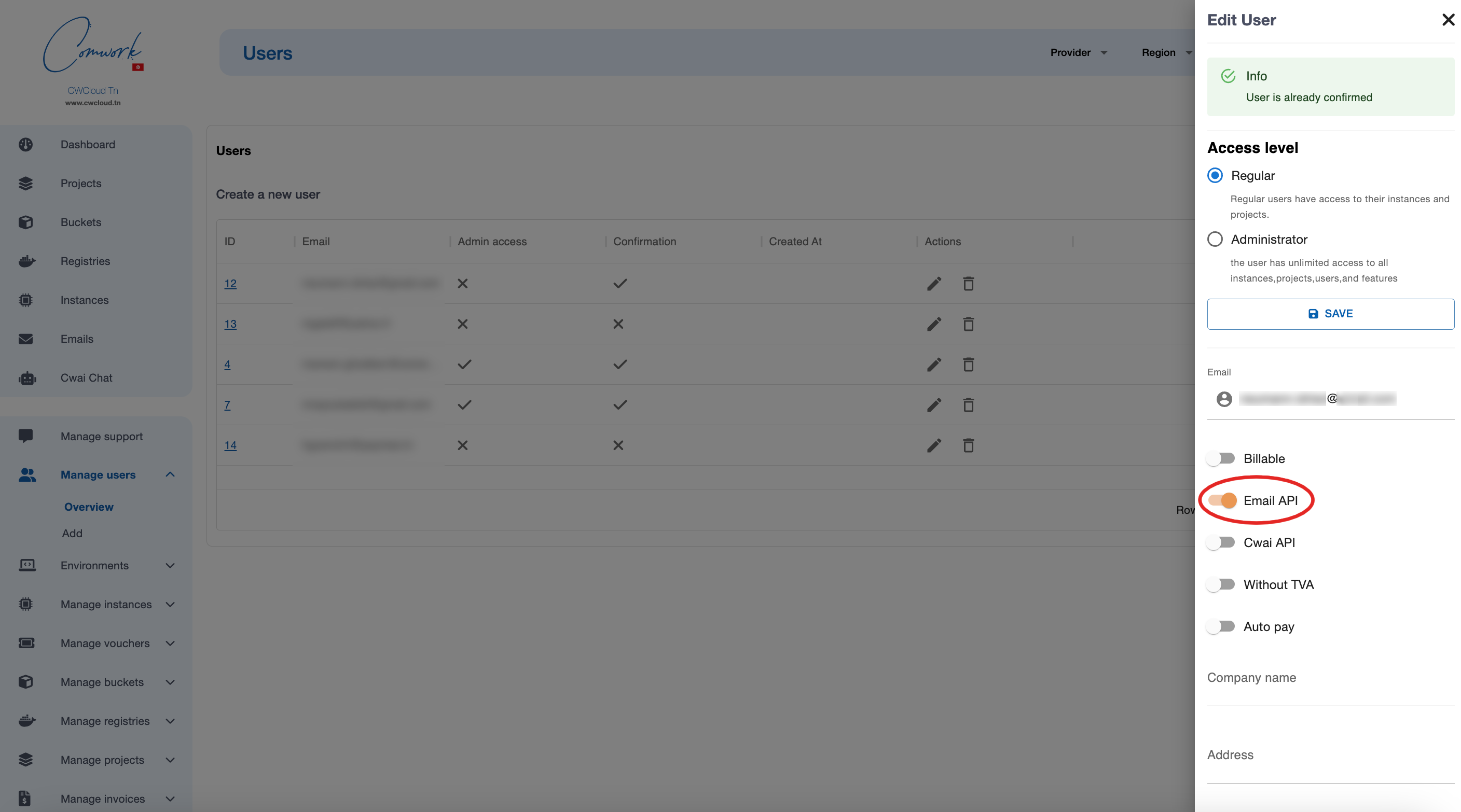
UI form
Once you're enabled, you can try to send emails using this web UI:
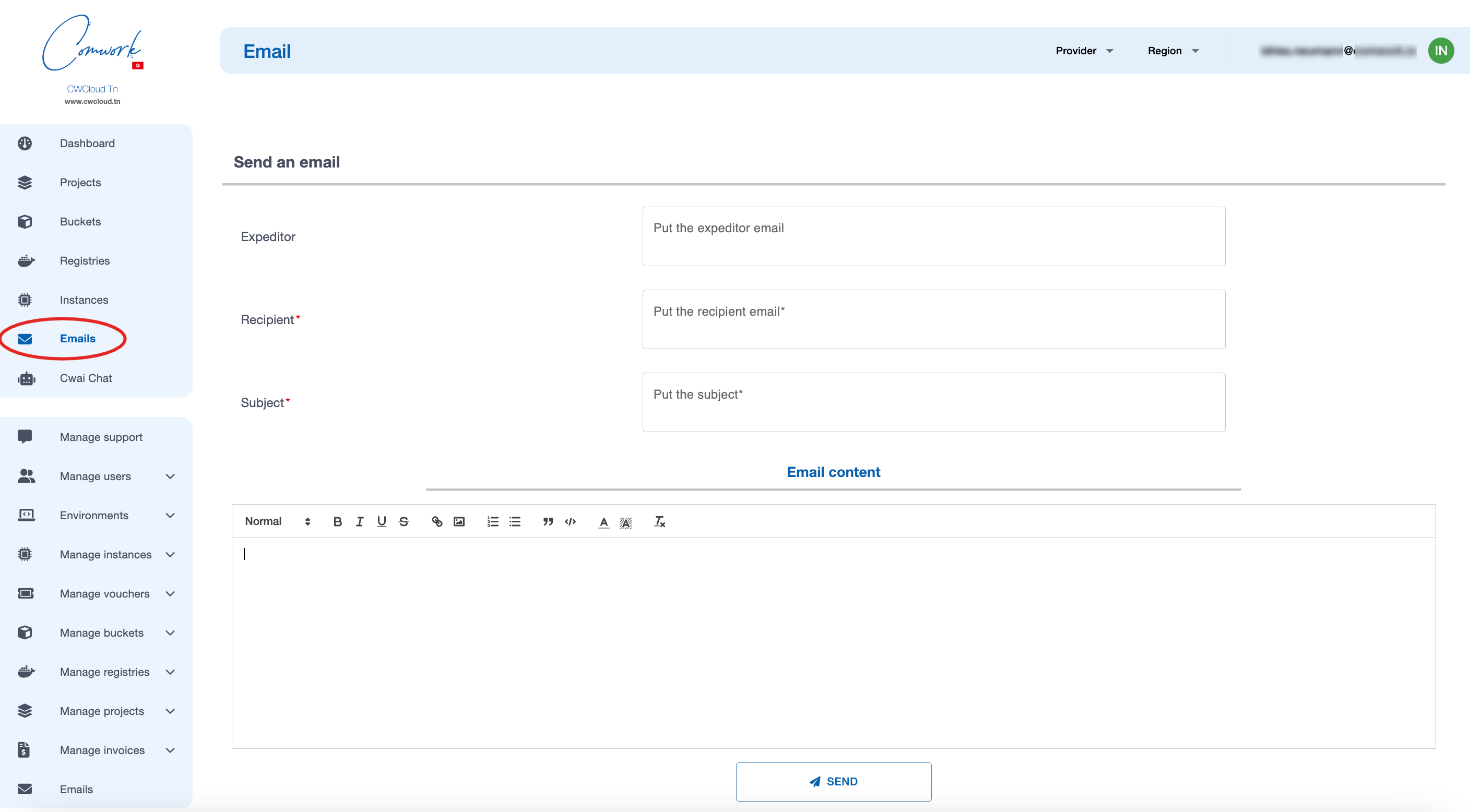
Use the API
You can use this endpoint in your applications in order to send emails:
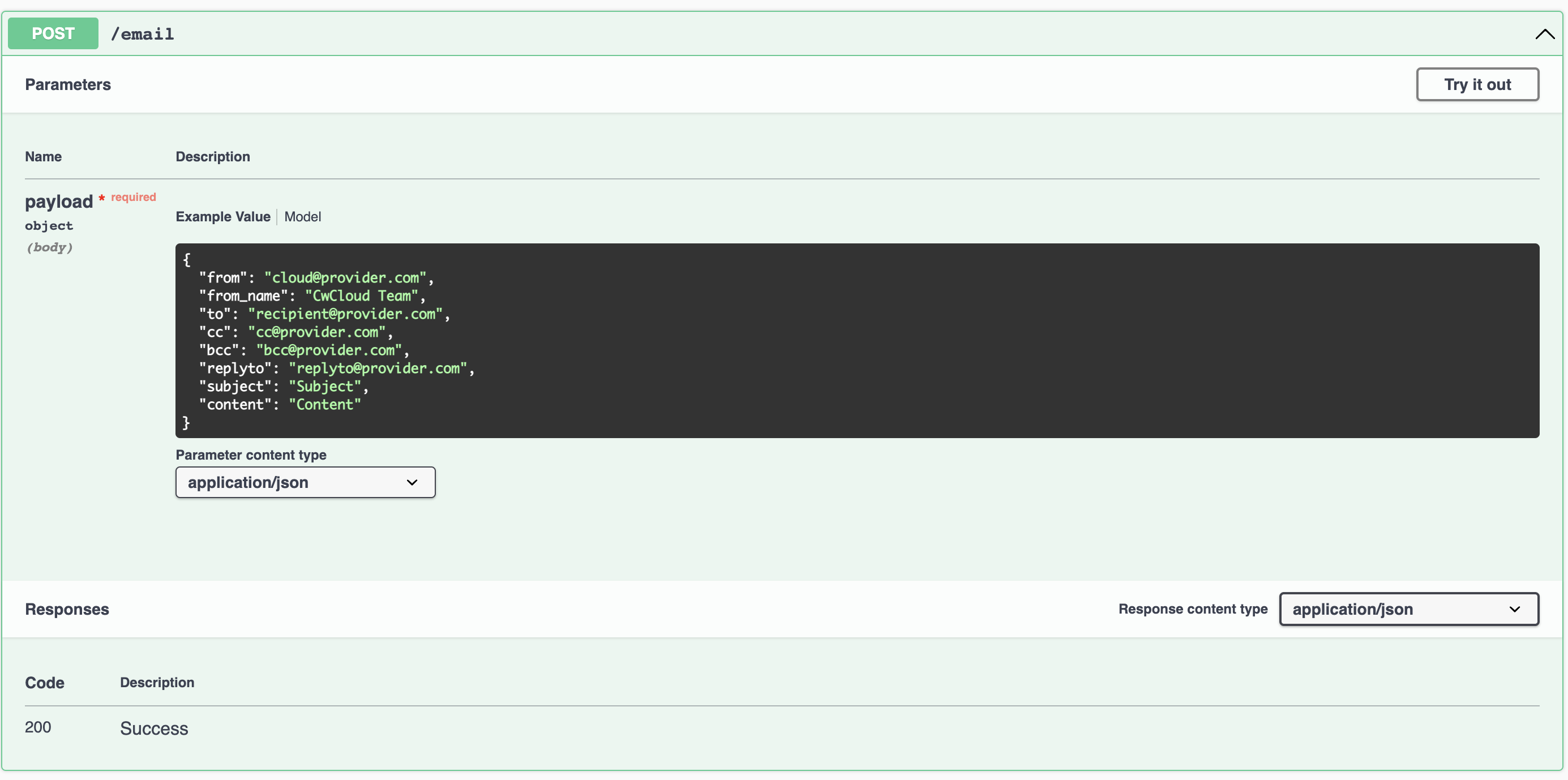
Here's how to use this endpoint using curl:
curl -X 'POST' \
  'https://api.cwcloud.tech/v1/email' \
  -H 'accept: application/json' \
  -H 'Content-Type: application/json' \
  -H 'X-Auth-Token: XXXXXX' \
  -d '{
    "from": "cloud@provider.com",
    "to": "recipient@provider.com",
    "bcc": "bcc@provider.com",
    "subject": "Subject",
    "content": "Content"
  }'
Notes:
- If you're on the Tunisian version, replace
api.cwcloud.techbyapi.cwcloud.tn - You have to replace the value
XXXXXXwith your own token generated with this procedure - The fields
to,bcc, andcccan contain a list of email addresses separated by commas (,).
Attachment
It's possible to join a file in the email content with the optional bloc attachment:
curl -X 'POST' \
  'https://api.cwcloud.tech/v1/email' \
  -H 'accept: application/json' \
  -H 'Content-Type: application/json' \
  -H 'X-Auth-Token: XXXXXX' \
  -d '{
    "from": "cloud@provider.com",
    "to": "recipient@provider.com",
    "bcc": "bcc@provider.com",
    "subject": "Subject",
    "content": "Content",
    "attachment": {
      "mime_type": "application/pdf",
      "file_name": "invoice.pdf",
      "b64": "base64content"
    }
  }'
Notes:
- You'll have to encode the file content in base64 before copying it inside the
b64field. On Linux and Mac, you can use the commandbase64 -i invoice.pdfand get the output. - You can send a list of attachments using a list of attachment objects in the
attachmentsfield.
CMS plugins
Wordpress
Installation and configuration
You can use this plugin:
1/ Download the right zip extension file (either the -tech if you're using console.cwcloud.tech instance of -tn if you're using the console.cwcloud.tn instance)
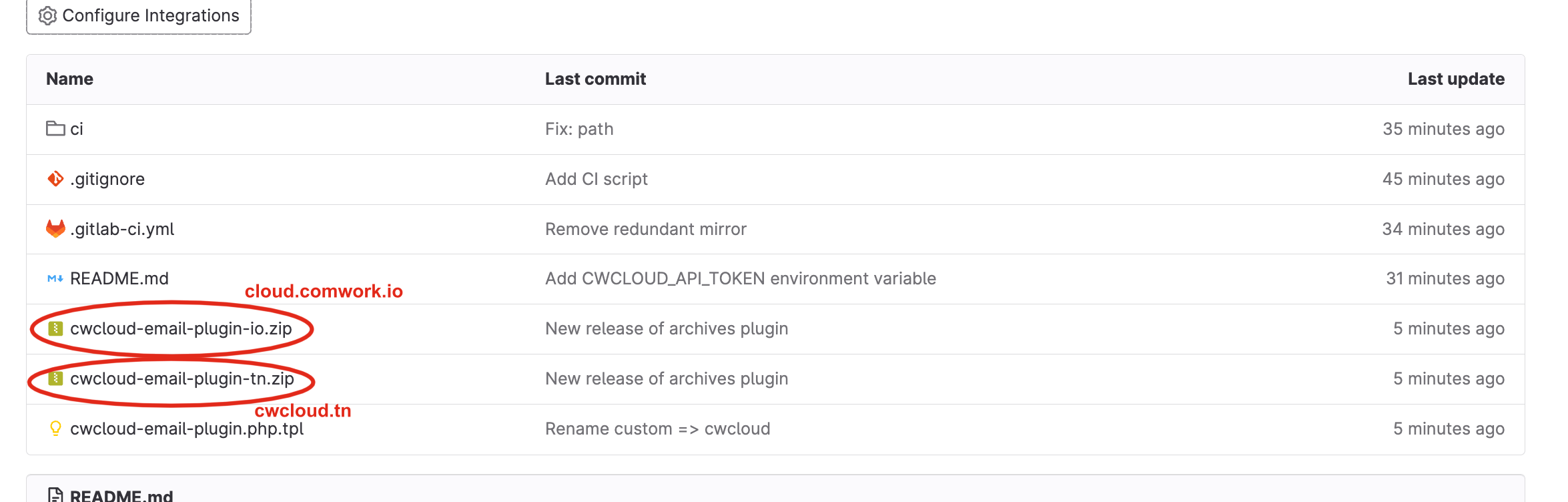
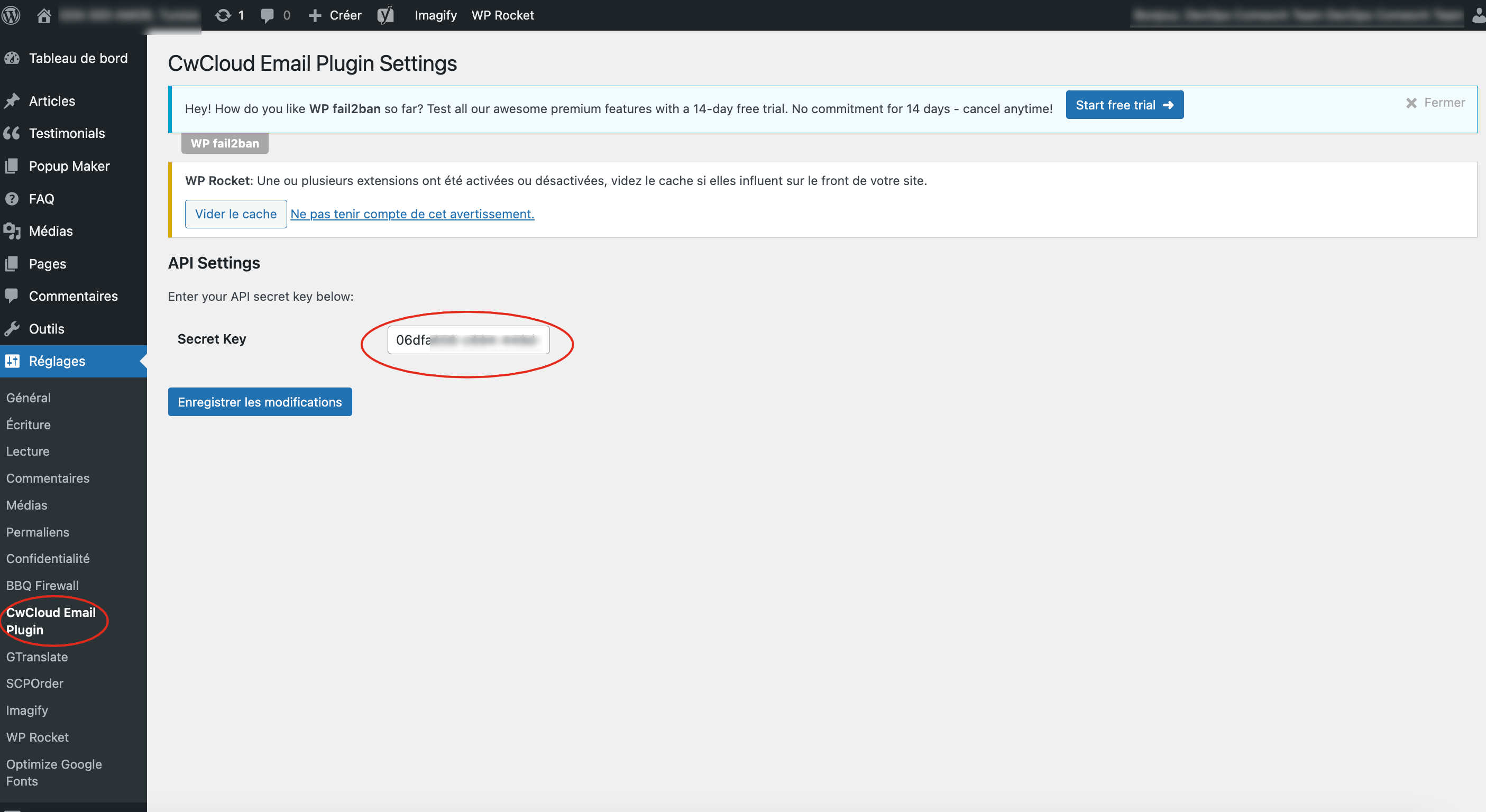
2/ Configure the extension:
Generate API credentials. You can see this tutorial
And copy paste the secret key here:
Debugging
Open a bash session on the wordpress container, install vim and open the cwcloud-email-plugin.php file:
docker exec -it wp_app /bin/bash
root@4d9443458fedapt update -y
root@4d9443458fedapt install -y vim
root@4d9443458fedvim wp-content/plugins/cwcloud-email-plugin-tn/cwcloud-email-plugin.php
Add the following line:
// ...

function cwcloud_email_send($phpmailer) {
    $api_endpoint = 'https://api.cwcloud.tn/v1/email';

    $from_addr = $phpmailer->From;
    $to_addr = $phpmailer->AddAddress;

    if (!$to_addr && !empty($tmp_to_addr = $phpmailer->getToAddresses()) && !empty($tmp_to_addr[0]) && $tmp_to_addr[0][0]) {
        $to_addr = $tmp_to_addr[0][0];
    }

    if (!$to_addr) {
        $to_addr = $from_addr;
    }

    $bcc_addr = $phpmailer->AddBCC ? $phpmailer->AddBCC : null;

    # This one
    error_log(sprintf("CWCLOUDEMAIL from = %s, to = %s, bcc = %s", $from_addr, $to_addr, $bcc_addr));

    // ...
}

// ...
Then, exit and monitor the container logs and replay the sending mail scenario that doesn't work. It'll indicate if there's some mandatory information's missing or if you're even invoking the wordpress phpmailer.
docker logs wp_app -f 2>&1 | grep CWCLOUDEMAIL
Prestashop
You can use this plugin:
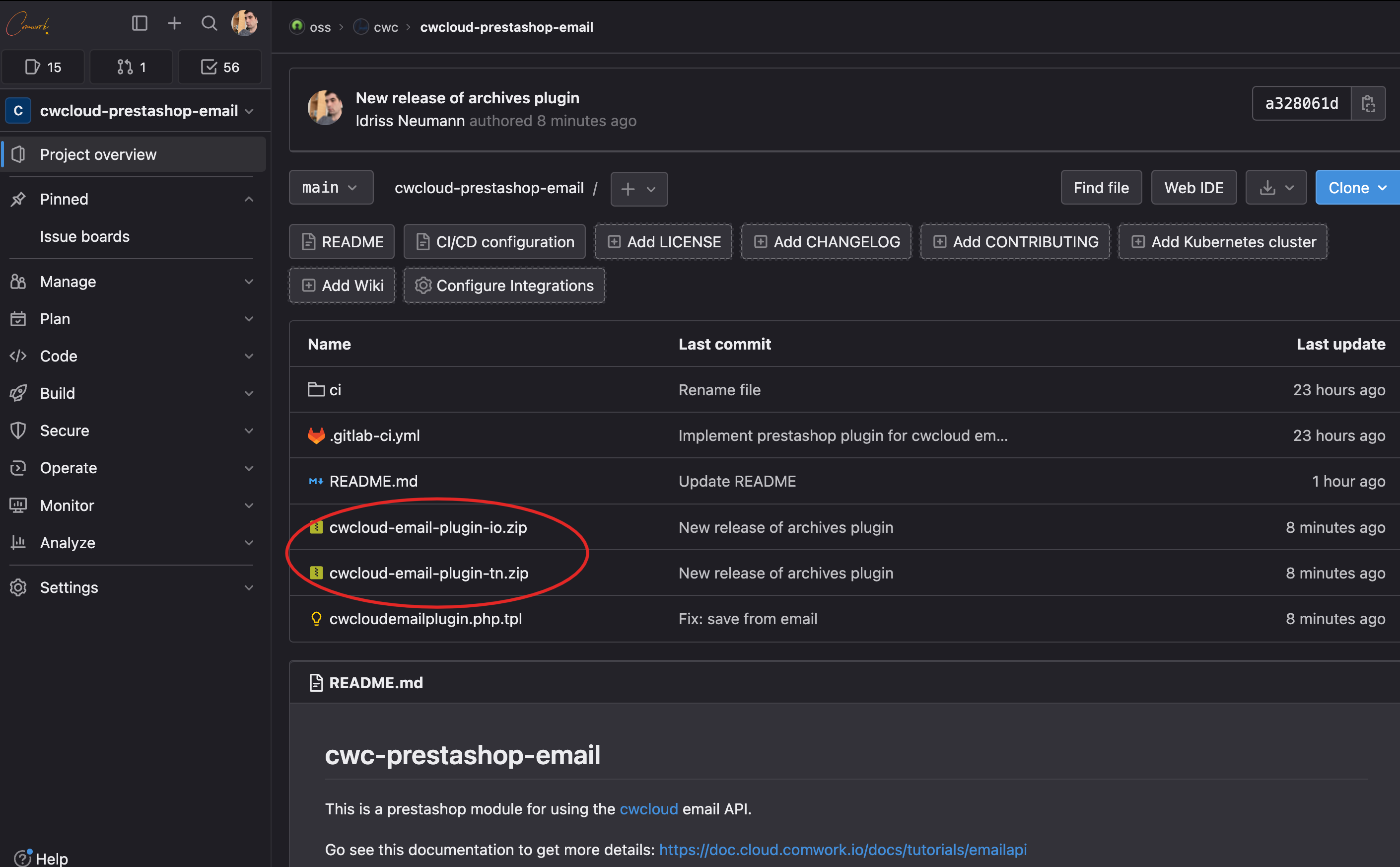
1/ Download the right zip extension file (either the -tech if you're using www.cwcloud.tech instance of -tn if you're using the cwcloud.tn instance)
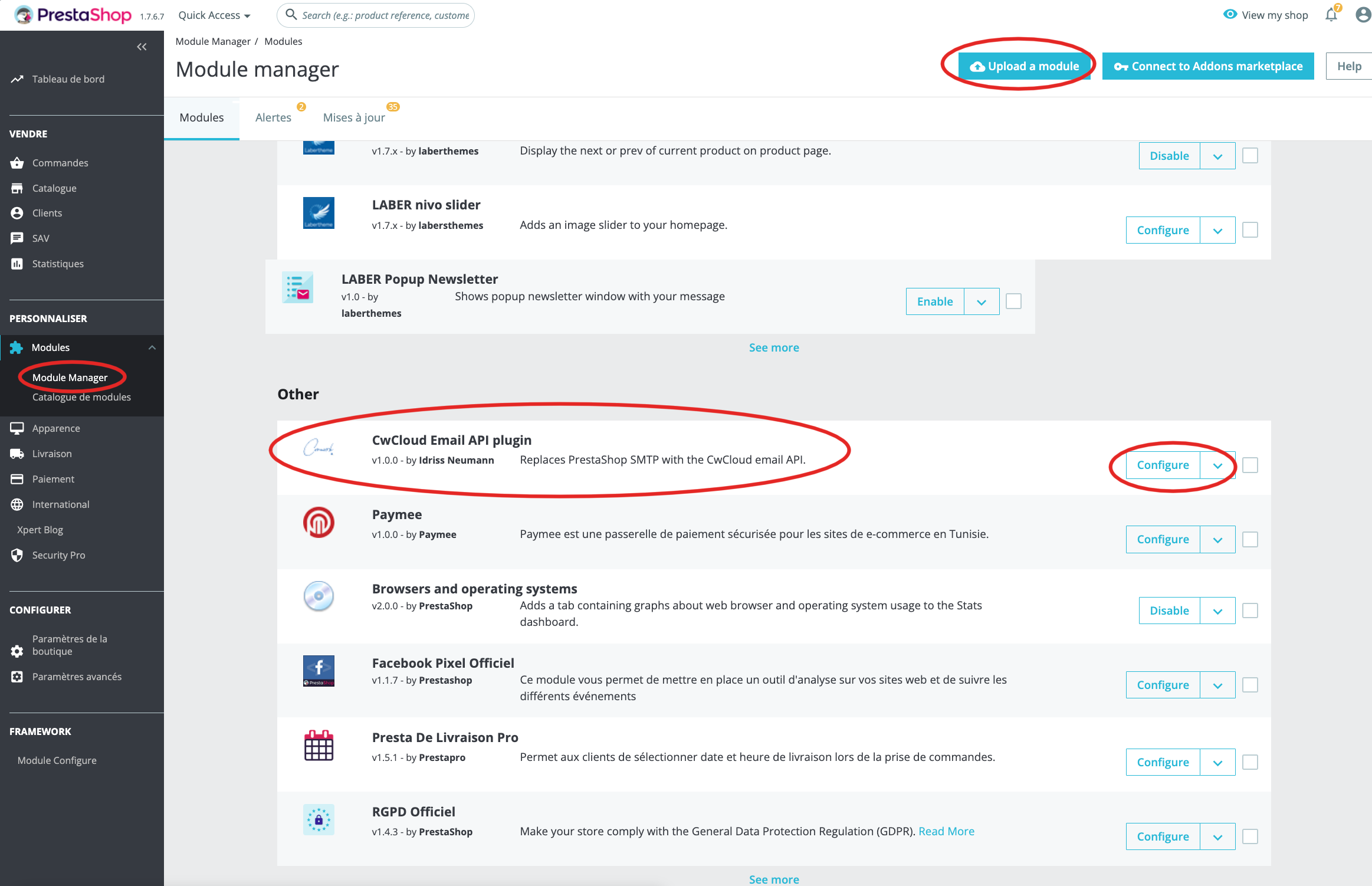
The upload it, you'll be able to see and configure it here:
2/ Configure the plugin:
Generate API credentials. You can see this tutorial
And copy paste the secret key here:
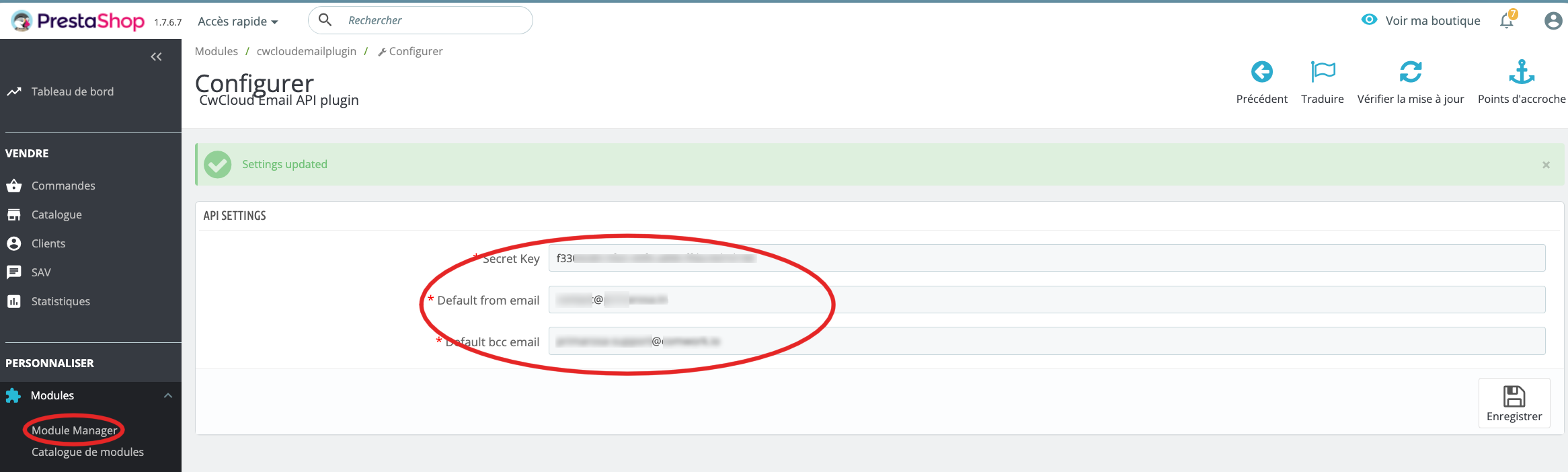
You'll have also to choose a default bcc and from email address.
Contact form for static websites
You can generate a backend endpoint to create contact forms for static websites like this:
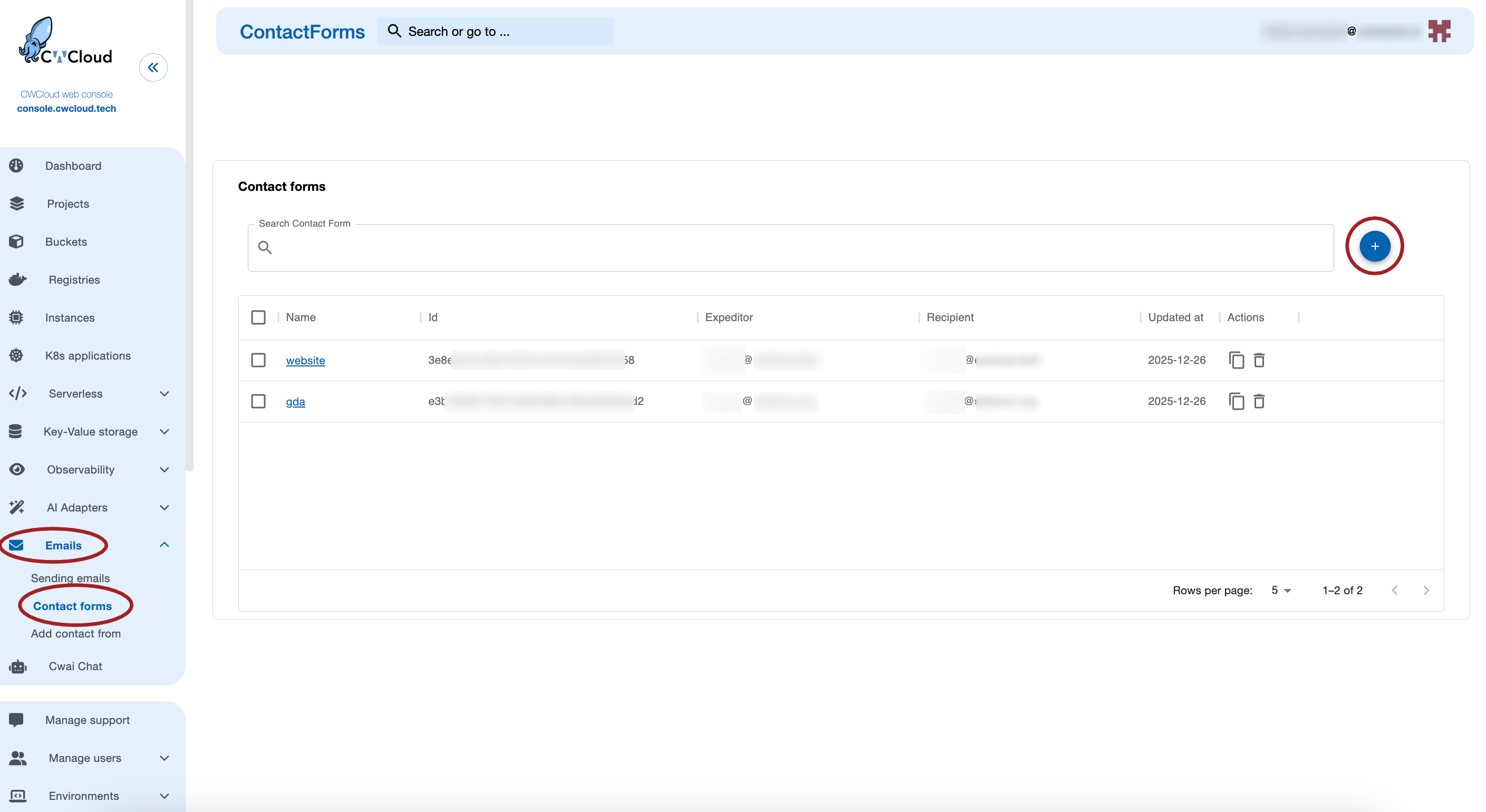
Then you can copy the id and use it in the following request:
curl -X 'POST' \
  'https://api.cwcloud.tech/v1/contactreq' \
  -H 'accept: application/json' \
  -H 'Content-Type: application/json' \
  -d '{
    "id": "<contact form uuid>",
    "email": "foo@bar.com",
    "subject": "Your subjet",
    "message": "Your message",
    "name": "Your name",
    "firstname": "Your first name"
  }'
Notes:
nameandfirstnameare optional- the message needs to be in one of the following language (detected as spam otherwise): English, French, Italian, Deutsch, Spanish and Arabic
- There's a rate limite configured by default to 30 seconds per ip adress1
Here's an example of webcomponent in react that can be used in a docusaurus static website:
import { useMemo, useState } from "react";

const RequiredStar = () => (
  <span style={{ color: "var(--ifm-color-danger)" }}>*</span>
);

const CWCloudContactForm = ({
  apiBaseUrl,
  formId,
  endpointPath = "/v1/contactreq",
  nameLabel = "Name",
  namePlaceHolder = "Your name",
  firstNameLabel = "First name",
  firstNamePlaceHolder = "Your first name",
  emailLabel = "Email",
  emailPlaceHolder = "Your email",
  subjectLabel = "Subject",
  subjectPlaceHolder = "Subject",
  messageLabel = "Message",
  messagePlaceHolder = "Your message...",
  sendButtonLabel = "Send",
  sendingLabel = "Sending...",
  successLabel = "Message sent",
  failureLabel = "Failure during request",
  formIdIsRequiredLabel = "formId is required",
  apiBaseUrlIsRequiredLabel = "apiBaseUrl is required",
  invalidEmailLabel = "Invalid email",
  requiredFieldsLabel = "Required fields missing",
  className = ""
}) => {
  const [form, setForm] = useState({
    firstname: "",
    name: "",
    email: "",
    subject: "",
    message: "",
  });

  const [status, setStatus] = useState("idle"); // idle | sending | success | error
  const [errorMsg, setErrorMsg] = useState("");

  const endpoint = useMemo(() => {
    const base = (apiBaseUrl || "").replace(/\/+$/, ""); // trim trailing slash
    const path = endpointPath.startsWith("/") ? endpointPath : `/${endpointPath}`;
    return `${base}${path}`;
  }, [apiBaseUrl, endpointPath]);

  const isValidEmail = (email) => /^[^\s@]+@[^\s@]+\.[^\s@]+$/.test(email);

  const onChange = (key) => (e) => {
    const value = e.target.value;
    setForm((prev) => ({ ...prev, [key]: value }));
  };

  const validateRequired = () => {
    const missing = [];
    if (!form.email.trim()) missing.push(emailLabel);
    if (!form.subject.trim()) missing.push(subjectLabel);
    if (!form.message.trim()) missing.push(messageLabel);

    if (missing.length > 0) {
      return `${requiredFieldsLabel}: ${missing.join(", ")}`;
    }
    return "";
  };

  const onSubmit = async (e) => {
    e.preventDefault();
    setErrorMsg("");

    if (!formId) {
      setStatus("error");
      setErrorMsg(formIdIsRequiredLabel);
      return;
    }
    if (!apiBaseUrl) {
      setStatus("error");
      setErrorMsg(apiBaseUrlIsRequiredLabel);
      return;
    }

    const requiredError = validateRequired();
    if (requiredError) {
      setStatus("error");
      setErrorMsg(requiredError);
      return;
    }

    if (!isValidEmail(form.email.trim())) {
      setStatus("error");
      setErrorMsg(invalidEmailLabel);
      return;
    }

    setStatus("sending");

    const payload = {
      id: formId,
      email: form.email.trim(),
      subject: form.subject.trim(),
      message: form.message.trim(),
      name: form.name.trim(),
      firstname: form.firstname.trim()
    };

    try {
      const res = await fetch(endpoint, {
        method: "POST",
        headers: { "Content-Type": "application/json" },
        body: JSON.stringify(payload),
      });

      let bodyText = "";
      try {
        bodyText = await res.text();
      } catch (_) {}

      if (!res.ok) {
        const details = bodyText ? ` — ${bodyText.slice(0, 500)}` : "";
        throw new Error(`Erreur API (${res.status})${details}`);
      }

      setStatus("success");
      setForm((prev) => ({
        ...prev,
        message: "",
      }));
    } catch (err) {
      setStatus("error");
      setErrorMsg(err?.message || "Une erreur est survenue lors de l’envoi.");
    }
  };

  return (
    <div
      className={className}
      style={{
        border: "1px solid var(--ifm-toc-border-color)",
        borderRadius: 12,
        padding: "1rem",
        background: "var(--ifm-background-surface-color)",
      }}
    >
      <form onSubmit={onSubmit} style={{ display: "grid", gap: "0.75rem" }}>
        <div style={{ display: "grid", gap: "0.5rem", gridTemplateColumns: "1fr 1fr" }}>
          <label style={{ display: "grid", gap: "0.25rem" }}>
            <span>{firstNameLabel}</span>
            <input
              type="text"
              value={form.firstname}
              onChange={onChange("firstname")}
              placeholder={firstNamePlaceHolder}
              style={inputStyle}
            />
          </label>

          <label style={{ display: "grid", gap: "0.25rem" }}>
            <span>{nameLabel}</span>
            <input
              type="text"
              value={form.name}
              onChange={onChange("name")}
              placeholder={namePlaceHolder}
              style={inputStyle}
            />
          </label>
        </div>

        <label style={{ display: "grid", gap: "0.25rem" }}>
          <span>{emailLabel}<RequiredStar /></span>
          <input
            type="email"
            value={form.email}
            onChange={onChange("email")}
            placeholder={emailPlaceHolder}
            required
            style={inputStyle}
          />
        </label>

        <label style={{ display: "grid", gap: "0.25rem" }}>
          <span>{subjectLabel}<RequiredStar /></span>
          <input
            type="text"
            value={form.subject}
            onChange={onChange("subject")}
            placeholder={subjectPlaceHolder}
            required
            style={inputStyle}
          />
        </label>

        <label style={{ display: "grid", gap: "0.25rem" }}>
          <span>{messageLabel}<RequiredStar /></span>
          <textarea
            value={form.message}
            onChange={onChange("message")}
            placeholder={messagePlaceHolder}
            required
            rows={6}
            style={{ ...inputStyle, resize: "vertical" }}
          />
        </label>

        <div style={{ display: "flex", gap: "0.75rem", alignItems: "center" }}>
          <button type="submit" style={buttonStyle(status)}>
            {status === "sending" ? sendingLabel : sendButtonLabel}
          </button>

          {status === "success" && (
            <span style={{ color: "var(--ifm-color-success)", fontWeight: 600 }}>
              ✅ {successLabel}
            </span>
          )}

          {status === "error" && (
            <span style={{ color: "var(--ifm-color-danger)", fontWeight: 600 }}>
              ❌ {errorMsg || failureLabel}
            </span>
          )}
        </div>
      </form>
    </div>
  );
}

const inputStyle = {
  width: "100%",
  padding: "0.6rem 0.75rem",
  borderRadius: 10,
  border: "1px solid var(--ifm-toc-border-color)",
  background: "var(--ifm-background-color)",
  color: "var(--ifm-font-color-base)",
  outline: "none",
};

const buttonStyle = (status) => ({
  padding: "0.6rem 0.9rem",
  borderRadius: 10,
  border: "1px solid var(--ifm-color-primary)",
  background: "var(--ifm-color-primary)",
  color: "white",
  cursor: status === "sending" ? "wait" : "pointer",
  opacity: status === "sending" ? 0.8 : 1,
});

export default CWCloudContactForm;
And here, how to invoke it in a .mdx file:
import CWCloudContactForm from '@site/src/components/CWCloudContactForm';

# ✉️ Contact

<CWCloudContactForm
    apiBaseUrl="https://api.cwcloud.tech"
    formId="<contact form uuid>"
/>
Footnotes
-
By default this quota is based on the client ip (with the headers
X-Real-IPorX-Forwarded-Bydynamically set by our reverse proxies if your using our SaaS versions). However it's possible, if you need this endpoint to be invoked on a server-side backend, to add the server ip in a trusted list. Then, your backend will have to set theX-Client-IPheader in order to communicate the real expeditor's ip adress to cwcloud. ↩